How to Prompt for Authentic Human Realism & Overcome Dataset Bias
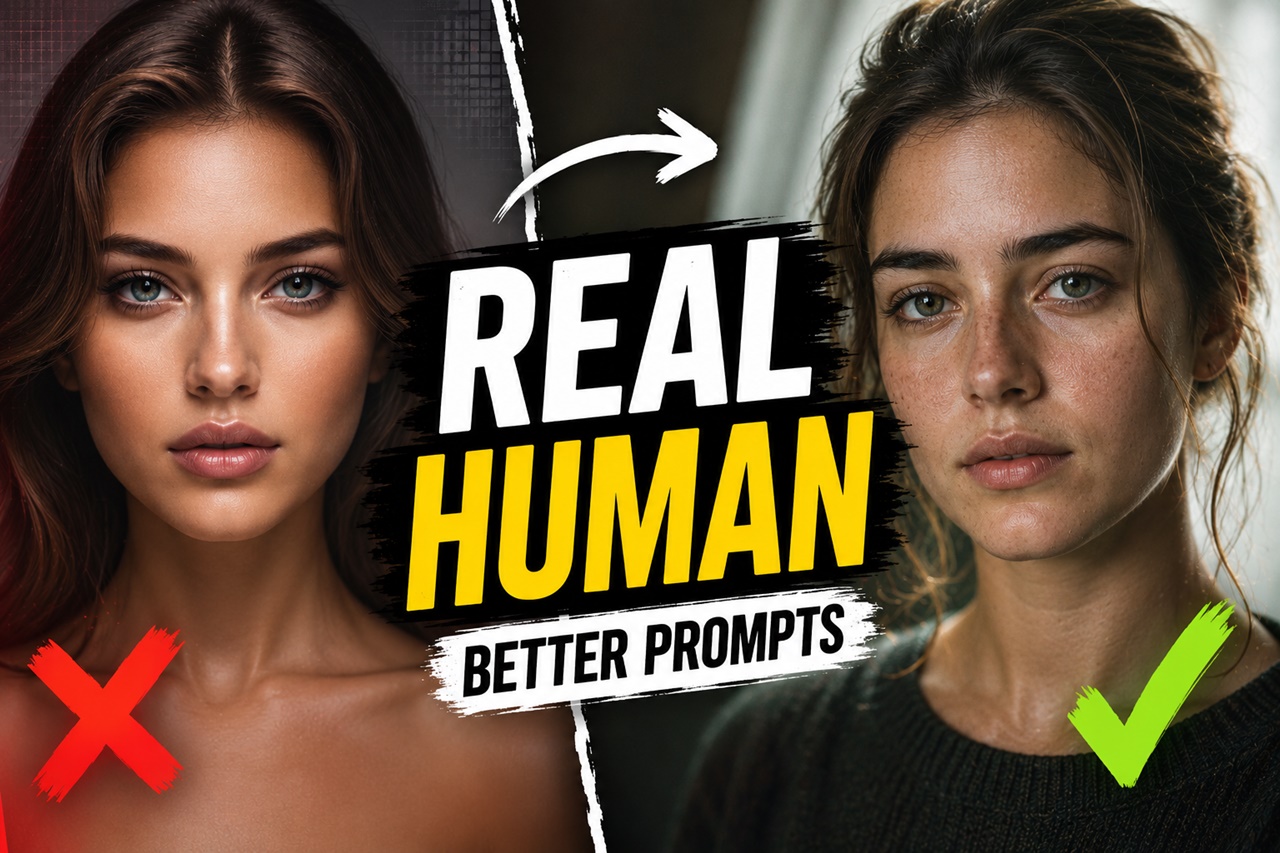
Type "a portrait of a doctor" into almost any text-to-image model, and you'll notice something strange happen ten times in a row: the same bone structure, the same lighting, the same narrow band of ages, skin tones, and body types, over and over.
Ask for "a beautiful woman" and you'll get a template, not a person. This isn't a coincidence or a glitch, it's dataset bias, baked into the billions of images these models learned from. The good news? You don't have to accept it. With the right prompting habits, you can steer these models away from their defaults and toward images that actually look like the real, varied world we live in. This guide breaks down exactly how.
What Is Dataset Bias, Really?
Every text-to-image model, whether it's SDXL, Flux, Midjourney, or anything else, learns by studying enormous datasets of image-caption pairs scraped from the internet. It doesn't "know" what a handsome man or a beautiful woman looks like in any objective sense. It only knows what appeared most often next to those words in its training data.
The internet is not a neutral, evenly distributed sample of humanity. Certain regions, skin tones, body types, age groups, and beauty standards are wildly overrepresented in stock photography, fashion media, and social platforms, while others are barely present. So when a model tries to generate "a person," it statistically leans toward whatever showed up most, and that's usually a narrow, idealized, often Western-centric image of a person.
This creates several common pitfalls when generating humans:
- Age Bias: The AI defaults to ages 18–30 unless explicitly told otherwise.
- Ethnic Homogeneity: Vague prompts often result in a default Eurocentric or homogenized "global average" appearance.
- The Plastic Skin: Pores, fine lines, asymmetry, and blemishes are often interpreted by the AI as "errors" to be smoothed out.
- Expressionless Faces: Subjects tend to have a neutral, catalog-model stare rather than capturing candid, fleeting human emotion.
This is dataset bias: not malicious, but mechanical. The model is simply reflecting the imbalance of what it was fed. Left unguided, it will keep producing the same handful of "default humans" no matter how many times you regenerate.
Why This Matters for Prompt Creators
If you're building character art, marketing visuals, game assets, editorial images, or just exploring creative portraits, relying on default outputs means:
- Repetition fatigue: every generation starts to look like a variation of the same three faces.
- Inauthentic representation: clients, brands, and audiences increasingly expect visuals that reflect real-world diversity, not a narrow template.
- Missed creative range: realism isn't just about skin texture and lighting; it's about the enormous natural variation in human appearance. Ignoring that variation actually makes images look less real, not more.
The fix isn't complicated software or fine-tuning a custom model (though that helps too). It's learning to prompt intentionally instead of letting the model default to its bias.
Strategy 1: Forcing Demographic Specificity
The first step away from the AI default is being ruthlessly specific about the demographics of your subject. Words like "man," "woman," "person," or even "beautiful" are too broad and will immediately trigger the AI's bias.
Instead of basic nouns, construct your subject using specific cultural, regional, and age-related descriptors.
i) Embracing Precise Terminology
Do not just prompt for a "man." Prompt for a "45-year-old working-class Mediterranean man." Do not just ask for a "woman." Ask for a "62-year-old Indigenous Navajo grandmother."
By anchoring your prompt with strong demographic keywords, you force the AI to look at entirely different clusters of its training data moving away from high-fashion stock photos and toward documentary photography and cultural archives.
ii) Age is Just a Number (But the AI Needs It)
Age is one of the easiest ways to inject character into a portrait. However, simply saying "old" or "elderly" often results in an overly dramatized, almost caricatured version of aging (think Gandalf-level wrinkles).
To get natural aging, specify exact decades and use physiological keywords associated with real aging.
- Weak: An old man.
- Strong: A 54-year-old man, salt-and-pepper hair, subtle crow's feet, slight skin laxity around the jaw.
iii) Cultural and Regional Grounding
Instead of broad racial categories, use regional or ethnic specifics. The more granular you get, the more authentic the output becomes, as the AI draws from specific geographic datasets rather than generalized ones.
- Examples: "Maori heritage," "first-generation Vietnamese-American," "Andalusian features," "East African descent."
Strategy 2: The Art of Imperfection
Real humans are not perfectly symmetrical. We have pores, scars, uneven skin tones, stray hairs, and asymmetrical eyes. To achieve realism, you must actively command the AI to include flaws. If you do not prompt for imperfections, the AI will automatically apply its invisible digital airbrush.
i) Texturizing the Skin
Skin texture is the immediate giveaway of an AI image. To combat the "plastic" look, build these keywords into your prompt library:
- Visible skin pores
- Peach fuzz / vellus hair
- Subtle freckles / sun damage / hyperpigmentation
- Rosacea / mild skin redness
- Textured skin / unretouched skin
ii) Breaking Symmetry
Human faces are naturally asymmetrical. One eye might be slightly lower, a smile might pull to one side, or a nose might have a slight bump. You can guide the AI to break its mathematical symmetry with phrases like:
- Slightly crooked smile
- Asymmetrical facial features
- Distinctive nose bump
- Uneven eyebrows
iii) Candid Expressions
The "AI Stare" is a dead giveaway. Real people in real photos are rarely staring dead-center into the lens with a blank expression. Give them something to do, an emotion to feel, or a reason to look away.
- Mid-laugh, genuine smile with crinkled eyes
- Looking off-camera, distracted expression
- Furrowed brow, deep in thought
- Caught mid-sentence
Strategy 3: Grounding with Photography Keywords
One of the most powerful ways to bypass dataset bias is to change the type of image you are requesting. If the AI thinks it is generating "digital art" or a "fashion shoot," it will apply heavy aesthetic filters.
If you convince the AI it is generating a raw, unedited photograph taken by a photojournalist or an amateur with a smartphone, the realism skyrockets.
i) Lo-Fi and Amateur Photography
Sometimes, the best way to make a face look real is to make the photo look slightly imperfect.
- Keywords: Polaroid, disposable camera aesthetic, amateur smartphone photo, unedited raw selfie, candid street photography.
ii) Documentary and Photojournalism
Photojournalism datasets contain some of the most authentic, unfiltered human faces. Referencing this style forces the model to prioritize raw human truth over idealized beauty.
- Keywords: Magnum photography style, National Geographic style portrait, documentary photojournalism, gritty realism.
iii) Specific Camera Gear and Film Stocks
Different cameras and films render skin tones, contrast, and grain differently. By specifying analog film stocks, you introduce natural color imperfections and film grain that trick the eye into perceiving the image as a real photograph.
- Keywords: Shot on Kodak Portra 400 (great for warm, natural skin tones), Fujifilm Superia (good for everyday realism), Ilford HP5 (for gritty black and white), 35mm lens, f/8 aperture (keeps the whole face in focus, avoiding the overly blurry "AI bokeh" background).
Strategy 4: Using Negative Prompts (and When to Avoid Them)
If you are using tools like Stable Diffusion, SDXL, or specific Midjourney parameters, negative prompting is your defense mechanism against the AI's worst habits.
However, there is a catch. If you over-use negative prompts (e.g., negative prompting "ugly, deformed, bad anatomy"), you often accidentally command the AI to make the person look too perfect. By constantly telling the AI "do not make them ugly," it defaults back to the supermodel aesthetic.
Strategy 5: Audit Your Prompt Like a Casting Director
Once you've written a prompt, read it back and ask:
- Have I specified age, skin tone, body type, and hair texture, or left them to default?
- Am I describing a real, specific person, or a vague "type"?
- Does any phrase lean on a stereotype instead of a genuine detail?
- Would this prompt, run 20 times, actually produce 20 visibly different people?
If the answer to that last question is no, your prompt is still too generic, and the model will keep sliding back toward its dataset's center of gravity. This kind of structural review is exactly the kind of task a prompt-auditing tool can speed up, quickly flagging vague or contradictory phrasing so you can tighten the description before you spend generation credits.
The Right Way to Negative Prompt for Realism
Instead of banning "ugly," ban the traits that make the image look fake or heavily edited. Add these to your negative prompt vault:
- Plastic skin, airbrushed, smooth skin, retouching, Photoshop, CGI, 3D render, studio lighting, hyper-symmetrical, glamour shot, makeup ad.
By banning "airbrushed" and "CGI," you leave room for the AI to generate natural human flaws without making the subject look monstrous.
Putting It All Together: A Before-and-After Example
Generic prompt:
"portrait of a nurse, hospital background, realistic, detailed"
Intentionally diverse prompt:
"portrait of a 45-year-old nurse, medium-brown skin with warm undertones, short natural afro-textured hair, laugh lines around the eyes, stocky build, tired but kind expression, worn hospital scrubs, fluorescent hospital lighting, candid documentary-style photo, slight asymmetry in smile"
The second prompt doesn't just diversify the subject, it makes the image feel like a real photograph of a real shift-worker, rather than a stock-photo archetype. That's the core idea: specificity is what creates authenticity, and authenticity is what breaks the model out of its biased defaults.
To Summarize
Dataset bias isn't something you can fix by wishing it away, and it isn't something the model will correct on its own. It's a structural feature of how these models are trained, and the only reliable counter is intentional, specific prompting on your end. Every time you name an age, a skin tone, a body type, a hair texture, or a lived-in imperfection instead of leaving it blank, you're pulling the output away from the dataset's statistical center and closer to a genuine, individual human being.
The habit is simple to build, even if it takes a little more thought per prompt: describe the person, not the category. Do that consistently, and your generations will start to feel less like variations of a template, and a lot more like real people.