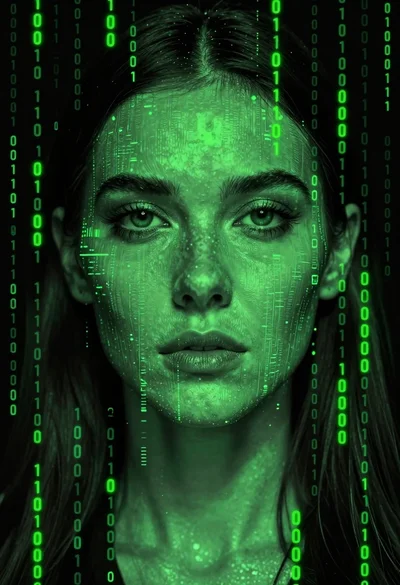

Close up profile portrait face made of glowing green digital characters
Prompt
A close-up profile of a woman's face composed entirely of glowing green digital text characters against a dark background.

Subject: A woman shown in profile facing left, her entire facial features constructed from vertical columns of bright green alphanumeric and Japanese script characters.

Clothing: The visible portion of her attire is obscured by shadows and the digital texture, blending into the dark environment.

Action: Her expression is neutral and contemplative with a soft gaze directed forward, while steam rises in a wavy line from a cup positioned near her mouth.

Environment: A dark, void-like setting filled entirely with falling green text characters that create a digital rain effect reminiscent of a code matrix.

Camera: The shot is a tight close-up profile view emphasizing the texture of the face and the glowing elements.

Lighting: Monochromatic green lighting emanates from the text itself, creating high contrast between the bright glowing characters and the deep black shadows.

Objects: A cup filled with rising steam sits in the foreground on the left side, also composed of the same glowing green digital text pattern.

Style Details: Digital art style featuring a matrix aesthetic with a monochromatic neon green color palette and a grainy, high-contrast visual texture.
Description
This prompt is useful for creating cyberpunk character concept art, abstract sci-fi album covers, and futuristic portraiture pieces. The combination of 'glowing green digital text characters' forming the subject's features against a 'dark, void-like setting' establishes a high-contrast, monochromatic neon aesthetic that immediately signals a technological or dystopian narrative suitable for these conceptual uses.
Suggestions
- Change 'alphanumeric and Japanese script characters' to 'binary code sequences' for a more technical feel.
- Adjust the lighting by adding 'subtle cyan rim light' to break the pure green monotony.
- Modify the environment by replacing 'falling green text characters' with 'slowly dissipating data streams'.
Category
Tags
Close UpDigital ArtFemale
Date added
July 3, 2026
Added by
PromptDexter Team
Related Prompts
More prompts with similar categories and tags.
Portrait of woman with dark hair against abstract paint splashes

Woman with closed eyes surrounded by abstract colorful swirls

Young woman in brown tank top against pink watercolor doodle background
Young woman in red hoodie jeans against torn paper collage background

Portrait of a young woman in a cardigan against scrapbook collage background

Young woman in white sweatshirt with crossed arms against illustrated doodle background

Confident man in denim jacket stands before traditional japanese pagoda on misty

Joyful man winking while splashing coffee beans in comic book style

Close up portrait of young man with glasses resting on hand against

Handsome man in black leather jacket against pink and black watercolor background