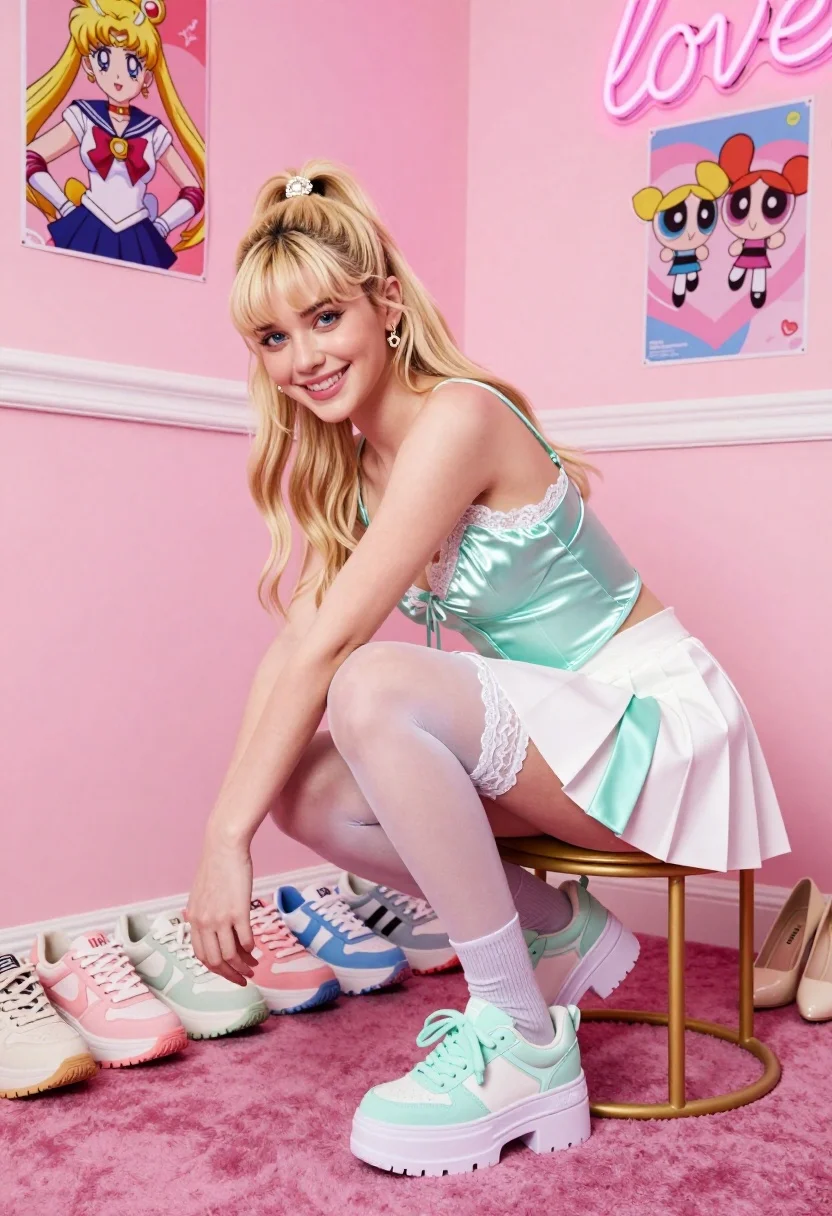
Smiling blonde woman crouching on gold stool in vibrant pink room
Prompt
A smiling young woman with blonde hair tied in a high ponytail crouches on a gold stool in a vibrant pink room.

Subject: A fair-skinned young woman with long blonde hair styled in a high ponytail secured by a jeweled clip, featuring blue eyes and a bright smile.

Clothing: She wears a shiny mint green satin camisole top with lace trim at the neckline, a white pleated skirt with mint green side panels, sheer white thigh-high stockings with lace tops, grey ribbed socks, and chunky platform sneakers in pastel mint green.

Action: The woman is crouching on a small gold metal stool, leaning forward slightly with her left hand reaching down toward a row of shoes on the floor while looking directly at the camera.

Environment: The setting is a corner of a room painted entirely in shades of pink, featuring a plush magenta carpet and white baseboards.

Objects: Several pairs of pastel-colored sneakers are lined up along the wall behind her, alongside a pair of high heels to the right. Two anime-style posters hang on the pink walls, one depicting Sailor Moon and another showing The Powerpuff Girls. A pink neon sign spelling "love" is mounted on the wall.

Lighting: The scene is illuminated by bright, soft studio lighting that creates a cheerful and airy atmosphere with minimal harsh shadows.

Camera: The shot is taken from a slightly low angle looking up at the subject, emphasizing her pose and outfit against the colorful background.

Style Details: The image features a high-fashion aesthetic with a pastel color palette, smooth skin texture, and a clean, commercial photography look.
Description
This prompt is useful for creating vibrant e-commerce product shots, themed editorial fashion spreads, and stylized character concept art. The combination of 'bright, soft studio lighting' with the 'pastel color palette' ensures that every element, from the 'shiny mint green satin camisole top' to the 'gold metal stool', remains visible without harsh shadows, which is crucial for showcasing both texture and merchandise in a commercial context.
Suggestions
- Change 'vibrant pink room' to 'blush pink room' for a more muted background.
- Swap 'chunky platform sneakers' for 'ballet flats' to adjust the overall vibe.
- Add 'bokeh effect' to the lighting description for added depth.
Category
Tags
BlondeCasual WearFair SkinFemaleLow AngleRealisticStudio
Date added
July 12, 2026
Added by
PromptDexter Team
Related Prompts
More prompts with similar categories and tags.
Young blonde woman in black satin slip dress sitting on marble stairs

Blonde woman sitting on white sports car in studio with dragon mural

Blonde woman taking mirror selfie on beige carpet near anime display
Confident woman in red jacket and white bodysuit against a white studio
Blonde woman kneeling in blue swimsuit against solid red studio background
Blonde woman in corset top and cowboy boots on light wood floor

Blonde woman adjusting shoe on white sofa near decorated christmas tree
Blonde woman reclining on blue sofa indoors by large window
Fair blonde woman in blue blouse on textured surface studio portrait

Portrait of woman with red hair in navy blouse and green skirt