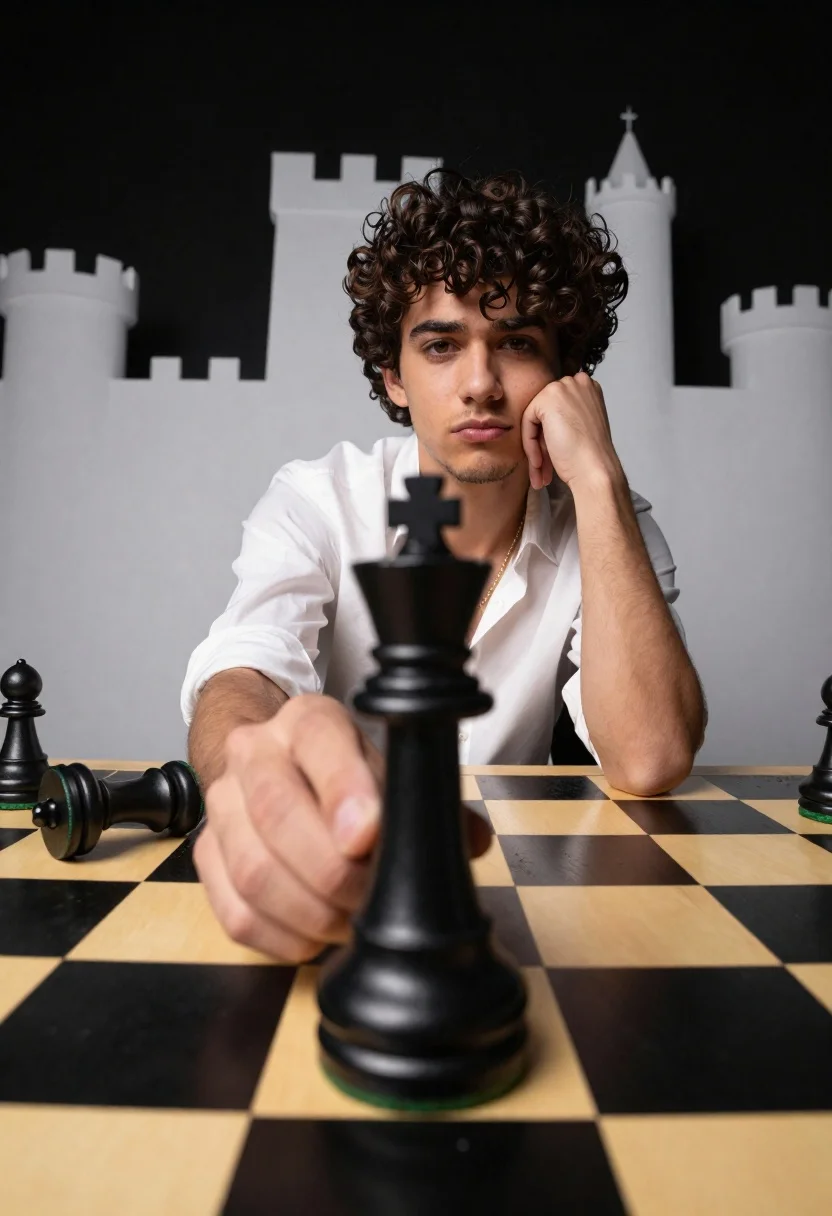
Young man holding large black king piece on glossy chessboard studio setting
Prompt
A young man with dark curly hair sits at a large chessboard, holding a giant black king piece in his right hand while resting his left cheek on his fist.

Subject: A handsome young man with messy dark brown curly hair and light stubble, looking directly at the camera with a serious expression.

Clothing: He wears an unbuttoned white dress shirt revealing a gold chain necklace around his neck.

Action: He holds a large black chess king piece in his right hand extended toward the viewer, while his left hand supports his head in a pensive pose.

Environment: The setting is a studio with a glossy black and gold checkered surface resembling a giant chessboard, against a dark background featuring white silhouettes of castle towers.

Camera: Shot from a low angle looking up at the subject to emphasize the scale of the chess piece, using a wide-angle lens that creates slight distortion on the edges.

Lighting: Dramatic studio lighting highlights the man's face and the glossy texture of the black chess piece against the dark background.

Objects: A large black king chess piece is held in the foreground, while a smaller black pawn lies toppled over on the board to the left.

Style Details: High-contrast photography with a focus on textures like the gold leaf finish on the board and the smooth plastic of the chess pieces.
Description
This prompt is useful for creating dramatic character portraits, conceptual fine art prints, and editorial spreads exploring themes of strategy or contemplation. The combination of 'low angle looking up' and a 'wide-angle lens that creates slight distortion on the edges' exaggerates the subject's power while the 'glossy black and gold checkered surface' grounds the composition in high contrast, making the held object feel monumental.
Suggestions
- Change 'messy dark brown curly hair' to 'slicked back wet hair' for a different mood.
- Swap 'gold chain necklace' for 'silver signet ring' to focus on hand details.
- Adjust 'low angle looking up' to 'eye-level medium shot' for a more intimate portrait.
Category
Tags
Casual WearLow AngleMaleRealisticStudioWide Shot
Date added
June 19, 2026
Added by
PromptDexter Team
Related Prompts
More prompts with similar categories and tags.
Young man on urban street between towering white buildings

Muscular man in blue blazer on solid deep blue background
Portrait of person with dark hair against red background

Stylish man in black blazer against vibrant city skyline at night
Studio portrait of man in black turtleneck against blue background
Young man in bulls jersey on brick storefront
Woman taking selfie in brightly lit convenience store aisle
Two friends running through grassy hills laughing joyfully
Woman in dusty rose slip dress looking over shoulder against light blue
Fair blonde woman in black blazer sitting on chair in studio