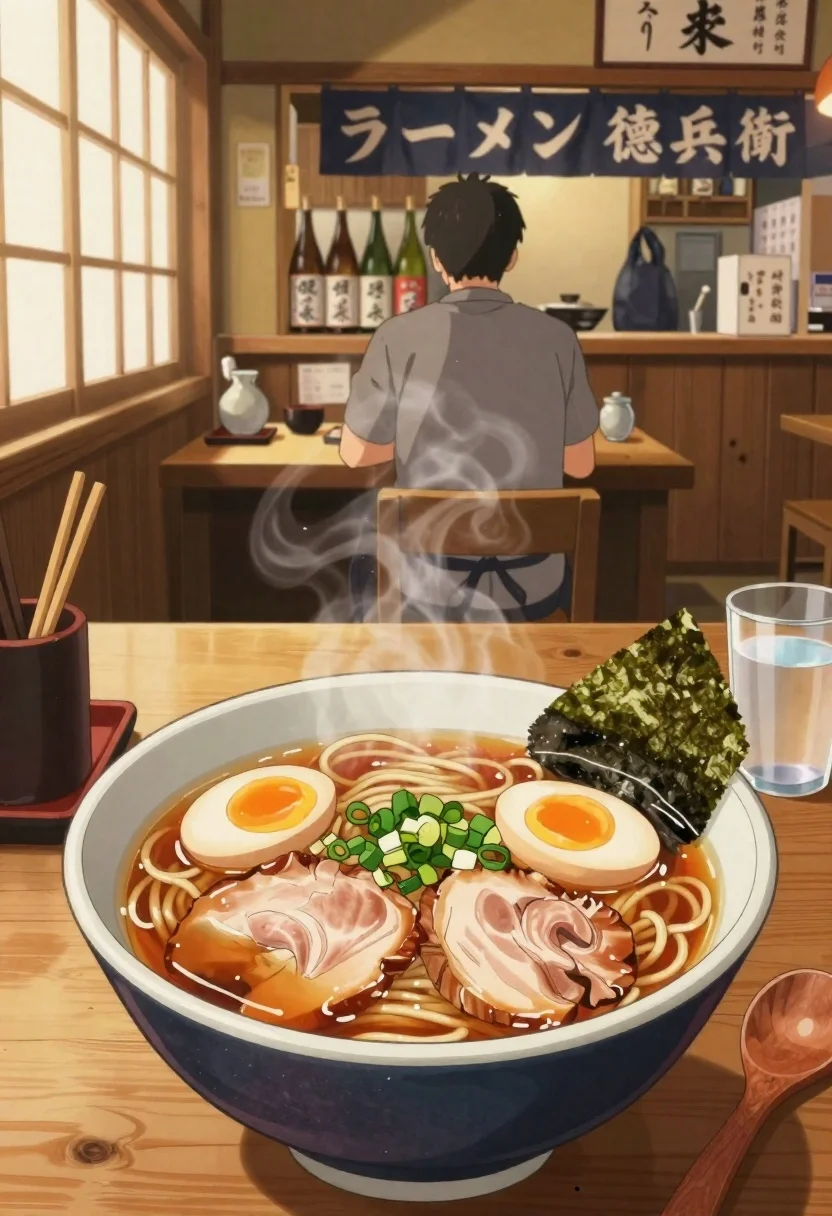
Anime style steaming ramen bowl on wooden table in japanese restaurant
Prompt
A steaming bowl of ramen sits in the foreground on a rustic wooden table inside a traditional Japanese restaurant.

Subject: A large ceramic bowl filled with rich broth, thick noodles, two slices of chashu pork belly, chopped green onions, a soft-boiled egg with a runny yolk, and a piece of nori seaweed resting on the rim.

Clothing: The background figure wears a grey shirt and dark apron.

Action: Steam rises gently from the hot soup, indicating it is freshly served and ready to eat.

Environment: A cozy ramen shop interior with wooden walls, sliding paper doors, and a counter where bottles of sake are lined up behind a seated customer.

Camera: Close-up perspective focusing on the bowl with shallow depth of field blurring the background slightly.

Lighting: Warm golden sunlight streams through the window on the left, casting soft highlights and creating a comforting atmosphere.
Second

Subject: A person sits at the counter in the background facing away from the camera.

Objects: Wooden chopsticks rest on a holder, a wooden spoon, a glass of water, and a small ceramic jar are placed beside the bowl.

Text/Graphics: Japanese characters appear on hanging banners above the counter reading "ラーメン 徳兵衛".

Style Details: Anime-style illustration with vibrant colors, detailed food textures, and soft ambient lighting effects.
Description
This prompt is useful for creating anime-style menu mockups, cozy cafe ambiance illustrations, and digital art pieces focused on culinary moments. The combination of 'Anime-style illustration' with 'Warm golden sunlight' ensures the food remains vibrant while the soft ambient lighting prevents harsh shadows, making the steam rise gently from the soup feel inviting rather than merely depicted.
Suggestions
- Change 'rustic wooden table' to 'polished dark wood counter' for a more upscale feel.
- Swap 'vibrant colors' for 'muted pastel palette' if you want a softer anime look.
- Add 'bokeh effect on sake bottles' to enhance the shallow depth of field.
Category
Tags
Close UpFoodIndoorsNatureOutdoorsRealistic
Date added
June 26, 2026
Added by
PromptDexter Team
Related Prompts
More prompts with similar categories and tags.

Elf wizard reading glowing book in starry night field
Anime girl in flower field with windmills and mountains
Anime woman in stone room by stained glass window

Anime girl in wooden rowboat on calm river

Anime couple taking selfie overlooking fantasy kingdom sunset

Anime man drinking from a blue bottle against orange wall
Young man taking selfie with cartoon characters in cozy living room
Person with basket of tomatoes near red armchair