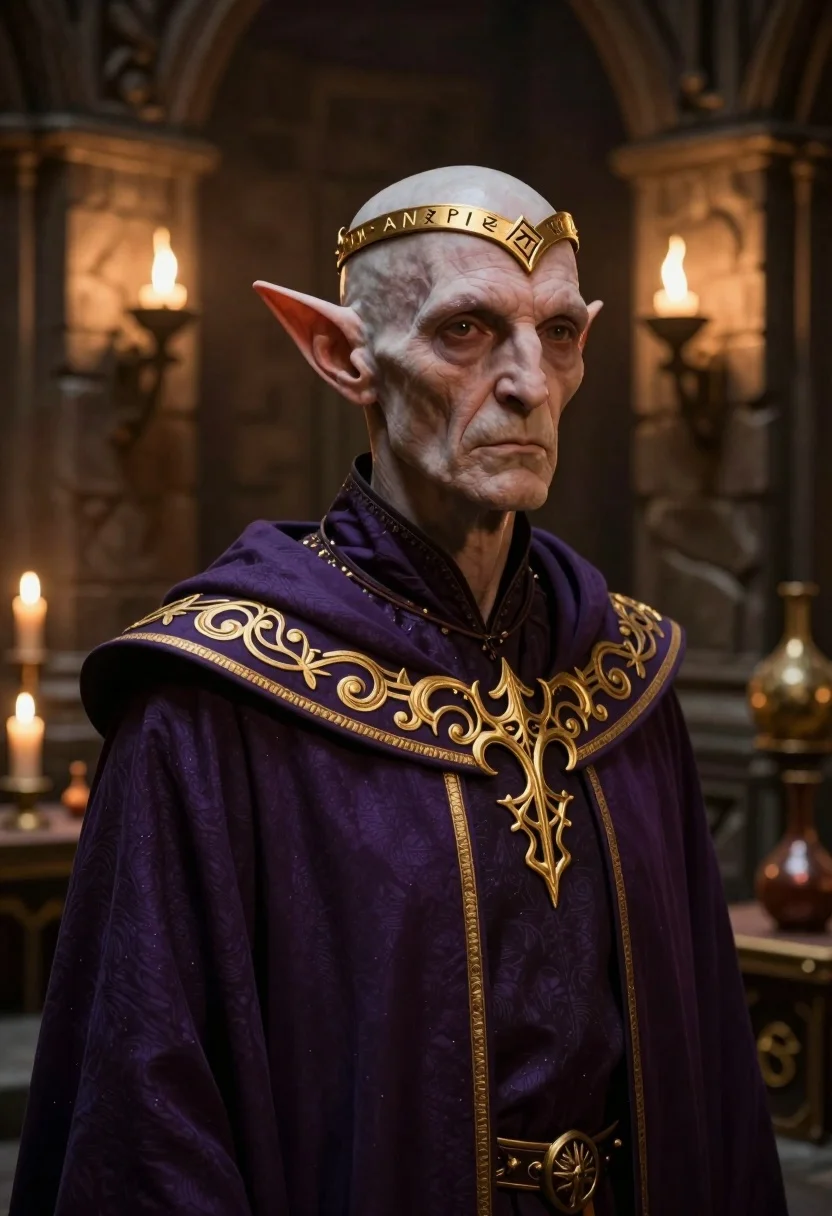
Stern elf figure in purple robe within dimly lit ancient stone chamber
Prompt
A stern, bald elf-like figure with pointed ears stands in a dimly lit stone chamber.

Subject: An elderly, pale-skinned humanoid with large pointed ears and a solemn expression, wearing an ornate golden circlet inscribed with runes on their forehead.

Clothing: A deep purple robe featuring intricate, glowing gold embroidery along the collar and shoulders, layered over a matching tunic.

Lighting: Warm ambient light emanates from wall-mounted torches in the background, casting soft shadows and highlighting the texture of the stone walls and the character's skin.

Environment: A dark, ancient stone room resembling a dungeon or wizard's tower, with stone pillars, tables holding candles and potions, and mystical artifacts visible in the blurred background.

Camera: Medium close-up shot with a shallow depth of field that keeps the subject sharp while softly blurring the atmospheric background details.

Style Details: High-fidelity digital art style with realistic textures, dramatic chiaroscuro lighting, and a cinematic fantasy aesthetic.
Description
This prompt is useful for creating concept art for high fantasy video games, character profile illustrations, and dark academic editorial spreads. The combination of 'dramatic chiaroscuro lighting' with the 'deep purple robe' ensures that the glowing gold embroidery catches the light sources from the background torches, preventing the subject from becoming a flat silhouette against the 'dark, ancient stone room'.
Suggestions
- Change 'golden circlet inscribed with runes' to 'obsidian circlet etched with celestial symbols' for a different magical feel.
- Swap 'deep purple robe' for 'midnight blue velvet robe' to deepen the shadows.
- Adjust 'Medium close-up shot' to 'head and shoulders portrait' to focus more on the expression.
Category
Tags
3dFictional CharacterMedium ShotPortrait Shot
Date added
July 12, 2026
Added by
PromptDexter Team
Related Prompts
More prompts with similar categories and tags.

High fashion portrait of android with white armor

Astronaut portrait with glowing digital circuitry overlay

Anime portrait of futuristic female character with silver hair

Low angle portrait of white android by turquoise ocean
Robotic warrior kneeling in rocky canyon terrain

Android suspended in glowing cyan liquid laboratory setting

Digital portrait of person with blue circuitry skin

Ufo hovering over mountain city skyline at night

Mechanical robot standing amidst flames and rubble

Cybernetic woman portrait with glowing eyes and armor