
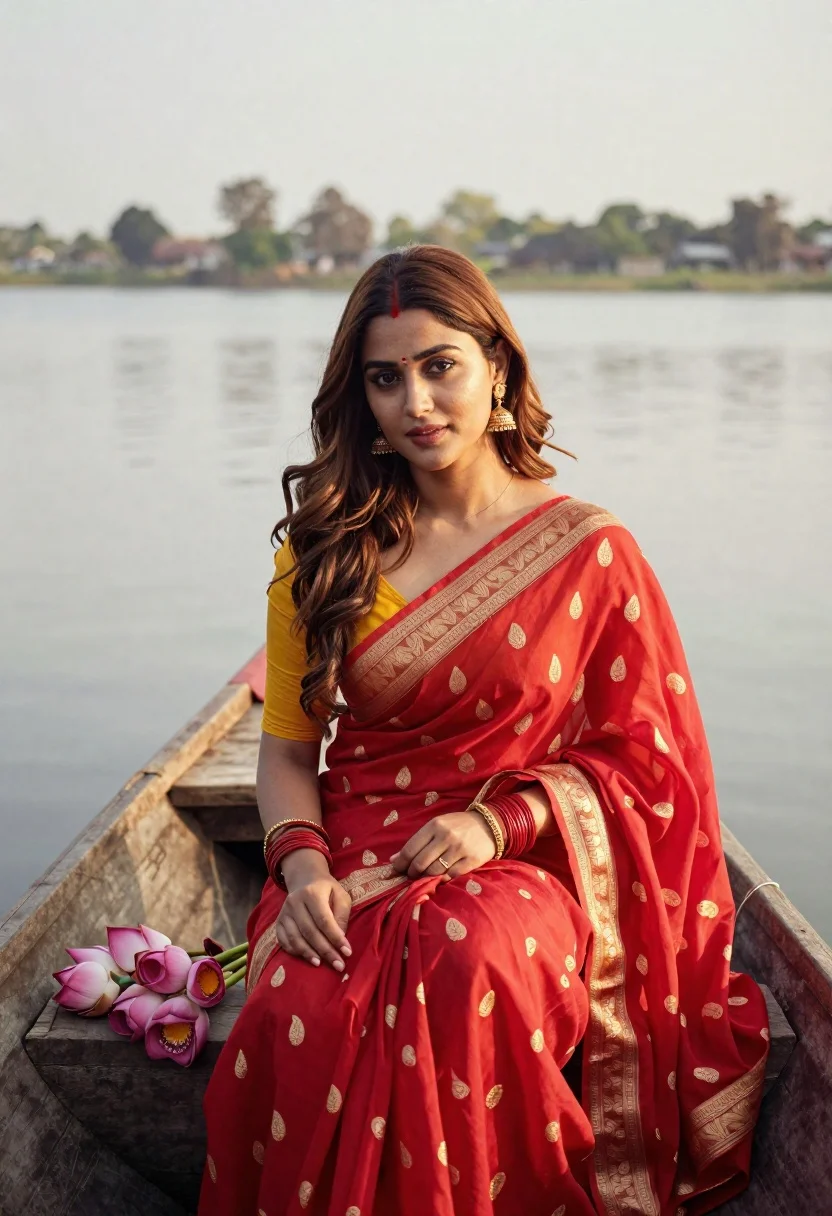
Young woman in red saree sitting in wooden boat on calm water
Prompt
A serene portrait of a young woman sitting in a wooden boat on calm water.

Subject: A beautiful young woman with long, wavy brown hair parted in the middle and fair skin, looking directly at the camera with a soft expression. She wears a small red bindi on her forehead.

Clothing: She is dressed in a vibrant red saree featuring intricate gold paisley patterns and a wide ornate gold border, draped over a yellow blouse. She wears traditional gold jhumka earrings, multiple red bangles on both wrists, and a gold bracelet.

Action: She sits gracefully with her legs tucked into the boat, holding a small bouquet of pink lotus flowers in her right hand while her left hand rests gently near her lap.

Environment: The setting is a tranquil lake or river with a soft-focus background showing distant trees and a hazy shoreline under a bright sky.

Camera: Shot from a slightly low angle looking up at the subject, utilizing a shallow depth of field to blur the background and emphasize the woman.

Lighting: Soft, natural daylight illuminates the scene, creating a gentle glow on her face and highlighting the rich colors of her attire without harsh shadows.

Style Details: The image has a cinematic, high-definition quality with warm color grading that enhances the reds and golds, resembling a polished fashion photograph.
Description
This prompt is useful for creating editorial travel features, cultural portraiture spreads, and luxury resort advertising campaigns. The combination of 'vibrant red saree' against the 'tranquil lake' background, coupled with the 'soft, natural daylight,' ensures that the rich gold patterns remain visible while the shallow depth of field keeps the focus intensely on the subject's expression.
Suggestions
- Change 'pink lotus flowers' to 'white lotus flowers' for a more monochromatic feel.
- Swap 'yellow blouse' for 'deep emerald blouse' to contrast the red saree.
- Adjust 'soft, natural daylight' to 'late afternoon diffused sunlight' for warmer tones.
Category
Tags
Brown HairFair SkinFemaleMedium ShotNatureOutdoorsPortrait ShotRealisticTraditional Wear
Date added
June 21, 2026
Added by
PromptDexter Team
Related Prompts
More prompts with similar categories and tags.

Young woman in green jacket holding plush toy at festive carousel

Young woman in pink cardigan holding camera in front of castle
Smiling woman in embroidered top standing in field of wildflowers
Woman in white lace cardigan and straw hat in mountain landscape
Young woman in lavender swimsuit standing in clear turquoise ocean water
Young woman in grey top and white skirt by water at dusk
Young woman with brown hair wearing embroidered top on sandy beach

Woman in black dress by window overlooking ocean at golden hour
