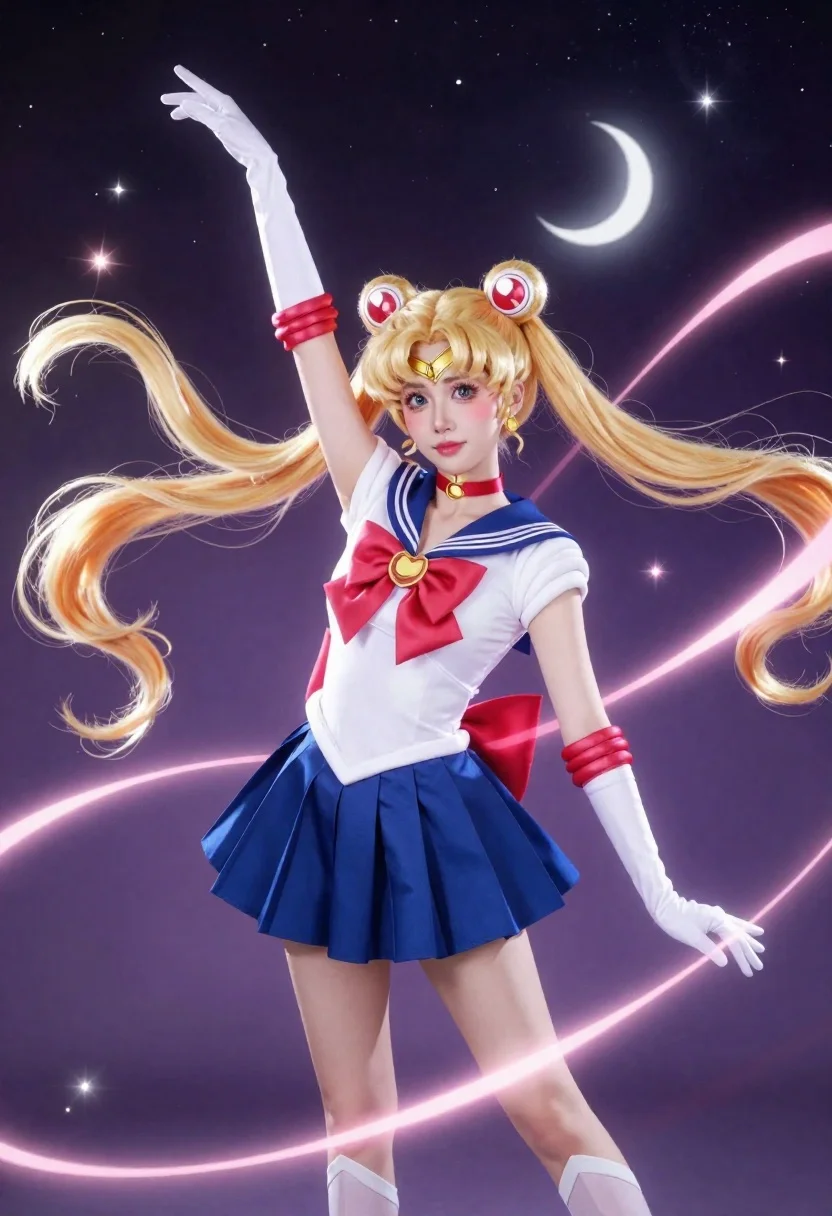
Anime cosplayer in sailor moon costume against outer space
Prompt
A full-body shot of a blonde female anime cosplayer dressed as Sailor Moon against a magical outer space backdrop.

Subject: blonde female anime cosplayer with long twin-tails and red curlers floating upward as if caught by wind, wide expressive eyes looking directly forward, bright pink lips, subtle blush on her cheeks.

Clothing: white sailor blouse with deep V-neck collar trimmed in dark blue piping, navy blue pleated skirt, large red bow with a golden brooch at the center, white gloves, matching thigh-high socks, ankle-length choker necklace with a moon-shaped pendant.

Action: right arm raised high while glowing pink ribbons swirl dynamically around her body in looping motion.

Environment: gradient purple-to-black outer space backdrop filled with scattered stars, small white crescent moon positioned behind one side of her head, soft lens flare sparkles throughout the scene.

Lighting: dramatic ethereal lighting emanating from the glowing ribbons, creating soft highlights and magical reflections across her costume and hair.

Camera: full-body composition with a slight upward tilt emphasizing height and motion, shallow depth of field softly blurring the distant background while keeping the subject sharply focused.

Style Details: high-saturation anime aesthetic blending realistic cosplay photography with digital art enhancements, glowing particles, smooth gradients, stylized ribbon physics, magical girl transformation sequence atmosphere.
Description
This prompt is useful for creating dynamic character concept art, magical girl transformation sequences, and highly stylized promotional key visuals. The combination of 'dramatic ethereal lighting' emanating from the glowing ribbons ensures that the costume details remain visible while simultaneously providing the necessary high-saturation glow expected in a 'magical girl transformation sequence atmosphere,' preventing the subject from looking flat against the deep space backdrop.
Suggestions
- Change 'blonde female anime cosplayer' to specify hair color like 'red haired anime cosplayer'.
- Swap 'gradient purple-to-black outer space backdrop' for 'nebula field with visible constellations'.
- Adjust 'shallow depth of field' to 'deep focus' if you want the stars in the background to be sharp.
Category
Tags
AnimeBlondeCosplay CostumeDigital ArtFemaleFull BodyOutdoorsRed HairSpaceWide Shot
Date added
June 19, 2026
Added by
PromptDexter Team
Related Prompts
More prompts with similar categories and tags.
Portrait of woman in jungle foliage vintage illustration
Anime girl in flower field with windmills and mountains
Elf girl by a stream in a serene forest setting
Anime girl walking on clouds under a rainbow sky

Spy peeking from behind a brick wall in alleyway

Elf wizard reading glowing book in starry night field
Young witch holding glowing orb in cosmic tunnel

Futuristic android woman in metallic corridor