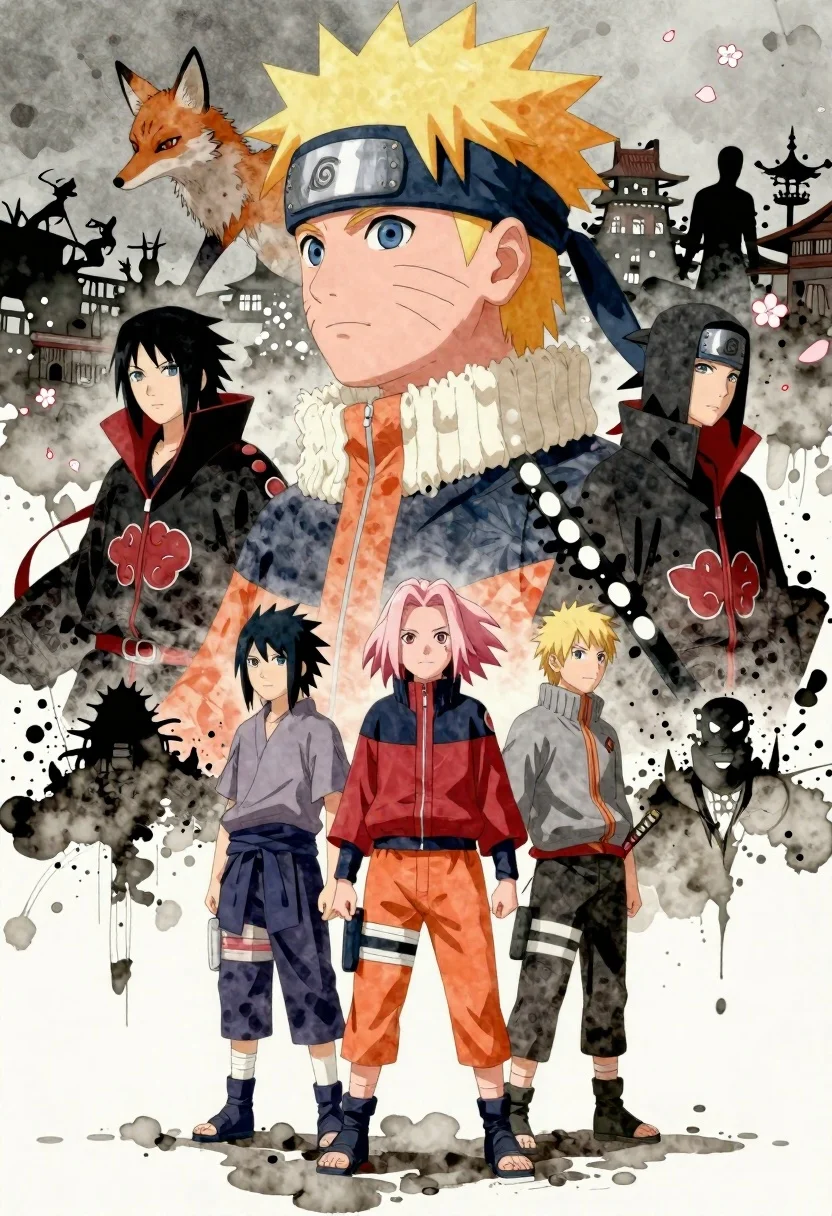
Anime illustration of naruto uzumaki profile portrait above sasuke sakura and ninja
Prompt
A dramatic anime-style illustration featuring a large profile of Naruto Uzumaki at the top, with his face composed of smaller scenes and characters from the series, including a fox spirit and silhouettes of other ninja.

Subject: A large profile portrait of Naruto Uzumaki with spiky blond hair, whisker marks on his cheeks, and a headband with a metal plate, standing above three smaller figures in the foreground who are Sasuke Uchiha, Sakura Haruno, and another character in orange pants.

Clothing: The main figure wears a black headband with a metal plate; the foreground characters wear ninja attire including an orange jumpsuit, red top with shorts, and grey outfit with a sword at the hip.

Action: The main figure gazes forward with a serious expression while smaller figures stand in a line below him looking upward or straight ahead.

Environment: A layered background filled with dark ink splatters, floating cherry blossom petals, traditional Japanese architecture, and silhouettes of other characters including Akatsuki members in black cloaks with red clouds.

Camera: Wide vertical composition emphasizing height and depth, with a slightly low angle on the foreground figures to highlight their importance against the towering main subject above.

Lighting: Soft diffused lighting with high contrast between light and shadow areas, creating a moody atmosphere with subtle highlights on faces and clothing textures.

Style Details: Watercolor and ink wash painting style with dynamic brush strokes, layered composition blending multiple scenes into one image, muted color palette dominated by greys, blacks, and whites with accents of red and orange.
Description
This prompt is useful for creating character concept art, narrative chapter openers, or dramatic group profile posters for fan projects. The combination of 'watercolor and ink wash painting style' with a 'wide vertical composition' ensures the towering main subject feels monumental while the foreground figures remain grounded through the specific 'low angle,' preventing the overall image from feeling top-heavy or flat.
Suggestions
- Change 'dark ink splatters' to 'gold leaf accents' for a more regal feel.
- Swap 'muted color palette' for 'deep jewel tones' to increase vibrancy.
- Adjust 'soft diffused lighting' to 'dramatic chiaroscuro' for harsher shadows.
Category
Tags
AnimeFictional CharacterLow AngleMaleWide Shot
Date added
June 26, 2026
Added by
PromptDexter Team
Related Prompts
More prompts with similar categories and tags.
Anime character monkey d luffy leaping forward in red jacket on white
Anime couple taking selfie overlooking fantasy kingdom sunset
Two young people on green hillside looking up at vast blue sky
Regal woman in black bodysuit on throne with black panther in digital
Anime woman with dragon in neon lit city alleyway
Man on wet rooftop overlooking vibrant city skyline at night
Anime warrior casting blue lightning energy portrait
Two cats on rooftop overlooking european cityscape at dusk