
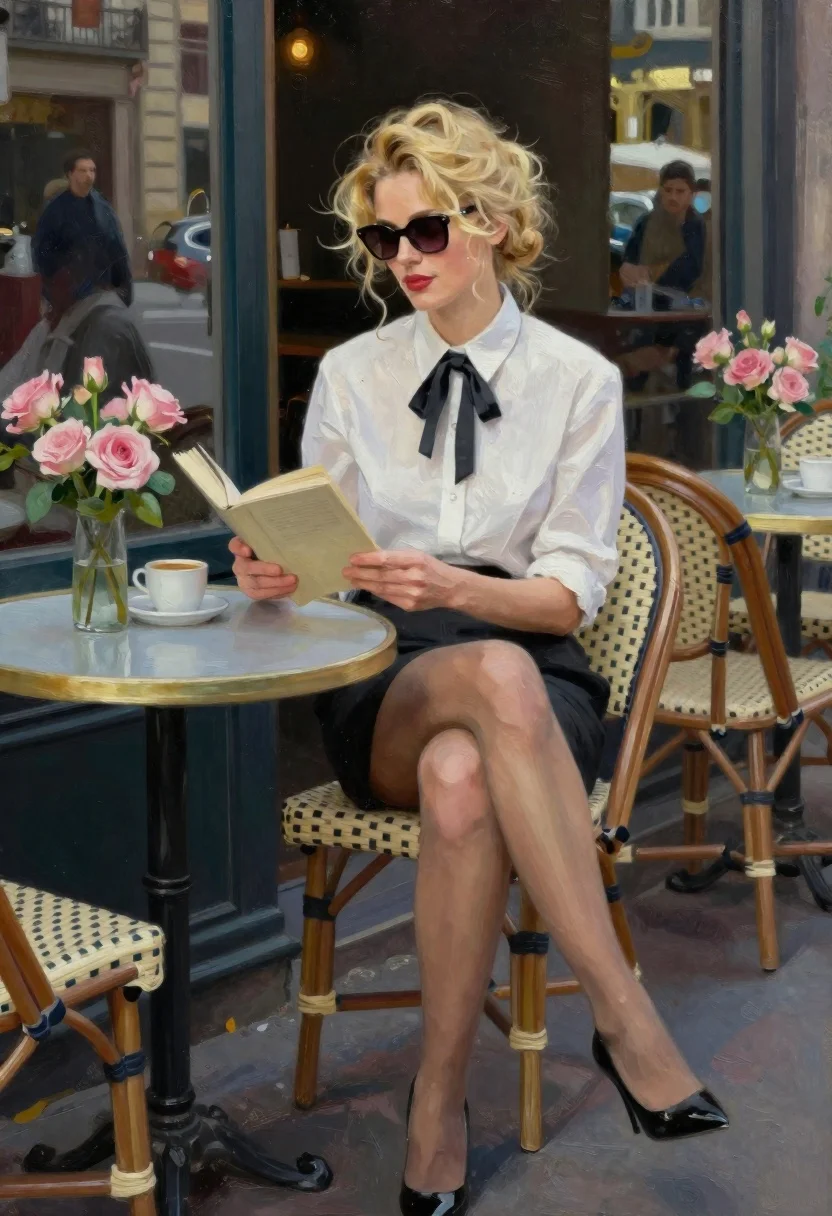
Blonde woman reading at a cafe table with roses
Prompt
Oil painting of a blonde woman reading outdoors at an outdoor cafe table

Subject: A fair-skinned woman with voluminous wavy blonde hair tied back in a messy bun, wearing large dark sunglasses and red lipstick

Clothing: She wears a crisp white collared shirt tucked into a black mini skirt, accessorized with a small black bow tie around the neck collar, sheer nude stockings covering her legs down to classic high-heel pumps

Action: Sitting relaxed on a woven chair holding an open book in both hands while gazing slightly upward toward it with focus and engagement

Environment: Seated at a round light blue tabletop beside another matching table set for coffee or tea nearby; lush pink roses arranged in glass vases sit adjacent to her, adding soft floral contrast against the urban backdrop of blurred windows and distant figures inside what appears like a cafe interior

Camera: Medium shot composition capturing full figure from knees up with shallow depth-of-field blurring background elements softly behind subject's silhouette

Lighting: Bright daylight illuminates scene creating strong highlights on skin tones, hair strands, table surface while casting deep shadows under chairs and around feet suggesting direct overhead sun exposure typical of afternoon hours in city setting

Style Details: Rendered in painterly brushstroke technique mimicking classic impressionistic style reminiscent mid-century European artistry with visible texture layers enhancing realism within stylized execution.
Description
This prompt is useful for creating editorial fashion moodboards, romantic lifestyle advertisements, and fine art portrait prints. The combination of 'painterly brushstroke technique' with 'bright daylight' ensures the subject remains grounded in a tangible setting while the visible texture layers prevent the image from looking like a sterile photograph, perfectly complementing the soft contrast provided by the 'lush pink roses'.
Suggestions
- Change 'black mini skirt' to 'tweed midi skirt' for more period detail.
- Swap 'bright daylight' for 'soft overcast light' to minimize harsh shadows.
- Add 'bokeh effect' to the camera section for stronger background separation.
Category
Tags
BlondeBrown HairCafeCasual WearFair SkinFemaleForestMedium ShotOutdoorsPortrait ShotRealisticRed Hair
Date added
June 19, 2026
Added by
PromptDexter Team
Related Prompts
More prompts with similar categories and tags.

Woman in black dress by window overlooking ocean at golden hour
Young woman in sage green embroidered gown against orange backdrop

Fair blonde woman touching hair outdoors overlooking hazy cityscape

Blonde woman in black coat leaning against white wall by window
Smiling blonde woman in pink satin dress against dark branded backdrop

Blonde woman looking back over shoulder against white wall
Portrait of woman with brown blonde hair in mint gown garden setting

Young woman with braided hair in misty woodland setting
