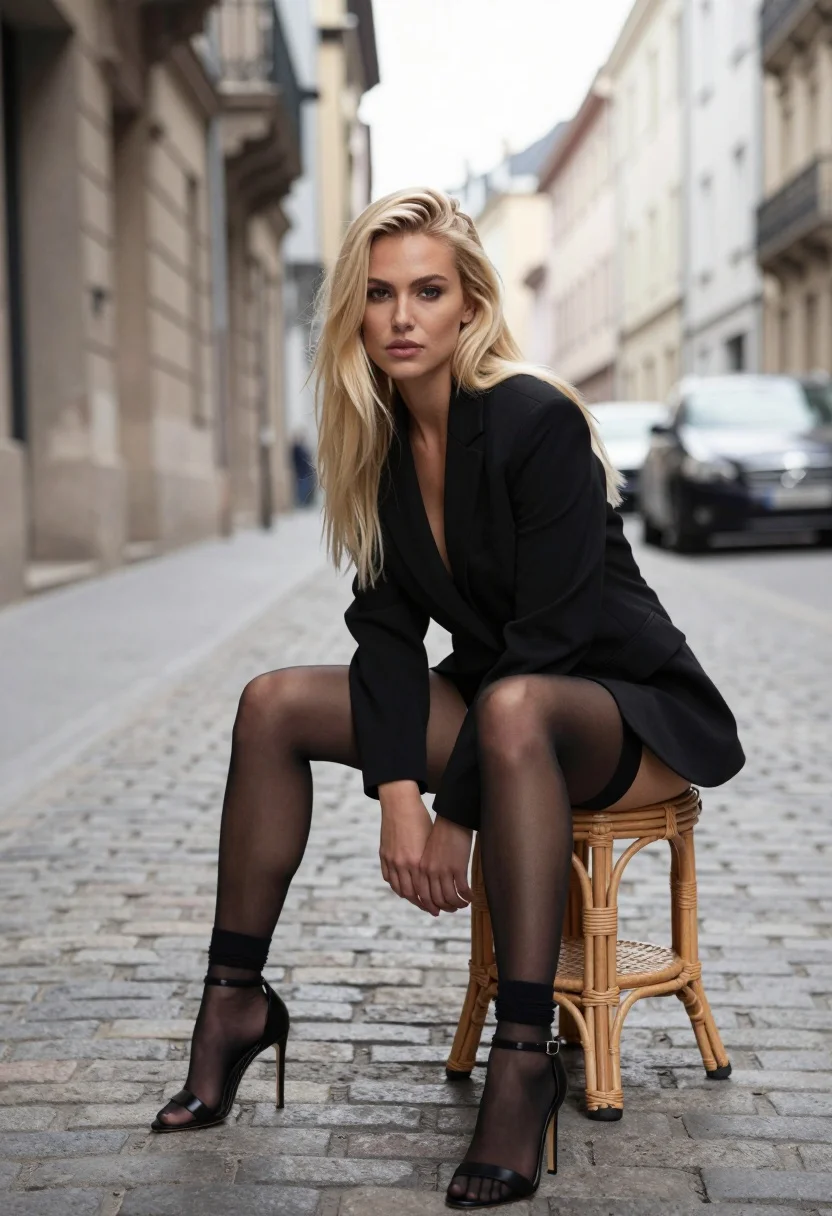
Blonde woman seated on stool in european cobblestone street setting
Prompt
A confident blonde woman sits on a wicker stool in the middle of a cobblestone street.

Subject: A young woman with long, straight platinum blonde hair and fair skin. She has a serious, direct gaze and is looking straight at the camera. Her posture is relaxed yet poised as she leans forward slightly while seated.

Clothing: She wears a black blazer over a low-cut black top or bodysuit. On her feet are sheer black stockings with black socks pulled up to mid-calf on one leg, paired with black high-heeled sandals featuring thin straps.

Action: She is seated on a small round wicker stool, leaning forward with her hands resting near her knees. Her body is angled slightly towards the camera while her head faces forward.

Environment: The setting is an urban European-style street paved with grey cobblestones. In the background are tall stone buildings with classic architecture and windows. A dark car is parked on the right side of the street, blurred by depth of field.

Camera: The shot is taken from a low angle looking up at the subject. The composition uses a shallow depth of field to keep the woman in sharp focus while blurring the background buildings and street elements.

Lighting: Soft natural daylight illuminates the scene from above and slightly to the side, casting gentle shadows on her face and clothing. The lighting is even and flattering without harsh contrasts.

Style Details: The image has a high-fashion editorial aesthetic with a cinematic color palette dominated by black, grey, and beige tones.
Description
This prompt is useful for creating high-fashion magazine editorials, character portraits evoking mystery, and mood boards for dark academia themes. The combination of 'low angle looking up' and the 'shallow depth of field' directs all attention to the subject while using the blurred background elements—like the stone buildings—to establish a grand, architectural context fitting for editorial storytelling.
Suggestions
- Change 'wicker stool' to 'marble plinth' for a more elevated feel.
- Swap 'black blazer' for 'charcoal wool blazer' to add texture.
- Adjust 'soft natural daylight' to 'overcast daylight' for flatter shadows.
Category
Tags
BlondeFair SkinFemaleLow AngleOutdoorsUrban
Date added
August 5, 2026
Added by
PromptDexter Team
Related Prompts
More prompts with similar categories and tags.
Blonde woman in pink moto jacket seated on stone ledge against blue

Young woman leaning against white wall with beige handbag under bright sunlight

Blonde woman in red swimsuit leaning outdoors near wooden fence
Blonde woman in black bikini on lounge chair at sunny beach

Blonde woman in black leather bodysuit on concrete ledge against blue sky

Blonde woman on black motorcycle on sunny dirt path in desert

Blonde woman in bikini on patio overlooking green hills under blue sky

Smiling blonde woman in sports bra sitting on outdoor lounge chair

Blonde woman in white embroidered mini dress on rooftop overlooking city

Young blonde woman in swimsuit on yacht deck under strong sunlight