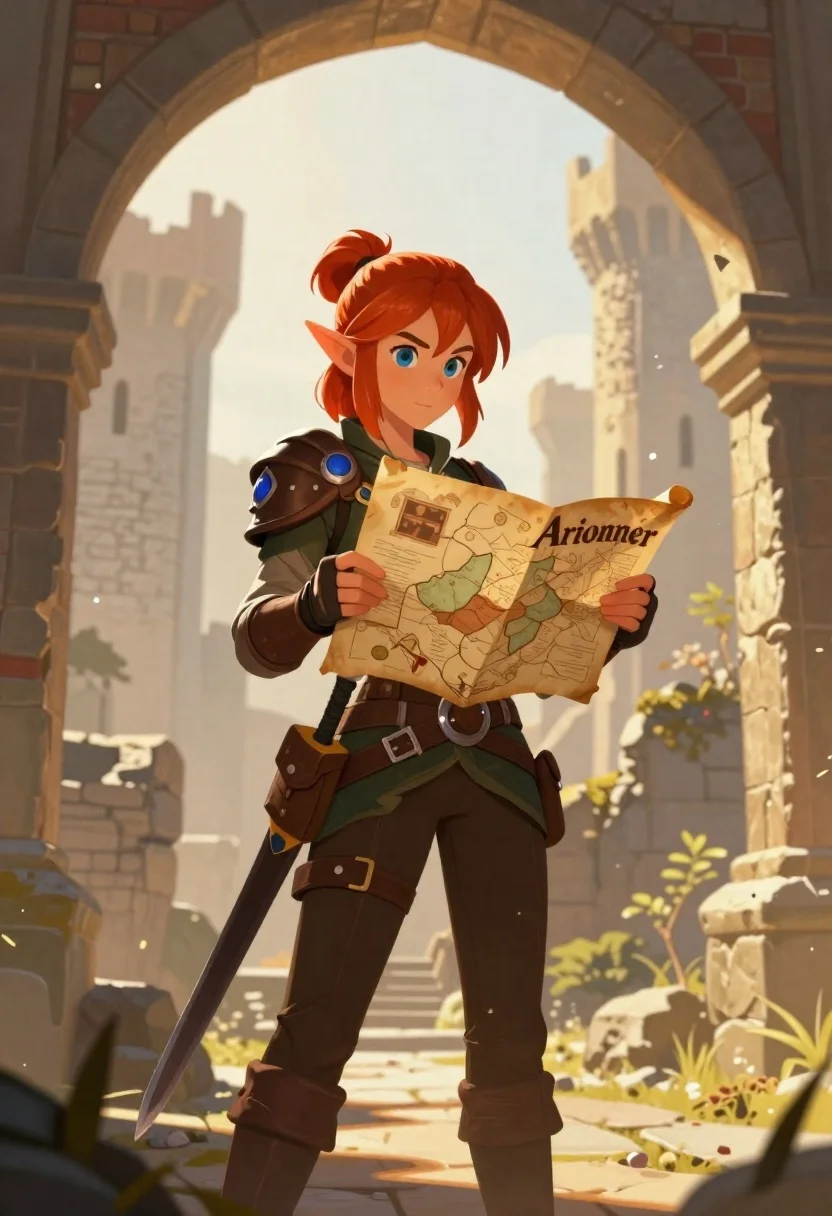
Elf woman reading map in ruined castle archway
Prompt
A digital illustration of a fantasy character standing in the foreground holding an open map labeled 'Arionner.'

Subject: A young elf woman with vibrant red hair tied up and large blue eyes, displaying a focused expression as she reads her map.

Clothing: She wears practical adventurer gear including brown leather shoulder armor with a prominent blue gem, green long-sleeved shirt underneath, dark trousers tucked into tall boots, secured by multiple utility belts holding pouches. A sword hangs at her hip in a leather scabbard.

Action: The character stands upright looking down intently at the map she holds open with both hands.

Objects: An ancient-looking paper scroll or parchment serving as a map is held directly to chest level; stone architecture forms an archway framing the scene behind her.

Environment: Ancient ruined castle setting featuring crumbling towers and weathered brickwork in soft focus background, suggesting overgrown wilderness reclaiming the location.

Lighting: Warm golden sunlight illuminating from above creating gentle shadows on face while maintaining overall bright atmosphere with slightly hazy backdrop quality.

Style Details: Soft semi-realistic fantasy art style reminiscent of modern RPG character designs rendered with smooth gradients and subtle atmospheric depth effects typical of contemporary digital concept illustrations
Description
This prompt is useful for creating cover art for fantasy role-playing games, narrative scene illustrations, or high-fantasy book jacket concepts. The combination of 'warm golden sunlight illuminating from above' with the 'soft semi-realistic fantasy art style' ensures that while the subject remains grounded in adventure gear, the overall rendering avoids looking like a flat concept sketch by incorporating subtle atmospheric depth effects.
Suggestions
- Change 'vibrant red hair' to 'silver braided hair' for an elven variation.
- Replace 'brown leather shoulder armor' with 'bronze scale pauldrons' for more visual interest.
- Adjust 'soft focus background' to 'deep bokeh' for a stronger separation from the subject.
Category
Tags
ArmorBrunetteDigital ArtFemaleForestFull BodyOutdoorsPortrait ShotRed HairRuins
Date added
June 19, 2026
Added by
PromptDexter Team
Related Prompts
More prompts with similar categories and tags.
Person in kimono before a giant red moon
Girl in puddle during rainstorm surrounded by flowers
Woman on park bench under autumn trees illustration
Woman standing above glowing lotus flower in dark setting

Woman in forest with purple hair and gradient skirt
Cowboy and woman embracing in a poppy field
Lone figure walking through surreal forest under pink moon
Young woman with green hair in glowing forest