
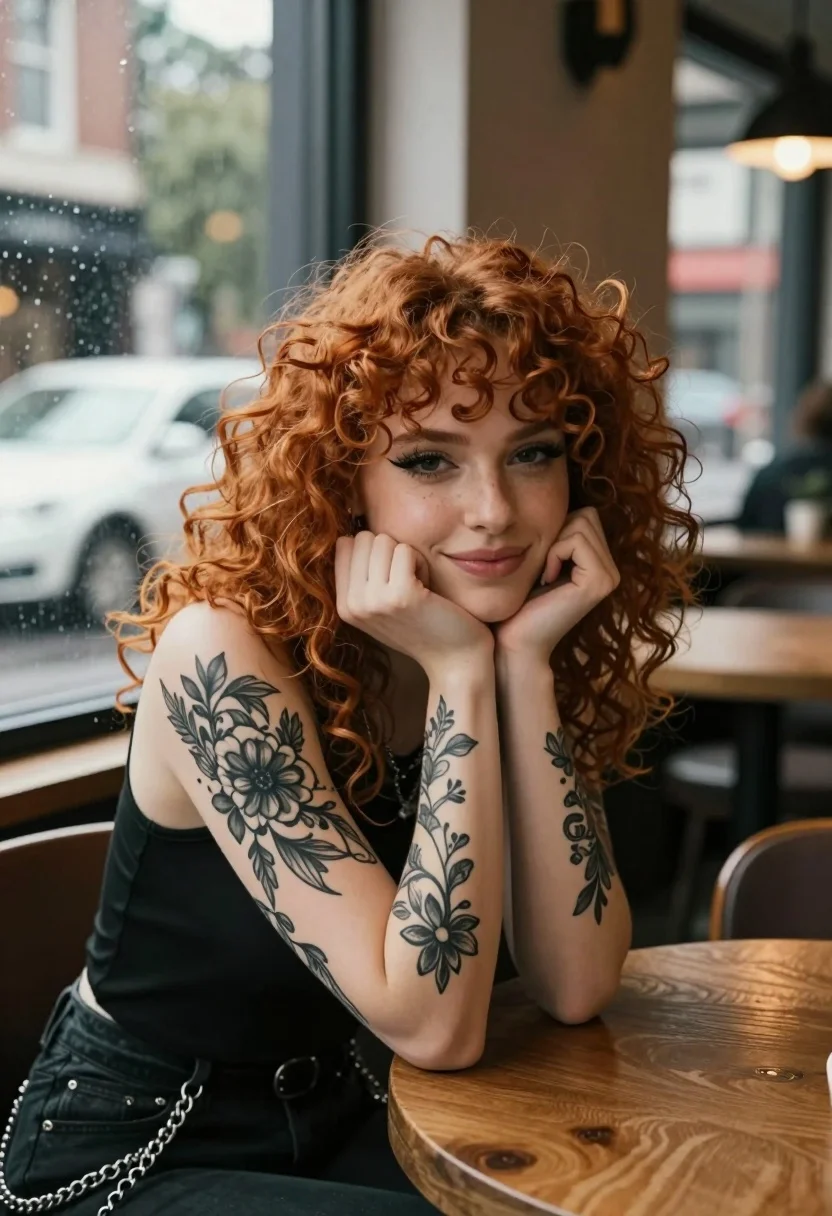
Medium close up portrait of woman with red hair in cafe by
Prompt
A portrait of a young woman with curly red hair resting her chin on her hands while looking at the camera.

Subject: A young woman with voluminous curly red hair and prominent black eyeliner. She has extensive black ink tattoos covering both forearms, featuring floral and vine patterns.

Clothing: She wears a black sleeveless top with silver chains hanging from the waistband of her pants.

Action: She is leaning forward with her elbows on a wooden table, resting her chin on her clasped hands, offering a soft smile.

Environment: The setting appears to be a cafe or restaurant interior next to a large window. Outside the window, raindrops are visible on the glass, and a white car is parked in the background.

Lighting: Soft natural light illuminates her face from the side, creating gentle shadows that highlight her features and tattoos.

Camera: The shot is a medium close-up with a shallow depth of field that keeps the subject sharp while blurring the background interior and exterior elements.

Style Details: The image has a cinematic, high-quality photographic aesthetic with rich colors and a polished finish.
Description
This prompt is useful for creating character concept art for indie films, moody editorial portraits, and atmospheric narrative scene illustrations. The combination of 'soft natural light' from the side sculpts the face and makes the 'black ink tattoos' visible without harsh glare, while the 'shallow depth of field' ensures the viewer focuses entirely on the subject despite the detailed background elements like raindrops and the car.
Suggestions
- Change 'wooden table' to 'marble tabletop' for a more upscale feel.
- Add 'bokeh effect' to enhance the background blur.
- Swap 'soft smile' for 'smoldering gaze' to change the mood.
Category
Tags
CafeFemaleIndoorsMedium ShotRealisticRed Hair
Date added
July 12, 2026
Added by
PromptDexter Team
Related Prompts
More prompts with similar categories and tags.

Young woman in white top and denim jeans against concrete wall
Young woman in striped sweatshirt sitting at restaurant table smiling

Medium close up portrait of young woman wearing black top and sunglasses
Black woman in brown dress at cafe window
Young woman in sweater and jacket holding coffee cup inside cafe
Young woman with red hair seated at wooden desk in cozy studio

Young woman leaning over table in cafe with dessert and drink
Portrait of young person with red hair inside subway car interior
Young woman with red hair holding flowers indoors

Red haired woman in workshop with tools background