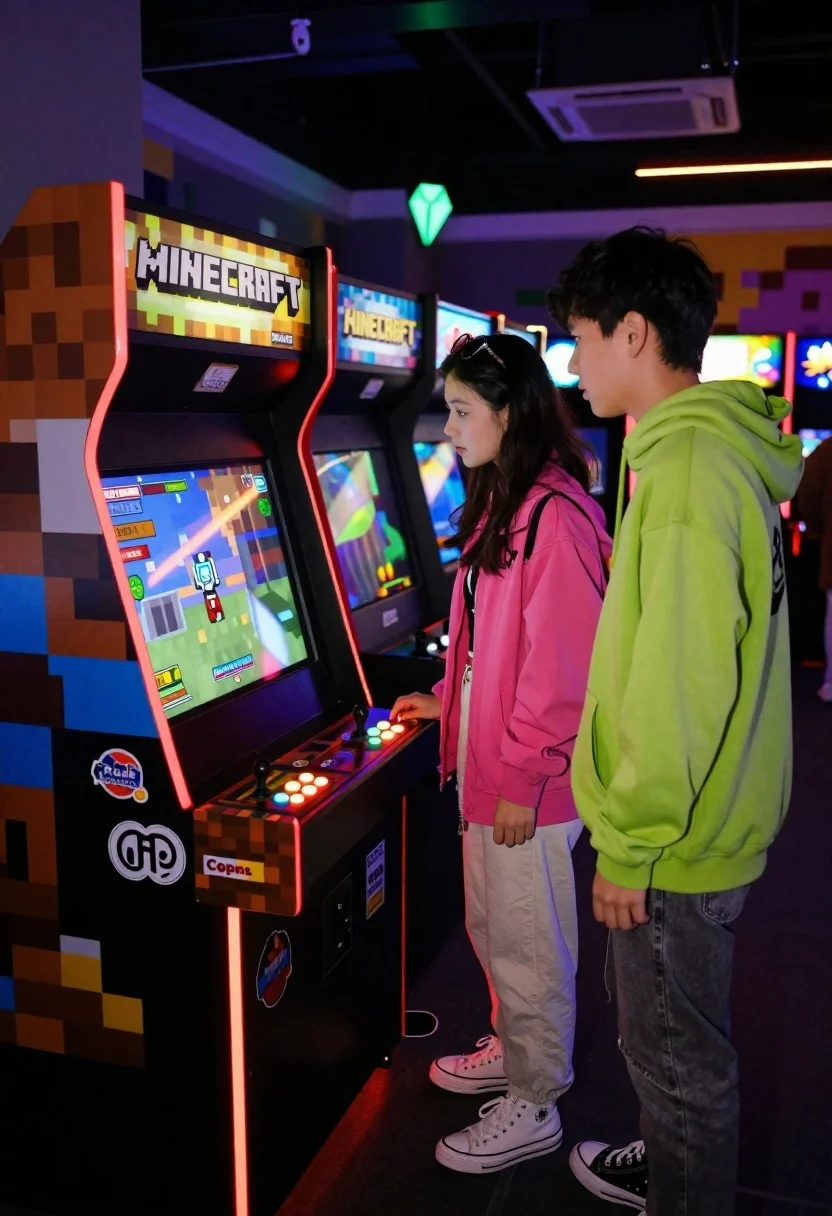
Two people looking at arcade cabinet in dimly lit hall
Prompt
A vertical photograph of a colorful arcade cabinet in an active gaming hall; two young people stand beside the machine looking at the screen with interest.

Subject: A woman wearing sunglasses on her head and a pink jacket stands next to a boy in a green hoodie, both focused intently on the game screen.

Clothing: The woman wears light-colored pants and high-top sneakers; the man's vibrant lime-green outerwear is prominent against the dark surroundings.

Action: They are standing still, leaning slightly forward with hands relaxed near their sides as they watch gameplay unfold.

Environment: A dimly lit arcade interior filled with glowing screens in the background, creating depth and atmosphere around the central machine.

Camera: Shot from a medium height at eye level, framing both subjects and the full front of the cabinet for context.

Lighting: Warm ambient glow emanating from red LED strips along the base and sides of the black cabinet; cool blue light reflects off the screen into their faces.

Objects: The arcade game features two joysticks with colored buttons arranged in a grid pattern across its control panel, plus multiple stickers adorning its front faceplate including one reading 'Rude Coppers.'

Text/Graphics: Bold pixelated lettering spelling out 'MINECRAFT' appears above the screen and on top marquee; smaller logos like 'EAST ARLE' are visible along with a glowing green diamond-shaped icon.

Style Details: Vibrant blocky aesthetic matching Minecraft's signature voxel style, contrasting sharply with dark background tones to highlight luminous elements.
Description
This prompt is useful for creating nostalgic arcade scene photography, character concept art showing shared focus, and editorial street style documentation of urban leisure. The combination of 'warm ambient glow' from the base and 'cool blue light reflects off the screen into their faces' establishes a high-contrast mood that emphasizes the subjects' focused attention against the dark surroundings, while the 'vibrant blocky aesthetic' grounds the scene in a specific pop-culture context.
Suggestions
- Change 'pink jacket' to 'oversized bomber jacket' for more streetwear impact.
- Swap 'lime-green outerwear' for 'charcoal hoodie' to balance the color palette.
- Add 'shallow depth of field' to blur the background screens further.
Category
Tags
Casual WearFemaleFull BodyIndoorsMaleMedium ShotRealisticStreetwearVehicles
Date added
June 19, 2026
Added by
PromptDexter Team
Related Prompts
More prompts with similar categories and tags.
Fit woman taking a mirror selfie in an elevator interior
Confident woman smiling indoors on dark wood walkway with red decor

Young man leaning on a modified sports car in city night
Young man in black t shirt standing in dimly lit industrial loft
Man leaning on orange mustang at night city street
Spider man costume selfie at a coffee shop with baristas
Stylish man in vintage convertible against blue background
Blonde woman in jogger pants standing in modern hallway