
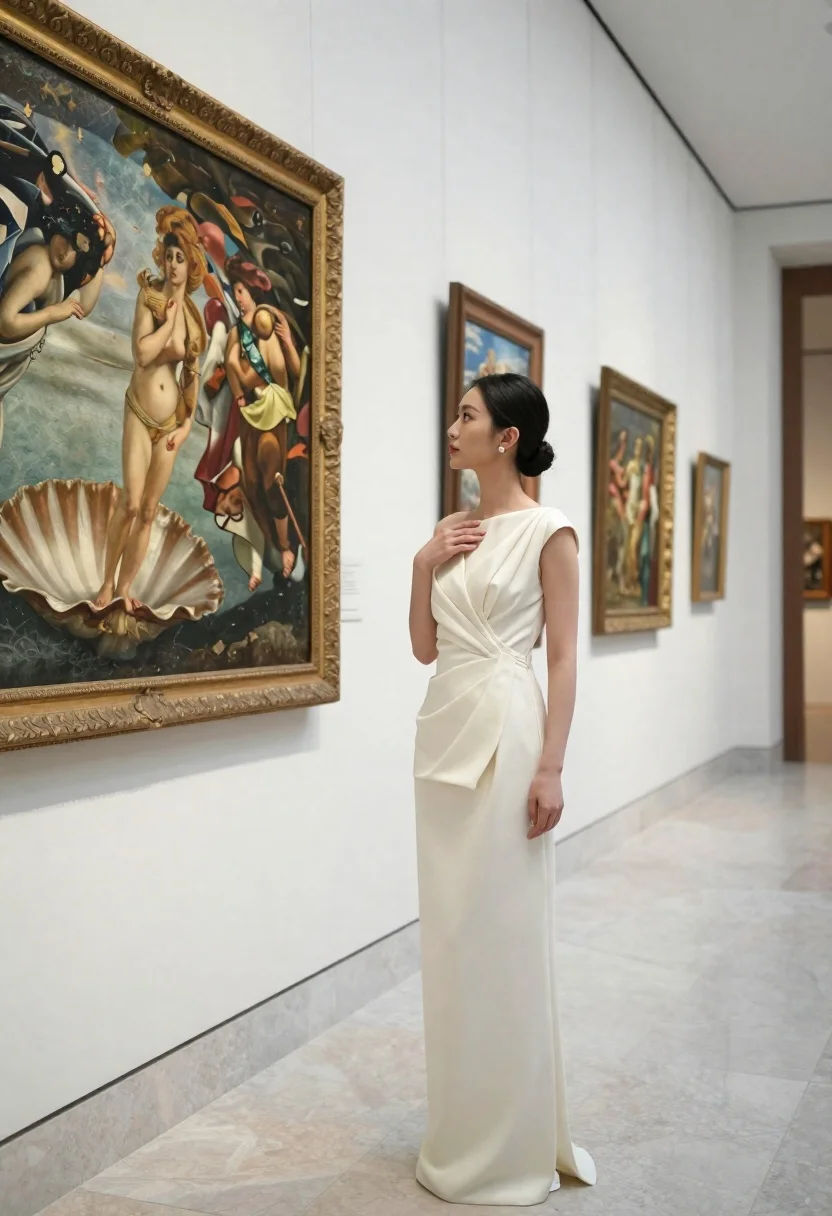
Woman in cream gown stands in museum gallery looking at large painting
Prompt
A woman stands in a museum gallery looking at a large painting on the wall.

Subject: A woman with dark hair pulled back into a neat bun, fair skin, and a calm, appreciative expression.

Clothing: She wears a sophisticated, floor-length cream gown featuring an asymmetrical draped bodice and structured fabric folds.

Action: She stands in profile facing left, gazing at the artwork, with her right hand gently touching her chest near her collarbone.

Environment: A high-ceilinged art gallery with white walls, polished marble floors, and a grey stone baseboard.

Objects: Several large paintings in ornate gold frames hang on the wall; one prominent painting depicts classical figures including a woman emerging from a seashell.

Lighting: Soft, diffuse indoor lighting illuminates the scene evenly, creating gentle shadows that highlight the texture of the dress and the depth of the gallery space.

Camera: A medium shot taken at eye level with a shallow depth of field that keeps the subject sharp while softly blurring the background paintings and hallway.

Style Details: The image has a clean, high-resolution aesthetic with natural color grading and a polished, elegant atmosphere typical of fine art photography.
Description
This prompt is useful for creating editorial fashion moodboards, museum exhibit promotional materials, and sophisticated portraiture showcasing garments. The combination of 'soft, diffuse indoor lighting' and the 'shallow depth of field' ensures that while the subject remains sharp, the background paintings are softly blurred, preventing visual competition with the elegant drape and texture of the cream gown.
Suggestions
- Change 'dark hair pulled back into a neat bun' to 'loose wavy hair' for a softer look.
- Swap 'polished marble floors' for 'dark wood parquet' to change the floor tone.
- Adjust 'medium shot' to 'full body shot' to better showcase the floor-length gown.
Category
Tags
Fair SkinFemaleFormal WearIndoorsMedium ShotPortrait ShotRealisticSide Profile
Date added
June 23, 2026
Added by
PromptDexter Team
Related Prompts
More prompts with similar categories and tags.

Woman in red dress holding heart shaped balloon against white wall
Young woman in purple velvet slip dress seated thoughtfully in studio

Close up portrait of young woman with brown braid indoors
Blonde woman at a bar counter in dimly lit pub
Woman in white satin slip dress seated on bed looking back over

Woman with black hair leaning indoors by glass railing in bright modern

Young woman in black crop top and cream trousers indoors looking over

Poised woman in black gown posing indoors with dramatic low key lighting
