
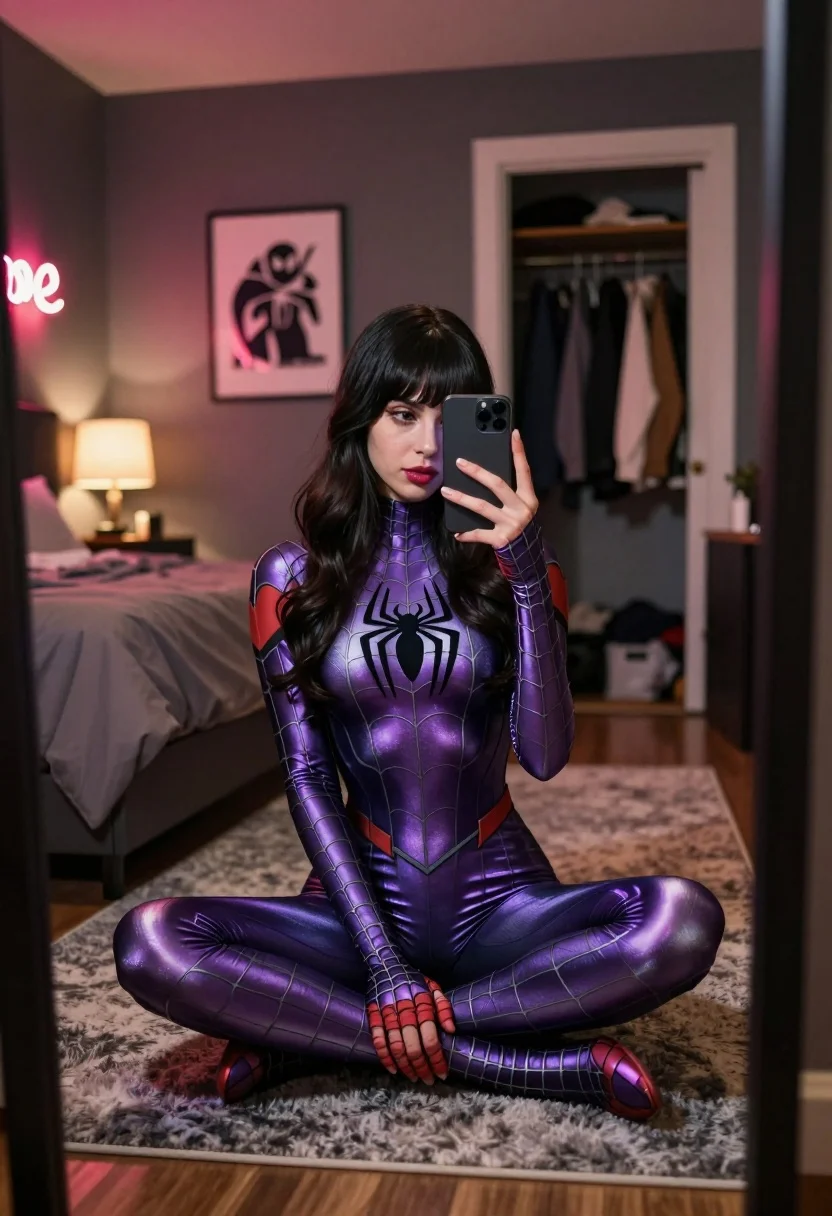
Woman in purple spiderman bodysuit taking mirror selfie in dimly lit bedroom
Prompt
A woman in a shiny purple Spider-Man bodysuit sits cross-legged on a rug while taking a mirror selfie with a smartphone.

Subject: A young woman with long dark wavy hair and bangs wearing a metallic purple full-body Spider-Man suit featuring a black spider emblem on the chest and webbing patterns across the fabric.

Clothing: The subject wears a tight-fitting, iridescent purple spandex bodysuit with black grid lines mimicking a spiderweb pattern; she has no other visible clothing or accessories.

Action: She holds a smartphone in her right hand to capture a mirror selfie, looking at the screen with a neutral expression while sitting cross-legged on the floor.

Environment: A bedroom setting with dark grey walls, a large bed with brown bedding to the left, and an open closet door revealing hanging clothes in the background; a framed poster hangs on the wall behind her.

Camera: Shot through a mirror reflection showing a vertical composition that captures both the subject and the room interior including the doorway and bed frame.

Lighting: Warm ambient lighting from a lamp on the bedside table casts soft shadows, while a red neon sign reading "love" glows on the left wall adding color contrast to the scene.

Style Details: The image has a cinematic quality with rich colors and depth of field that emphasizes the metallic texture of the costume against the cozy bedroom atmosphere.
Description
This prompt is useful for creating character concept art, themed cosplay photography, and narrative mood pieces set in intimate domestic spaces. The combination of 'iridescent purple spandex' with 'warm ambient lighting' ensures the metallic sheen catches highlights effectively, while the inclusion of a 'red neon sign reading "love"' provides a specific, contrasting color pop that prevents the otherwise dark bedroom setting from becoming visually flat.
Suggestions
- Change 'metallic purple' to 'deep indigo' for a more subdued tone.
- Replace 'smartphone' with an old film camera to alter the selfie action.
- Adjust 'dark grey walls' to 'exposed brick' for a different background texture.
Category
Tags
BedroomBrunetteFemaleFull BodyIndoorsRealisticSelfie
Date added
July 12, 2026
Added by
PromptDexter Team
Related Prompts
More prompts with similar categories and tags.

Woman in copper sequin dress taking a mirror selfie in luxurious bathroom
Woman taking a selfie in bed with ring light and patterned black

Woman in cream fur coat seated on bed looking at camera

Glamorous woman reclining on hotel bed wearing gold sequin outfit

Brunette woman in black mini dress looking back from modern bedroom
Fair skinned woman in spider man bodysuit taking mirror selfie indoors

Young woman taking mirror selfie in bright room with denim jeans
Young woman taking mirror selfie in black crop top and patterned maxi

Glamorous woman taking mirror selfie in sheer sequined top

Young woman taking mirror selfie in black dress indoors