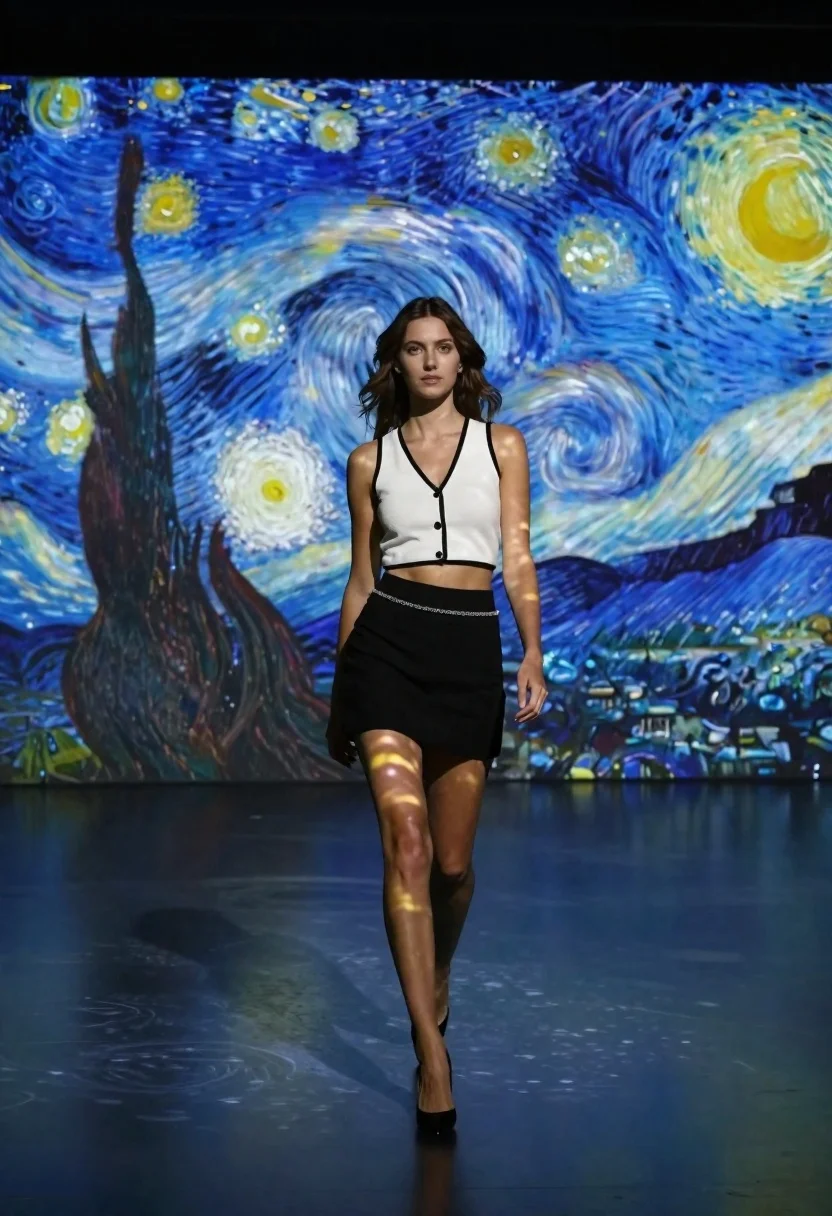
Woman in white top walking through immersive van gogh art gallery
Prompt
A woman walks confidently toward the camera in a dark immersive art gallery where the floor and walls are projected with swirling blue and yellow patterns from Vincent van Gogh's Starry Night.

Subject: A young woman with wavy brown hair, fair skin, and a calm, direct gaze walking forward.

Clothing: She wears a white sleeveless crop top with black trim and buttons, a black mini skirt featuring a silver chain detail at the waist, and black high heels.

Action: The subject walks forward with a steady stride, her shadow cast clearly on the floor beneath her.

Environment: A dark indoor gallery space where the walls and floor are covered in large-scale projections of Vincent van Gogh's Starry Night painting.

Camera: Eye-level perspective capturing the full length of the subject from head to toe against the immersive background.

Lighting: The scene is lit by the projected light itself, casting swirling blue and yellow patterns across the woman's skin and clothing.

Style Details: High-quality photography with a cinematic atmosphere that blends reality with digital art projection.
Description
This prompt is useful for creating editorial fashion editorials, conceptual album artwork, and immersive brand advertisements. The combination of 'white sleeveless crop top' against the 'swirling blue and yellow patterns' ensures the subject remains a clear focal point despite the overwhelming background projection, while the 'steady stride' action grounds the high-concept digital art in believable human movement.
Suggestions
- Change 'Starry Night painting' to 'Impressionist swirling pattern' for broader artistic flexibility.
- Add 'wet look hair' to enhance the reflection from the projected light.
- Swap 'black mini skirt' for 'leather trousers' to increase material contrast.
Category
Tags
Brown HairDigital ArtFair SkinFemaleFull BodyIndoorsPortrait ShotRealisticUrban
Date added
June 21, 2026
Added by
PromptDexter Team
Related Prompts
More prompts with similar categories and tags.

Fair skinned woman in black sequined outfit sitting elegantly indoors
Woman in grey suit and cream turtleneck standing against white wall
Stylish woman in white cardigan standing before large abstract digital screen
Woman in black jumpsuit standing before large white heart on red

Young woman in mint green satin dress sitting on stone window ledge
Stylish young woman in oversized blazer standing before fashion magazine wall
Young woman in pink hanfu gown seated near ornate vanity window
Confident woman in red top standing on wet cobblestone city street
