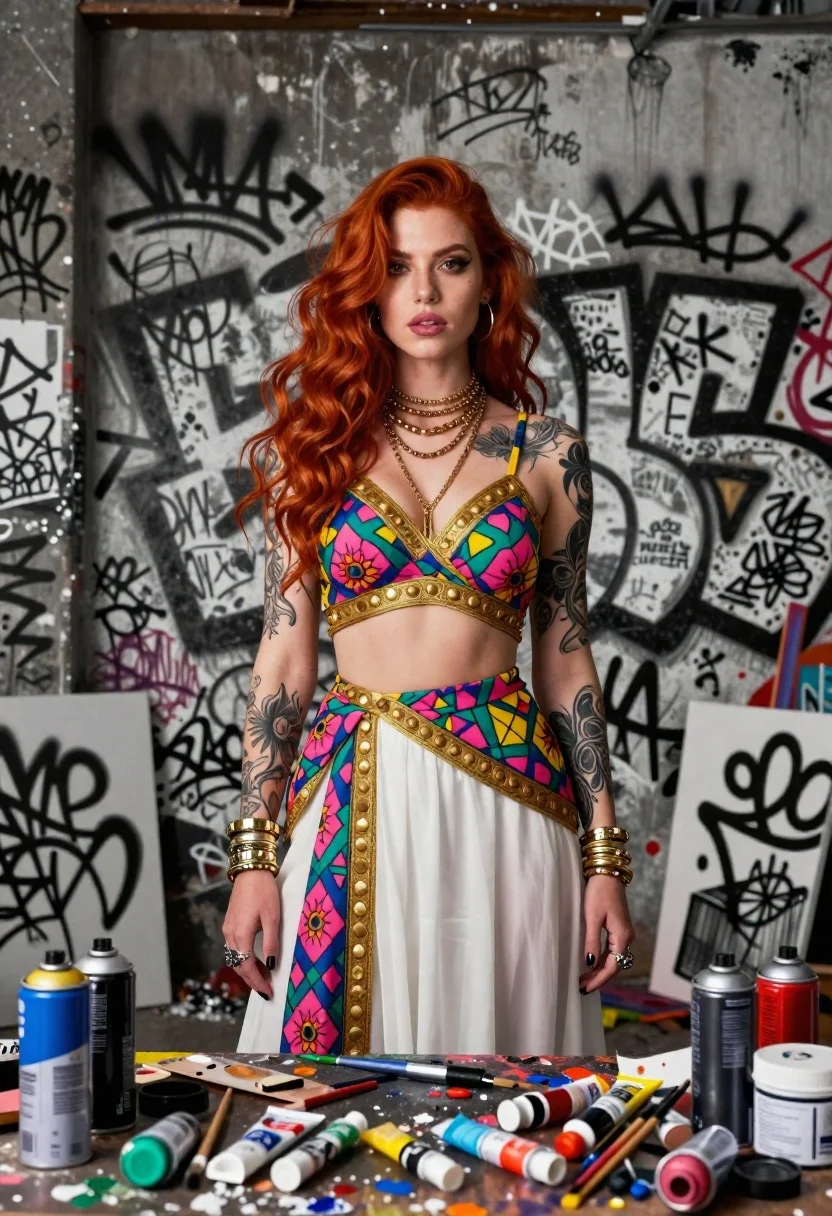
Woman with red hair in graffiti covered studio
Prompt
Portrait of a woman with long red hair standing confidently in an urban studio filled with graffiti-covered walls and scattered paint supplies

Subject: A striking young woman with vibrant red wavy hair, confident gaze directed at the viewer, adorned with intricate black tattoos covering both arms from shoulders to wrists. She wears multiple gold necklaces around her neck some choker-style and thick stacked bracelets on each wrist along with rings on several fingers. Her outfit is a colorful two-piece set featuring bright pink blue green and yellow geometric floral patterns bordered by ornate golden trim, paired over flowing white fabric that drapes down the front

Environment: The background consists entirely of densely packed black-and-white graffiti tags covering every inch of what appears to be concrete walls behind her. In the foreground at waist height there's a cluttered workbench surface covered with various art tools including spray paint cans (blue red silver), brushes, tubes of acrylic or oil paints splattered across palette knives and canvases suggesting active painting session

Lighting: Studio lighting setup creates soft even illumination highlighting facial features while casting subtle shadows against the textured wall backdrop enhancing depth without harsh contrasts. Overall mood feels creative gritty yet polished blending street art aesthetic with high-fashion presentation through detailed rendering style

Style Details: Hyper-detailed digital illustration mimicking hyper-realistic photography meets graphic novel textures, emphasizing bold colors versus monochrome environment creating visual contrast between subject and surroundings.
Description
This prompt is useful for creating editorial fashion moodboards, character concept art for comic books, and stylized portfolio pieces showcasing vibrant subjects against industrial backdrops. The combination of 'bright pink blue green and yellow geometric floral patterns' against the 'densely packed black-and-white graffiti tags' establishes a high-contrast visual tension that prevents the subject from blending into the chaotic background, while the 'soft even illumination' ensures the intricate details of the tattoos and jewelry remain visible.
Suggestions
- Change 'vibrant red wavy hair' to 'wet look slicked back hair' for a different texture.
- Swap 'gold necklaces' for 'silver industrial chains' to shift the metallic feel.
- Adjust the background by changing 'graffiti-covered walls' to 'exposed brick and concrete' for a different grit.
Category
Tags
Black HairFemaleFull BodyPortrait ShotRealisticRed HairStreetwearStudioUrban
Date added
June 19, 2026
Added by
PromptDexter Team
Related Prompts
More prompts with similar categories and tags.
Woman in superhero costume in urban twilight setting

Portrait of woman in black dress with rose arch backdrop
Selfie portrait on busy hollywood boulevard at night

Woman stepping onto oversized open manga book

Woman in black shirt on urban street at sunset
Confident woman smiling indoors on dark wood walkway with red decor
Woman in oversized blazer sitting cross legged studio portrait

High fashion portrait of woman with red hair in black jacket