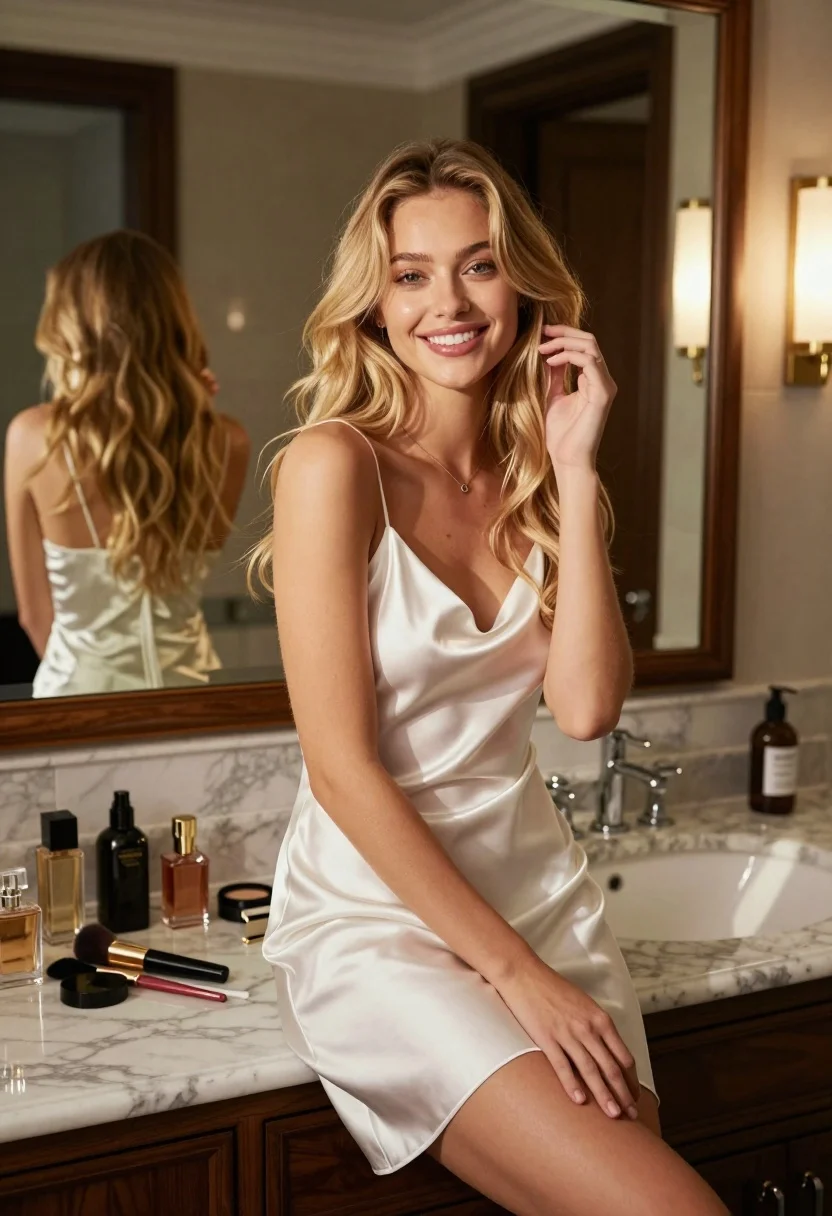
Young blonde woman smiling on marble vanity counter in elegant bathroom setting
Prompt
A young woman with long blonde hair sits smiling on a bathroom vanity counter.

Subject: A young woman with long, wavy blonde hair and a warm smile, looking directly at the camera.

Clothing: She wears a silky white slip dress with thin straps and a delicate necklace.

Action: She is seated with one hand gently touching her hair near her face while her other hand rests on her lap.

Environment: The setting is an elegant bathroom featuring a marble countertop, dark wood cabinetry, a large wall mirror reflecting her back, and a white vessel sink.

Objects: Various cosmetic items including perfume bottles, makeup brushes, and lipstick are arranged on the counter beside her.

Lighting: Warm sunlight streams in from the right side, casting soft highlights on her skin and creating gentle shadows across the room.

Camera: The shot is framed at eye level with a medium close-up perspective that emphasizes the subject against the interior background.

Style Details: The image has a cinematic quality with rich color grading and a polished, high-end aesthetic.
Description
This prompt is useful for creating luxury lifestyle advertisements, bridal beauty editorials, and intimate portraiture featuring domestic settings. The combination of 'silky white slip dress' against the 'marble countertop' grounds the image in opulence, while the 'warm sunlight streams in from the right side' sculpts her features with soft highlights that prevent harsh shadows, which is crucial for high-end cosmetic promotion.
Suggestions
- Change 'silky white slip dress' to 'ivory silk chemise' for a warmer tone.
- Add 'bokeh background' to soften the reflection in the mirror.
- Swap 'warm sunlight' for 'diffused window light' for a more even look.
Category
Tags
BlondeFemalePortrait ShotRealistic
Date added
July 12, 2026
Added by
PromptDexter Team
Related Prompts
More prompts with similar categories and tags.

Portrait of young woman with blue eyes and blonde hair

Fair blonde woman resting chin on hand at dimly lit bar lounge
Young woman with blonde hair posing against gray wall

Blonde woman in black hat standing in misty green rolling hills

Blonde woman at a bar counter in dimly lit pub

Blonde woman smiling with green lollipop in brightly lit candy store
Joyful young woman holding gold medals against a solid black background

Young blonde woman in black lace camisole holding red rose indoors

Portrait of young blonde woman in deep red satin top against white

Close up portrait of blonde woman touching head against metallic structure