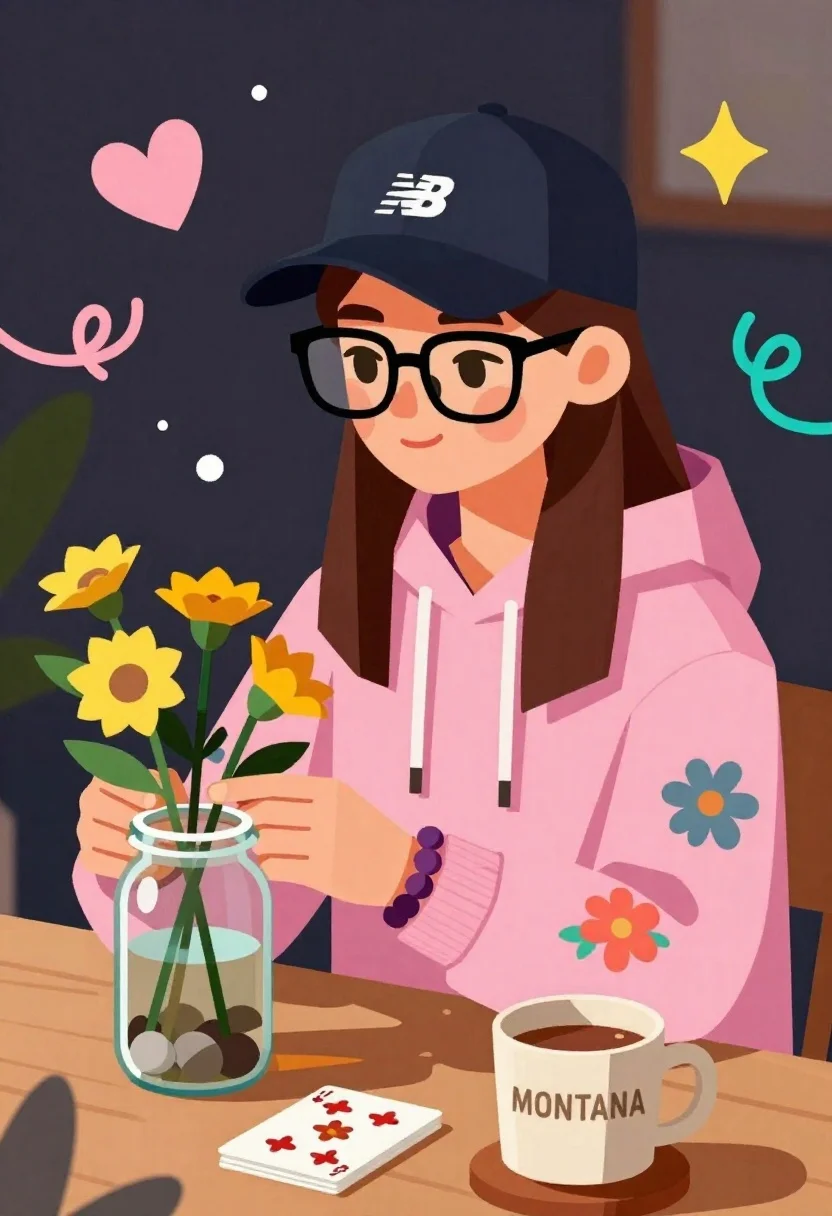
Young woman arranging yellow flowers in a glass jar at a wooden
Prompt
A stylized illustration of a young woman wearing a pink hoodie and a black baseball cap with a white logo, sitting at a table in a cozy setting.

Subject: A young woman with long brown hair, wearing large black-rimmed glasses and a pink hooded sweatshirt with floral patterns on the sleeves. She has a small pink blush mark on her cheek and is smiling gently while looking to the side.

Clothing: She wears a dark blue baseball cap with a white New Balance logo, a pink hoodie with colorful flower designs on the sleeves, and a purple beaded bracelet on her wrist.

Action: The woman is arranging yellow flowers in a glass jar filled with water and stones, holding the bouquet with both hands while seated at a wooden table.

Environment: A dark background with abstract doodles including a pink heart, a yellow starburst, teal scribbles, and white dots floating around her.

Camera: Close-up framing focusing on the upper body and hands, with a slightly tilted angle that emphasizes the character’s expression and activity.

Lighting: Soft, warm lighting highlights the subject against the dark background, creating gentle shadows and emphasizing the vibrant colors of her clothing and flowers.

Objects: A glass jar containing yellow flowers and stones, a stack of playing cards with floral designs, and a ceramic mug labeled "MONTANA" filled with coffee or tea on a wooden coaster.

Style Details: Geometric low-poly art style with bold outlines, flat color blocks, hand-drawn doodle elements, and a playful, illustrative aesthetic reminiscent of modern graphic design.
Description
This prompt is useful for creating cozy lifestyle illustrations, character concept sheets for indie games, and whimsical editorial mood boards. The combination of 'geometric low-poly art style with bold outlines' and the 'dark background with abstract doodles' grounds the subject while allowing the 'soft, warm lighting' to make the yellow flowers pop against the otherwise muted palette, achieving a playful yet contained visual narrative.
Suggestions
- Change 'pink hoodie' to 'cream knit sweater' for a softer color focus.
- Swap 'yellow starburst' for 'gold constellation' in the doodles for more elegance.
- Adjust 'Close-up framing focusing on the upper body and hands' to 'medium close-up' to include more of the table setting.
Category
Tags
Brown HairCasual WearClose UpDigital ArtFemaleIndoors
Date added
June 23, 2026
Added by
PromptDexter Team
Related Prompts
More prompts with similar categories and tags.
Young girl named paige standing in a cozy bedroom with magical sparkles
Smiling couple embracing indoors woman in red satin dress holding roses
Full body illustration of young girl with pigtails holding teddy bear
Young girl taking mirror selfie with shopping bags in dreamy watercolor style
Young female athlete in white tracksuit holding sunflowers and gold medal
Young woman on stone ledge wearing overalls against solid orange background
Couple embracing in front of a large pink heart watercolor illustration
Young woman with glasses gently touching nose of fluffy cream cat indoors