
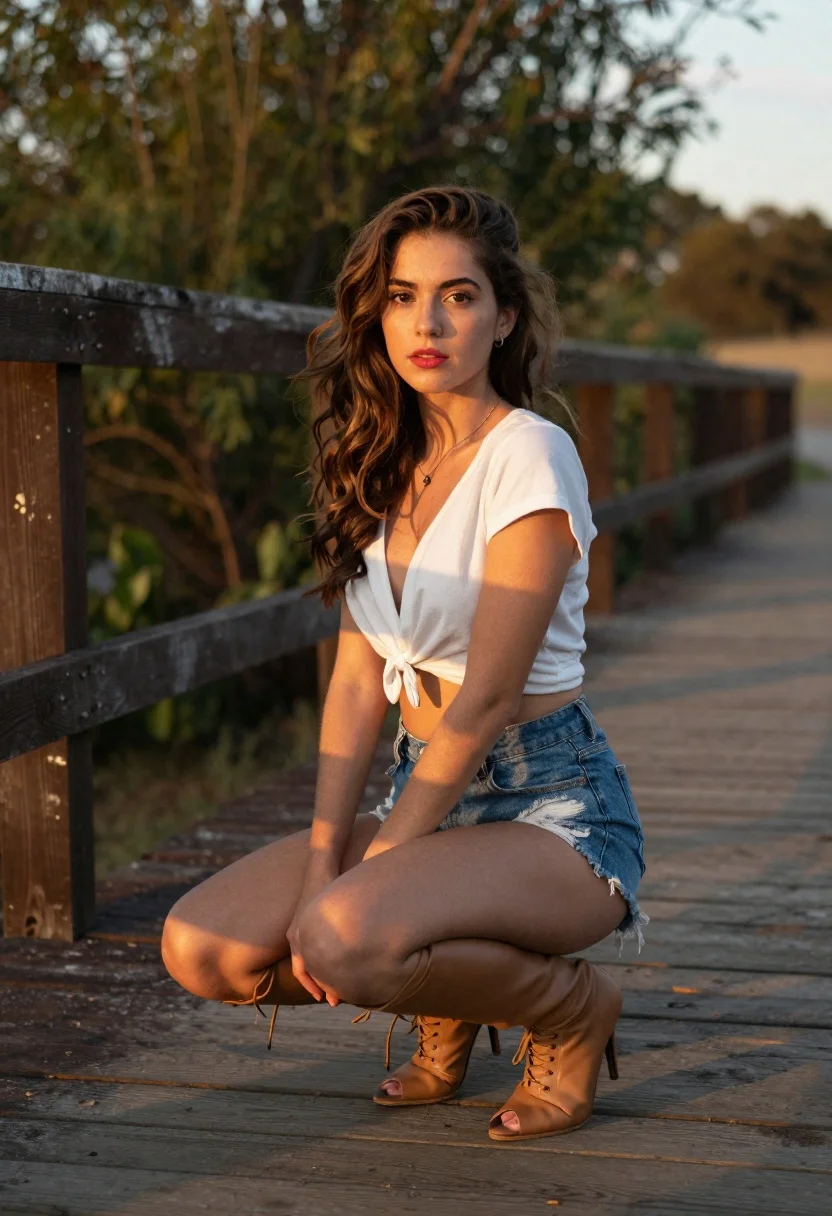
Young woman crouching on wooden boardwalk with trees
Prompt
Portrait of a young woman crouching on a wooden boardwalk with trees in the background, wearing a white crop top and distressed denim shorts.

Subject: Young woman with long wavy brown hair cascading over shoulders, fair skin with natural glow, expressive dark eyes looking directly at viewer, soft red lipstick accentuating lips

Clothing: White short-sleeved V-neck crop top tied in front revealing midriff, distressed denim shorts frayed along hemline worn high-waisted style, tall tan leather lace-up boots reaching thigh-high with stiletto heels and peep-toe design

Action: Seated in low squat position on wooden planks, hands resting gently near knees framing legs slightly apart, facing camera directly with composed confident posture

Environment: Rustic outdoor setting featuring weathered dark brown wooden fence running horizontally behind subject creating depth layering against blurred green foliage backdrop suggesting park or nature trail location, golden hour lighting conditions casting warm ambient tones

Camera: Medium close-up shot composition focusing on upper body from slightly elevated downward angle offering clear view of subject's pose and attire, shallow depth of field effect via wide aperture rendering distant elements softly out-of-focus

Lighting: Warm directional sunlight originating from upper right side illuminating left face shoulder and arm creating subtle shadow play enhancing three-dimensional form definition, golden hues reflecting off wood grain leather and denim weave adding depth and warmth.
Description
This prompt is useful for creating lifestyle catalog images, character concept art for outdoor narratives, and editorial features focusing on natural settings. The combination of 'warm directional sunlight' hitting the left face and shoulder sculpts the subject's form by creating subtle shadow play, which prevents a flat look often seen in direct daylight while the 'shallow depth of field effect' keeps focus tightly on the subject against the blurred green foliage.
Suggestions
- Change 'distressed denim shorts' to 'linen sarong' for a softer texture.
- Adjust 'golden hour lighting conditions' to 'overcast softbox light' for more even illumination.
- Swap 'stiletto heels' for 'combat boots' to change the overall aesthetic tone.
Category
Tags
Brown HairCasual WearFair SkinFemaleForestLow AngleMedium ShotOutdoorsPortrait ShotRealistic
Date added
June 19, 2026
Added by
PromptDexter Team
Related Prompts
More prompts with similar categories and tags.

Smiling young woman in maroon top standing outdoors with blurred background
Young woman with brown hair sitting outdoors at night with tropical dress

Young woman in black jacket near snow capped mountains

Anime girl holding toy blaster against bright blue sky
Low angle shot of blonde woman leaning against a tree in lush

Medium close up portrait of woman with brown hair on coastal balcony
Smiling woman in red dress leaning against post in lush garden setting

Blonde woman reading at a cafe table with roses
