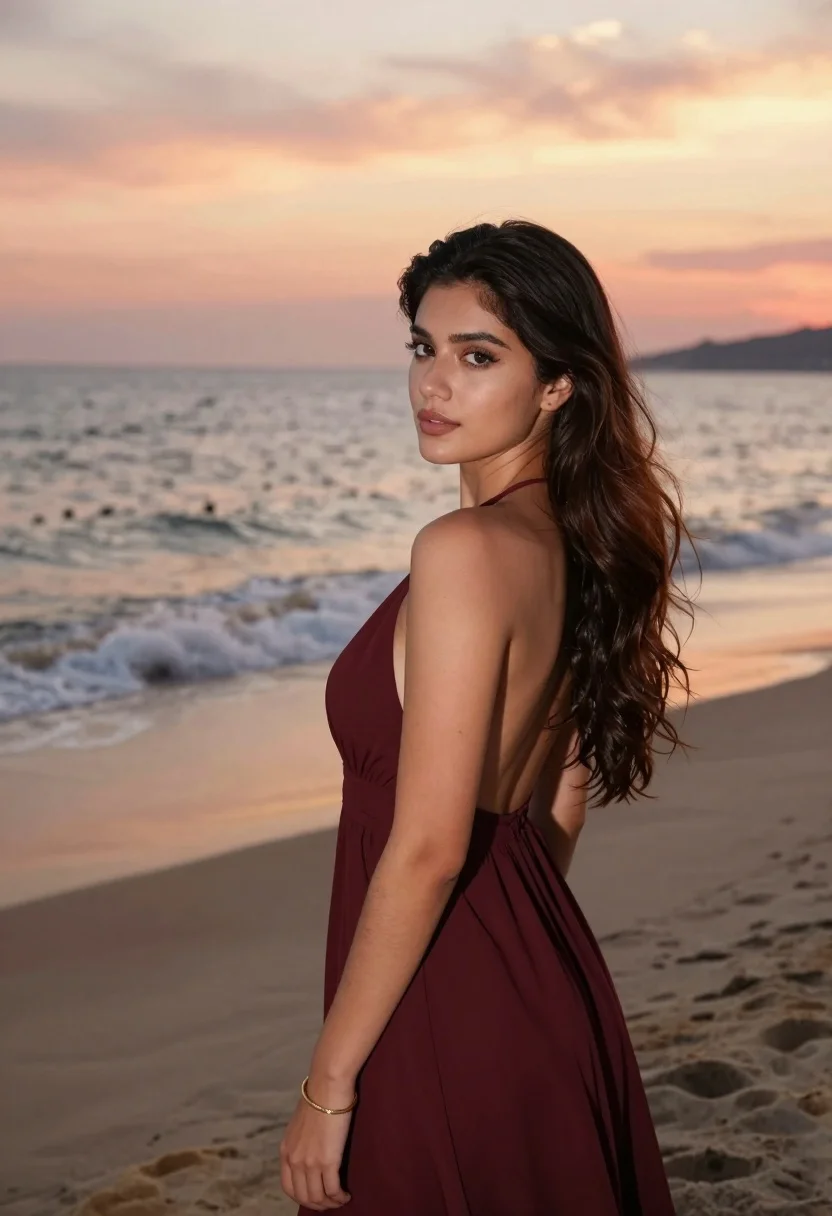
Young woman in maroon gown on beach looking back at sunset golden
Prompt
A young woman stands in profile on a beach at sunset, gazing back over her shoulder with a soft expression.

Subject: A young woman with long, wavy dark brown hair and fair skin. She has defined eyebrows, subtle eye makeup, and natural-looking lips. Her posture is relaxed yet poised as she turns her head to look directly at the viewer.

Clothing: She wears an elegant, sleeveless maroon gown that features a low-cut back and thin straps. The fabric appears soft and flowing, draping gracefully around her figure.

Action: She stands with her body angled away from the camera while turning her head to face forward. Her left arm is bent at the elbow with her hand resting near her waist, showcasing a gold bracelet on her wrist.

Environment: A sandy beach stretches out behind her with gentle waves rolling onto the shore. The background features a calm ocean meeting a dramatic sky filled with warm orange and pink hues of sunset.

Lighting: Soft, golden hour sunlight illuminates the scene from the side, casting a warm glow on her skin and creating gentle shadows that highlight the contours of her face and body.

Camera: Shot with a medium telephoto lens to compress the background slightly while keeping the subject sharp and in focus. The composition uses a shallow depth of field to blur the ocean and horizon line softly behind her.

Style Details: High-resolution portrait photography with smooth skin texture, natural color grading, and a cinematic aesthetic that emphasizes the romantic atmosphere of the sunset setting.
Description
This prompt is useful for creating editorial fashion moodboards, romantic travel advertisements, and fine art portraiture focusing on dramatic backlighting. The combination of 'soft, golden hour sunlight' illuminating her skin while using a 'medium telephoto lens' with a shallow depth of field ensures the subject remains sharp against a beautifully blurred background, which emphasizes the elegant drape of the 'maroon gown' without distracting details.
Suggestions
- Change 'maroon gown' to 'deep emerald silk' for a richer color contrast.
- Swap 'soft expression' for 'melancholic gaze' to deepen the mood.
- Adjust 'medium telephoto lens' to '85mm prime lens' for more flattering facial compression.
Category
Tags
BeachBrown HairCasual WearFair SkinFemaleFull BodyMedium ShotOutdoorsRealisticSide Profile
Date added
August 5, 2026
Added by
PromptDexter Team
Related Prompts
More prompts with similar categories and tags.

Fair blonde woman sitting on sandy beach looking at camera

Young woman in white top and denim shorts on seaside promenade

Young woman posing atop great wall of china overlooking green mountains
Young woman with brown hair in cream sweater on beach at sunset
Young woman in purple embroidered dress standing on sandy beach

Young woman in blue bikini on beach at dusk near city lights
Woman in traditional thai dress standing before a grand golden temple

Smiling young woman in pink puffer jacket at a mario theme park

Young woman with long dark hair sitting on a traditional boat

Woman in pink satin slip dress on balcony overlooking coastal town