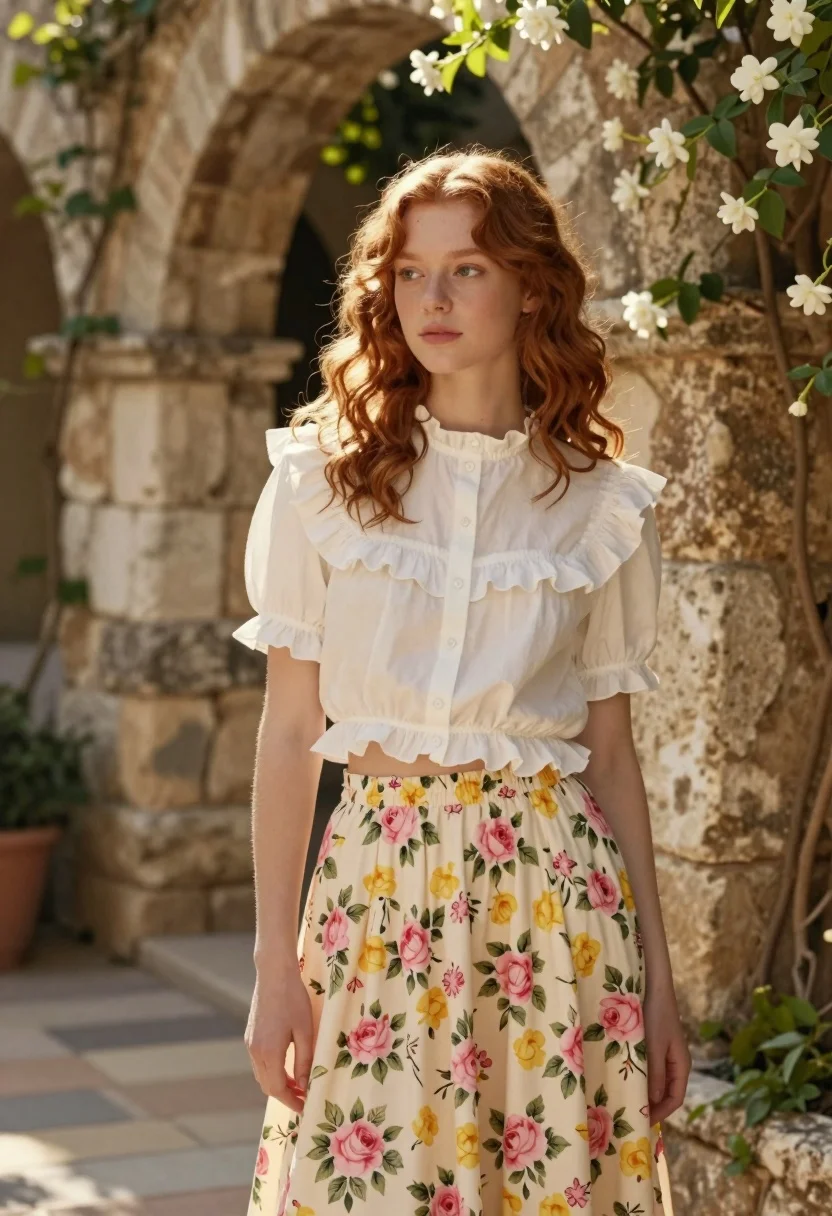
Young woman in white blouse and floral skirt in sunlit stone garden
Prompt
A young woman with wavy reddish-brown hair stands in a sunlit stone garden wearing a white ruffled blouse and a floral skirt.

Subject: A young woman with soft, shoulder-length wavy reddish-brown hair and a calm, contemplative expression looking slightly to the side.

Clothing: She wears a crisp white short-sleeved blouse featuring a large ruffled collar, puffed sleeves, and a hemline with delicate ruffles that exposes her midriff, paired with a high-waisted, voluminous skirt patterned with pink and yellow roses on a cream background.

Action: She stands in a relaxed pose with her body angled slightly away from the camera while her head turns to gaze off into the distance.

Environment: The setting is an ancient stone courtyard or garden featuring weathered arches and walls covered in climbing vines, with clusters of white jasmine flowers blooming on the right side.

Camera: Shot at eye level with a medium framing that captures the subject from the thighs up, utilizing a shallow depth of field to blur the background foliage and stone textures softly.

Lighting: Soft, natural sunlight filters through the arches creating a warm, golden-hour glow that highlights her hair and casts gentle shadows on the stone walls.

Style Details: The image has a dreamy, cinematic aesthetic with high-quality rendering, soft focus on the background elements, and a color palette dominated by warm earth tones and pastel floral hues.
Description
This prompt is useful for creating romantic editorial portraits, vintage lifestyle photography, and mood boards evoking Mediterranean romance. The combination of 'soft, shoulder-length wavy reddish-brown hair' against the 'warm, golden-hour glow' ensures that the subject remains the focal point while the shallow depth of field blurs the background foliage and stone textures softly, preventing visual competition with the detailed floral skirt.
Suggestions
- Change 'reddish-brown hair' to 'auburn hair' for a richer tone.
- Swap 'pink and yellow roses' for 'deep indigo and cream peonies' for contrast.
- Adjust 'medium framing' to 'full body shot' to better showcase the voluminous skirt.
Category
Tags
Brown HairFemaleMedium ShotOutdoorsRealisticRed Hair
Date added
August 5, 2026
Added by
PromptDexter Team
Related Prompts
More prompts with similar categories and tags.

Woman standing barefoot in dry autumn field at golden hour

Young woman in black and white patterned outfit on urban rooftop
Young woman with red hair standing in a snowy forest

Smiling blonde woman in sports bra sitting on outdoor lounge chair
Woman in dark brown slip dress outdoors against bright white sky

Smiling woman with red hair in floral twotoned dress outdoors
Woman in red halter dress sitting on stones against textured rock wall
Woman in black outfit standing in lush garden by brick archway
Medium close up portrait of blonde woman in yellow top outdoors

Smiling blonde woman in cowboy hat standing outdoors with green foliage