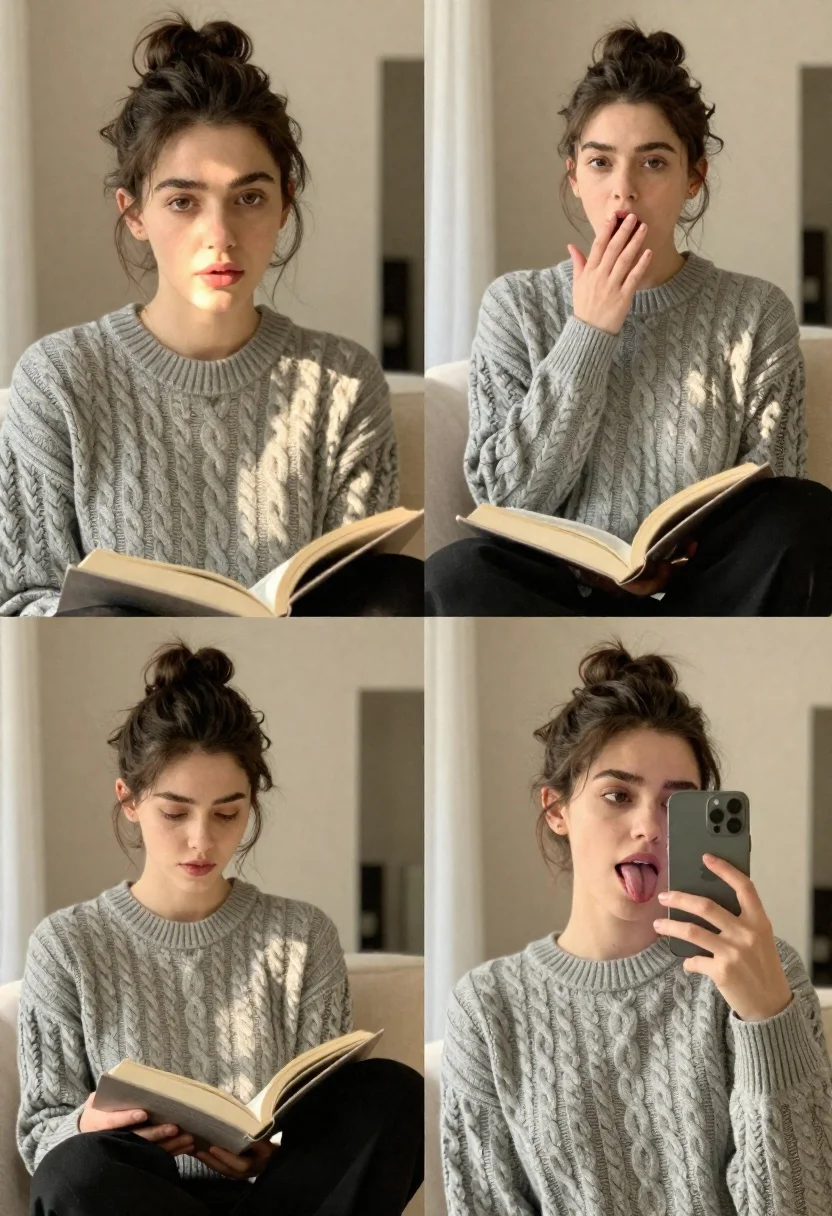
Collage of four candid portraits of young woman in cozy indoor setting
Prompt
A collage of four candid lifestyle portraits featuring a young woman in a cozy indoor setting.

Subject: A young woman with dark brown hair pulled back into a messy bun, fair skin, and expressive hazel eyes.

Clothing: She wears a grey cable-knit crewneck sweater and black trousers.

Action: The images capture various relaxed poses including looking directly at the camera, yawning with one arm raised, reading an open book over her lap, and taking a playful mirror selfie while sticking her tongue out.

Environment: A bright, minimalist interior room with neutral beige walls, soft natural light filtering through sheer curtains, and a glimpse of a doorway in the background.

Camera: Close-up framing that emphasizes facial expressions and textures, utilizing a shallow depth of field to blur the background slightly.

Lighting: Soft, warm natural sunlight streaming from the side, creating gentle highlights on her face and sweater while casting soft shadows.

Style Details: Authentic, unposed aesthetic with high-definition detail, natural skin texture, and a clean, bright color palette.
Description
This prompt is useful for creating lifestyle blog features, intimate character studies, and mood boards depicting domestic comfort. The combination of 'soft, warm natural sunlight streaming from the side' with 'natural skin texture' ensures that the images feel lived-in rather than overly polished, while the 'shallow depth of field' keeps the focus tightly on the subject's varied expressions against a muted backdrop.
Suggestions
- Change 'grey cable-knit crewneck sweater' to 'cream chunky knit cardigan' for warmer tones.
- Swap 'neutral beige walls' for 'pale sage green walls' to introduce subtle color variation.
- Add 'film grain, Kodak Portra 400' to the style details for a vintage feel.
Category
Tags
Brown HairCasual WearClose UpFair SkinFemaleMedium ShotRealistic
Date added
June 21, 2026
Added by
PromptDexter Team
Related Prompts
More prompts with similar categories and tags.

Close up portrait of young woman with brown braid indoors

Young woman taking a selfie seated in a car interior during daylight

Close up portrait of blonde woman touching face at golden hour

Close up portrait of young woman making heart shape over chest

Photorealistic portrait of woman in red gold armor holding shield studio shot

Young woman with brown hair holding red cherries in a soft indoor
Young woman with brown hair under pink umbrella at outdoor cafe setting

Close up portrait of blonde woman in gold beaded top against stone