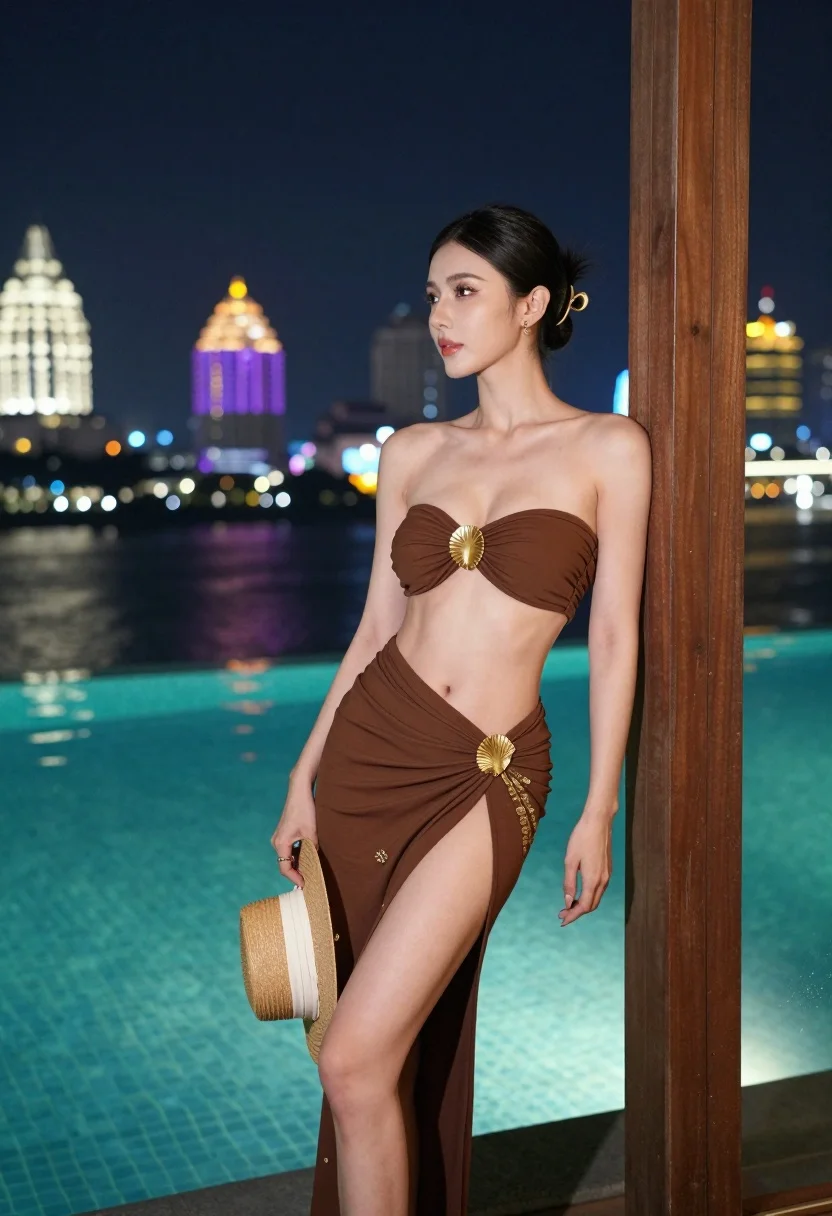
Confident woman leaning by door overlooking glowing city skyline and pool
Prompt
A confident woman stands leaning against a wooden door frame at night, overlooking a glowing city skyline and a turquoise swimming pool.

Subject: A fit woman with dark hair pulled back into a ponytail secured with a gold accessory, featuring defined facial features and a poised expression.

Clothing: She wears a brown strapless top with a large gold shell-like clasp in the center, paired with a matching high-slit wrap skirt that reveals her leg and features subtle gold embroidery near the hem.

Action: She leans casually against a wooden door frame on the right side of the frame, holding a straw hat with a white ribbon in her left hand while looking off to the side.

Environment: The setting is an outdoor poolside area at night, with a large swimming pool reflecting colorful city lights and a vibrant urban skyline featuring illuminated skyscrapers and temple spires in the background.

Camera: Shot from a medium-full angle with a shallow depth of field that keeps the subject sharp while softly blurring the distant city lights.

Lighting: The scene is lit by ambient city glow and artificial pool lighting, creating soft highlights on her skin and warm reflections on the water surface.

Style Details: High-resolution digital photography with cinematic color grading, vibrant teal and purple tones, and a polished, glamorous aesthetic.
Description
This prompt is useful for creating editorial fashion moodboards, luxury travel advertisements, and sophisticated personal branding imagery. The combination of 'ambient city glow' and 'vibrant teal and purple tones' establishes a high-contrast, cinematic atmosphere that makes the subject pop against the detailed background, while the 'shallow depth of field' ensures the viewer's focus remains squarely on her poised expression.
Suggestions
- Change 'wooden door frame' to 'marble archway' for a more luxurious feel.
- Swap 'straw hat with a white ribbon' for 'small clutch bag' to change the prop.
- Adjust 'vibrant teal and purple tones' to 'deep sapphire and gold' for a warmer palette.
Category
Tags
Brown SkinBrunetteCasual WearFemaleFull BodyMedium ShotRealisticRooftopUrban
Date added
August 5, 2026
Added by
PromptDexter Team
Related Prompts
More prompts with similar categories and tags.

Young woman in green jacket holding plush toy at festive carousel

Young woman in grey top and white skirt by water at dusk

Young woman adjusting ponytail on wide sandy beach under overcast sky

Woman on beach daybed under beige umbrella

Stylish woman with ice cream next to vintage light blue convertible car

Smiling woman in coral top standing waist deep in turquoise water

Young east asian woman by railing on rocky coastal path at sunset

Young woman in red velvet corset on busy illuminated city street at
Full length portrait of blonde woman in cream gown by calm blue

Young woman in black and white patterned outfit on urban rooftop