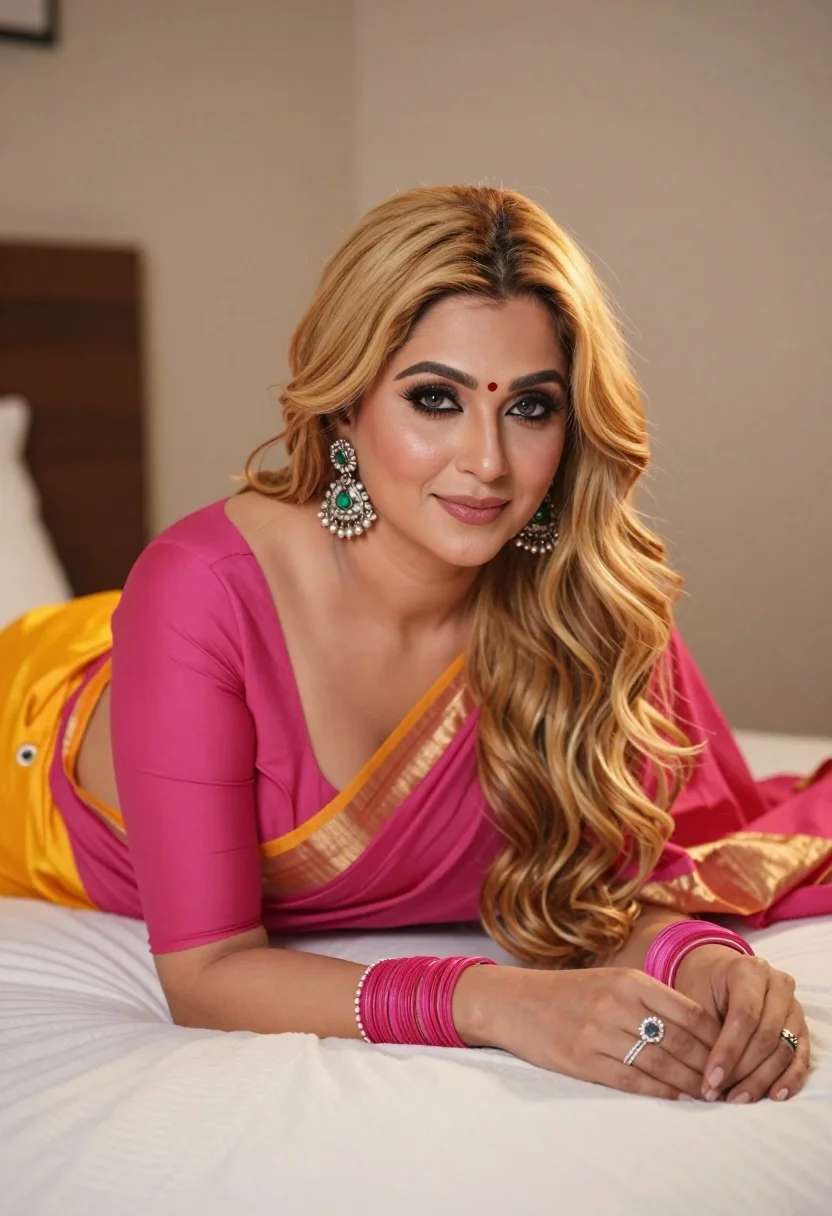
Fair blonde woman in pink and yellow saree reclining on white bed
Prompt
A woman with long wavy blonde hair lies on a white bed wearing a vibrant pink and yellow saree.

Subject: A fair-skinned woman with long wavy blonde hair parted in the middle, featuring soft makeup including defined eyebrows, eyeliner, and a small red bindi on her forehead.

Clothing: She wears a bright magenta blouse with three-quarter sleeves and a matching draped saree with a golden-yellow border and pallu, accessorized with large ornate silver chandelier earrings with green gemstones, multiple pink bangles on her wrist, and a diamond ring on her finger.

Action: She is reclining on her stomach with her arms resting gently on the bedspread, looking directly at the camera with a soft, subtle smile.

Environment: The setting is an intimate indoor space featuring a white textured bedsheet and a mustard-colored pillow or cushion visible behind her shoulder against a plain neutral beige wall.

Lighting: Soft warm lighting illuminates the scene from the front, creating gentle highlights on her skin and hair while casting minimal shadows for a flattering portrait effect.

Camera: Shot with a medium close-up framing that captures her upper body and face clearly, utilizing a shallow depth of field to keep the background softly blurred.

Style Details: The image has a polished studio photography aesthetic with high color saturation and smooth skin textures.
Description
This prompt is useful for creating bridal editorial spreads, luxury catalog imagery, and intimate portraiture featuring traditional attire. The combination of 'soft warm lighting' and the 'shallow depth of field' ensures that the subject's face remains the primary focus while the vibrant colors of the 'magenta blouse' and 'golden-yellow border' pop against the muted background elements.
Suggestions
- Change 'mustard-colored pillow' to a velvet cushion in emerald green for richer contrast.
- Swap 'soft warm lighting' for 'rim light from the side' to add more drama.
- Adjust 'medium close-up framing' to 'head and shoulders portrait' for tighter focus.
Category
Tags
BlondeFair SkinFemalePortrait ShotRealisticStudioTraditional Wear
Date added
August 5, 2026
Added by
PromptDexter Team
Related Prompts
More prompts with similar categories and tags.
Fair blonde woman in blue blouse on textured surface studio portrait

Portrait of woman with red hair in navy blouse and green skirt
Young blonde woman in lace bodysuit leaning against wooden cabinet indoors

Blonde woman posing in black lingerie against pink purple gradient studio backdrop

Blonde woman in black gown seated on white stool in bright room

Close up portrait of blonde woman in black and white dress

Blonde woman in striped swimsuit seated on sofa indoors studio shot
Glamorous portrait of blonde woman in embellished gown against floral wallpaper

Glamorous blonde woman reclining on metallic silver tufted sofa studio portrait
Glamorous portrait of blonde woman in black leather bustier top