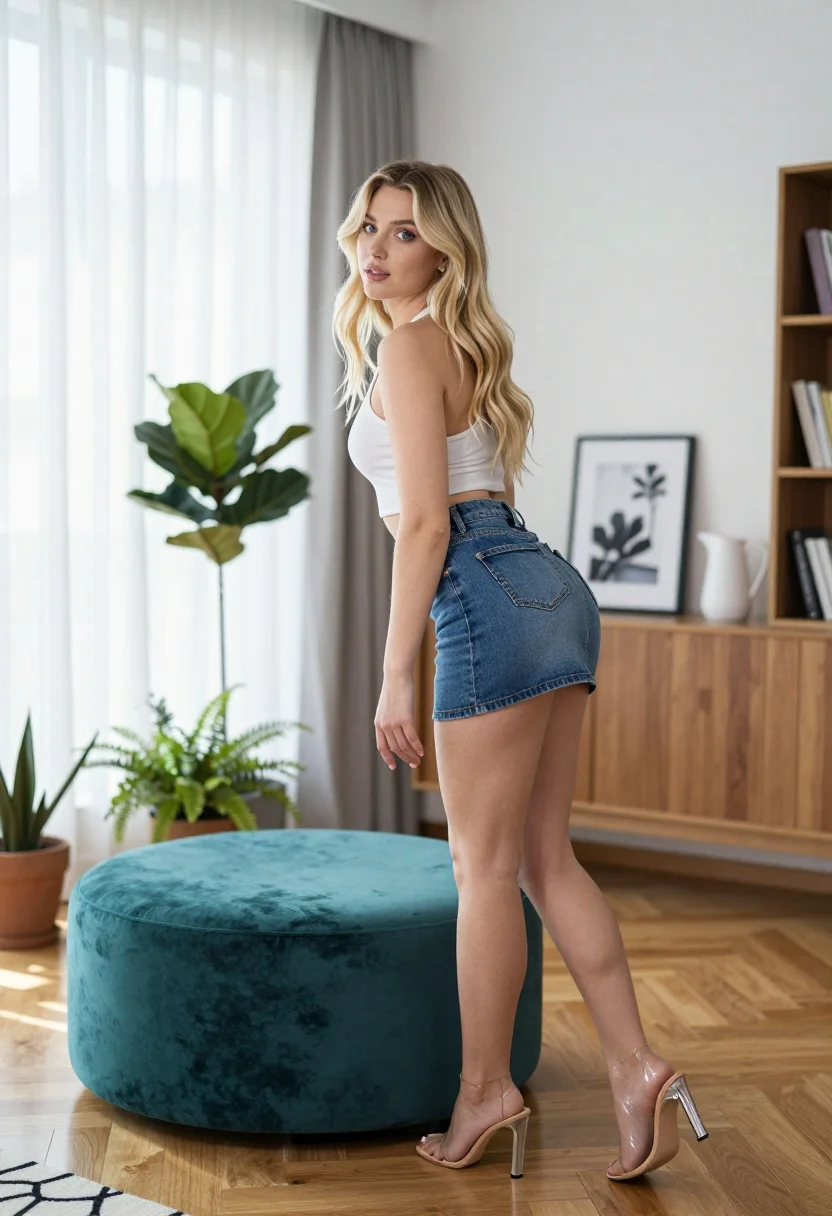
Fair blonde woman leaning over teal ottoman in bright modern living room
Prompt
A young woman with long blonde hair stands in a modern living room, leaning forward over a teal velvet ottoman while looking back over her shoulder.

Subject: A fair-skinned woman with long wavy blonde hair and blue eyes.

Clothing: She wears a white halter-neck crop top and a short blue denim mini skirt, paired with clear high-heeled sandals.

Action: She is leaning forward onto a teal ottoman with one hand extended slightly forward, looking back over her shoulder at the camera with a soft expression.

Environment: A bright living room with light wood floors, floor-to-ceiling sheer curtains on the left, and a wooden sideboard against the back wall displaying framed photos and a white pitcher.

Objects: Several potted plants including a fiddle leaf fig and ferns are visible near the window, alongside a black wire sculpture and a bookshelf on the right.

Lighting: Soft natural light filters through the sheer curtains creating a bright airy atmosphere with gentle shadows.

Camera: Eye-level medium shot capturing the full body pose with a shallow depth of field keeping the subject sharp while softly blurring the background details.

Style Details: High-resolution photography with vibrant colors and a clean modern aesthetic.
Description
This prompt is useful for creating lifestyle magazine features, interior design mood boards, and contemporary fashion editorials showcasing casual wear. The combination of 'soft natural light' filtering through sheer curtains establishes the bright airy atmosphere necessary for these settings, while the 'shallow depth of field' ensures the subject remains sharp against the softly blurred background details.
Suggestions
- Change 'teal velvet ottoman' to 'cream boucle pouf' for a warmer contrast.
- Swap 'blue denim mini skirt' for 'beige silk slip' to shift the fashion focus.
- Add 'golden hour glow' to the lighting description for more dramatic highlights.
Category
Tags
BlondeFair SkinFemaleIndoorsMedium ShotRealistic
Date added
July 12, 2026
Added by
PromptDexter Team
Related Prompts
More prompts with similar categories and tags.

Blonde woman in black lace gown standing in opulent room setting

Blonde woman in bikini shorts inside rustic wooden boat house setting

Blonde woman in striped swimsuit seated on sofa indoors studio shot
Young woman looking back over shoulder in champagne knit top indoors

Two women in red mini dresses posing indoors at an opulent setting
Blonde woman in shimmering gold gown standing in an elegant hallway
Blonde woman in neon yellow sequins posing in an interior doorway
Blonde woman in sheer white shirt by large sunlit window indoors

Blonde woman in black leather jacket standing in modern marble bathroom

Fair blonde woman sitting on vintage gold sofa in dimly lit room