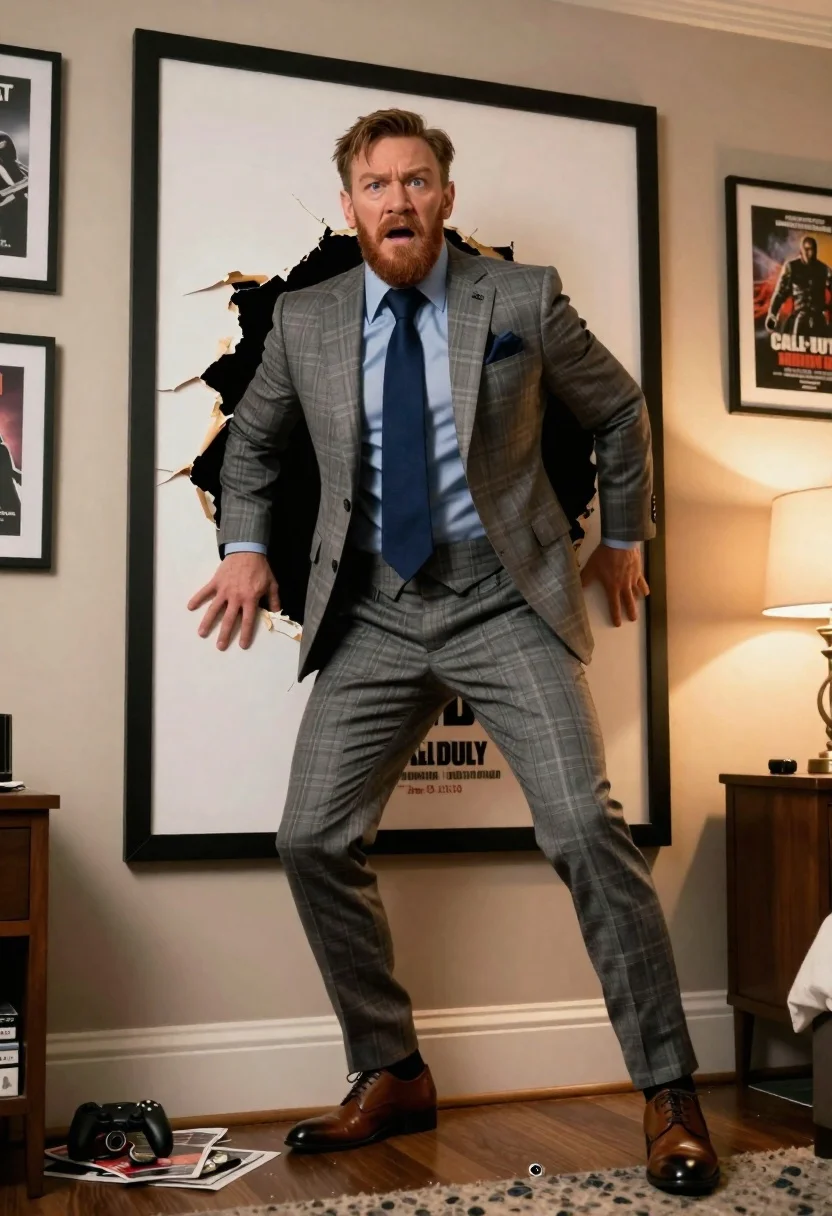
Fair skinned man in grey plaid suit bursts through wall poster indoors
Prompt
A bearded man in a grey plaid three-piece suit bursts through a large framed poster of Conor McGregor on the wall with a shocked expression.

Subject: A fair-skinned man with short brown hair and a full reddish-brown beard, wearing a grey plaid suit jacket, matching vest, light blue dress shirt, dark blue tie, and brown leather shoes.

Clothing: A formal grey plaid three-piece suit with a blue pocket square, a light blue collared shirt, a navy blue tie, and brown leather dress shoes.

Action: The man is emerging from a large tear in the wall poster, gripping the torn edges of the paper frame with both hands, his body angled forward as if pushing through.

Environment: An indoor room setting featuring a wall covered in framed posters, including one for Call of Duty, and a wooden bedside table with a lamp to the right.

Camera: A medium shot capturing the subject from the waist up, emphasizing the action of breaking through the poster with a slight low angle perspective.

Lighting: Warm ambient lighting coming from a lamp on the side table, casting soft shadows and highlighting the texture of the torn paper and the man's face.

Objects: Scattered debris including magazines, a game controller, and a crushed can lie on the floor near the bottom left corner.

Style Details: A cinematic composition with high detail, realistic textures, and a dramatic visual effect where the subject appears to be physically breaking through a two-dimensional surface.
Description
This prompt is useful for creating dynamic character introductions in film stills, highly stylized action sequences, and narrative concept art depicting sudden revelations. The combination of 'low angle perspective' and 'dramatic visual effect where the subject appears to be physically breaking through a two-dimensional surface' forces the viewer into an immediate confrontation with the man, while specifying 'warm ambient lighting' ensures that the debris and suit textures read as tangible elements rather than flat background props.
Suggestions
- Change 'grey plaid three-piece suit' to 'charcoal herringbone suit' for a more somber tone.
- Swap 'Call of Duty' poster for 'vintage movie star poster' to change the context.
- Adjust 'medium shot' to 'full body shot' to better capture the debris on the floor.
Category
Tags
Brown HairFair SkinFormal WearIndoorsLow AngleMaleMedium ShotRealisticUrban
Date added
June 26, 2026
Added by
PromptDexter Team
Related Prompts
More prompts with similar categories and tags.

Young man reading book on autumn city street under warm streetlamp glow
Man in black suit walking toward camera near massive fireball explosion

Young woman in beige mini dress looking back at camera on subway
Man in dark suit adjusting tie on wet city street at night

Romantic couple dancing intimately on cobblestone street at dusk
Young woman in black dress standing on stone steps before classical building

Young woman in elaborate ballgown on grand marble staircase interior

Profile portrait of woman at dining table in upscale restaurant setting