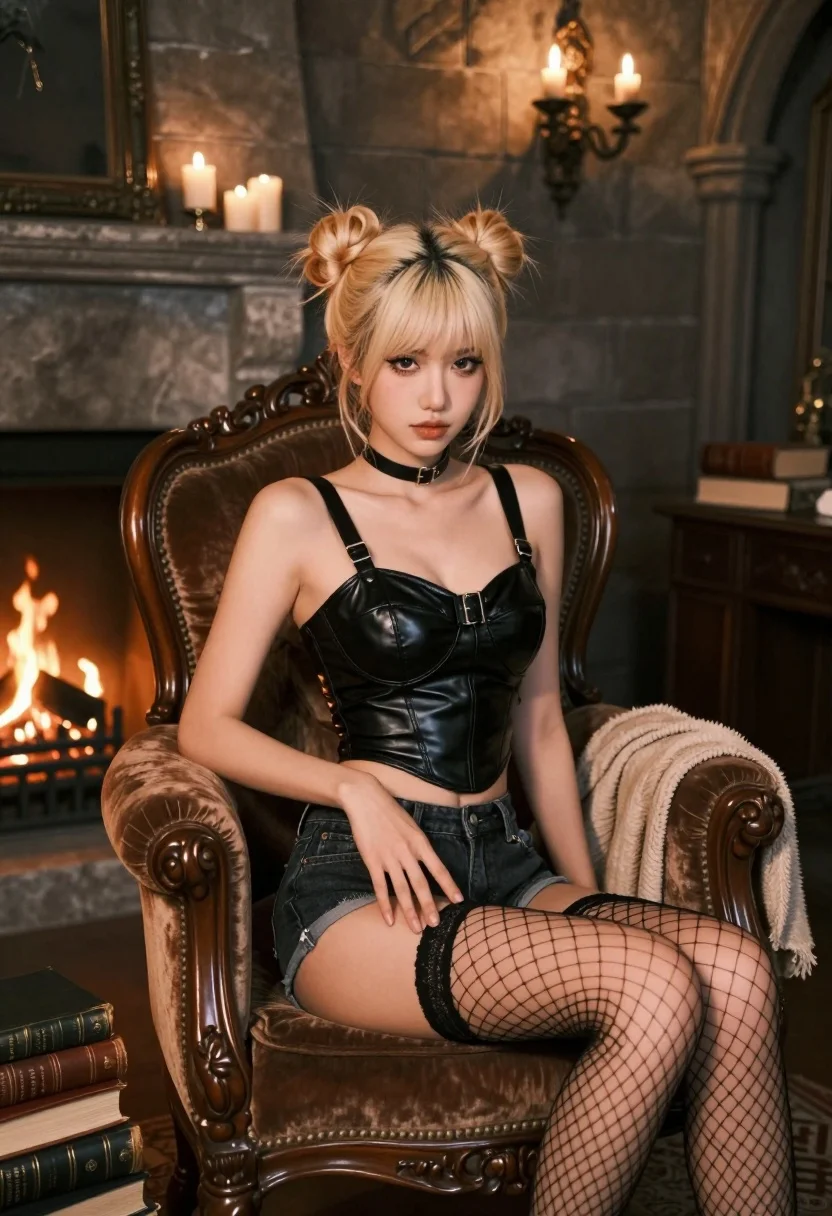
Fairskinned woman with blonde hair on velvet chair in dimly lit stone
Prompt
A young woman with platinum blonde hair styled in two high buns sits on a vintage brown velvet armchair.

Subject: A fair-skinned woman with platinum blonde hair tied into two messy high buns and wispy bangs, featuring sharp winged eyeliner and a neutral, direct gaze.

Clothing: She wears a black leather bustier top with wide straps and a buckle detail at the waist, paired with dark denim shorts and sheer black fishnet stockings with a web pattern.

Action: She is seated in a relaxed pose on an ornate wooden chair, looking directly at the camera with one hand resting gently on her thigh.

Environment: The setting is a dimly lit stone room resembling a dungeon or castle interior, featuring a fireplace with a fire burning in the background and a stone mantlepiece holding candles.

Objects: Several old leather-bound books are stacked on the arm of the chair and on the floor nearby, alongside a draped beige blanket.

Lighting: The scene is illuminated by warm, flickering candlelight from the fireplace and wall sconces, casting soft shadows and creating a moody atmosphere.

Camera: A medium shot captures the subject from the waist up with a shallow depth of field that blurs the stone background slightly to emphasize her figure.

Style Details: The image features a cinematic color palette with high contrast between the dark leather textures and the warm ambient light, rendered in a photorealistic style.
Description
This prompt is useful for creating gothic editorial portraits, character concept art for role-playing games, and moody fashion editorials. The combination of 'black leather bustier top' against the 'dimly lit stone room' utilizes high contrast to make the subject pop while the 'warm, flickering candlelight' prevents the scene from becoming too flat by adding directional highlights that define the textures.
Suggestions
- Change 'vintage brown velvet armchair' to 'ornate black velvet chaise lounge' for a more dramatic feel.
- Swap 'platinum blonde hair' for 'raven black hair' to increase contrast with the leather.
- Adjust 'shallow depth of field' to 'deep focus' if you want all background elements visible.
Category
Tags
Black HairBlondeCasual WearFair SkinFemaleIndoorsMedium ShotPortrait ShotRealistic
Date added
July 12, 2026
Added by
PromptDexter Team
Related Prompts
More prompts with similar categories and tags.

Young woman seated on grey sofa against pink wall fashion portrait

Blonde woman taking a mirror selfie in black dress indoors

Blonde woman in striped swimsuit seated on sofa indoors studio shot
Young woman looking back over shoulder in champagne knit top indoors

Two women in red mini dresses posing indoors at an opulent setting
Blonde woman in shimmering gold gown standing in an elegant hallway
Fair blonde woman in patterned black dress against plain beige wall

Blonde woman in cream sweater sitting on beige couch
Fair blonde woman in white lace camisole sitting on tiled floor

Blonde woman in suede jacket lingerie against warm beige wall