
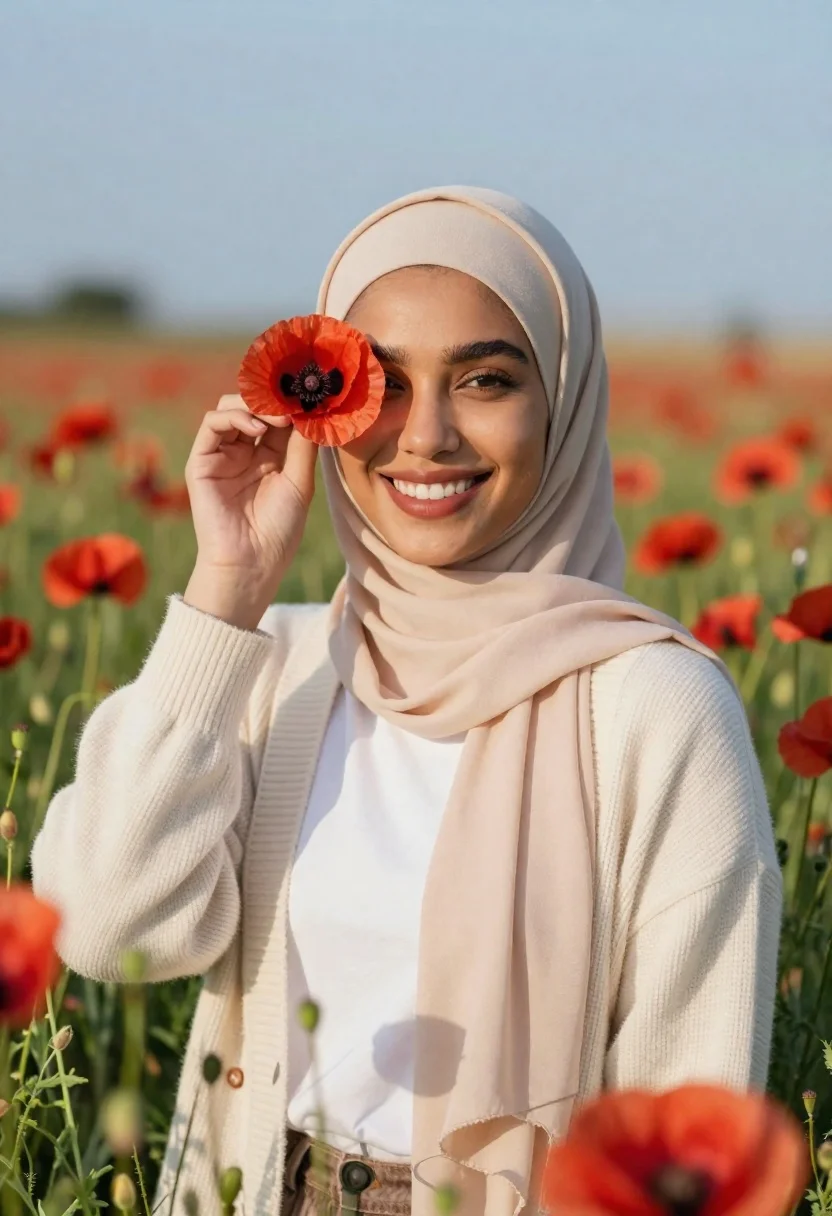
Smiling woman in beige hijab holding red poppy flower near eye
Prompt
A smiling woman wearing a beige hijab stands in a field of red poppies holding a single flower near her eye.

Subject: A young woman with warm skin tone and dark hair visible under a beige hijab, featuring defined eyebrows and a bright smile.

Clothing: She wears a white t-shirt underneath a textured cream-colored cardigan sweater, with the hijab draped neatly around her neck.

Action: She holds a red poppy flower delicately between her fingers near her right eye, looking directly at the camera with a joyful expression.

Environment: A vast field filled with green stems and blooming red poppies stretches into the distance under a clear blue sky.

Camera: The shot is framed as a medium close-up with a shallow depth of field that blurs the foreground flowers and background to focus on the subject.

Lighting: Soft, natural sunlight illuminates her face from the side, creating gentle shadows and highlighting the texture of her clothing.

Style Details: The image has a cinematic quality with vibrant colors and a soft, dreamy atmosphere typical of high-end portrait photography.
Description
This prompt is useful for creating editorial portraits celebrating cultural attire, fine art floral studies, and joyful lifestyle branding imagery. The combination of 'soft, natural sunlight' casting gentle shadows and the 'shallow depth of field' ensures that the focus remains tightly on the subject's expression while allowing the vibrant red poppies to provide rich, colorful context without distracting from her face.
Suggestions
- Change 'beige hijab' to 'dusty rose hijab' for a warmer tone.
- Add 'bokeh effect' to enhance the background blur.
- Swap 'red poppy flower' for 'wild lavender sprig' to alter the color palette.
Category
Tags
FemaleFull BodyMedium ShotOutdoorsRealistic
Date added
June 23, 2026
Added by
PromptDexter Team
Related Prompts
More prompts with similar categories and tags.

Smiling young woman in white ruffled dress between green topiary bushes

Young woman in pink camisole standing in sunlit rolling hills

Smiling young woman in sweater vest within sunny autumn park setting
Young woman in patterned dress looking back over grassy hills
Young woman with brown hair in light blue top standing in sunny
Fair blonde woman walking outdoors in white top and beige trousers
Young woman adjusting brown hair outdoors near blue tiled building wall
Woman in pink blouse picking up shoe on green lawn near stone
