
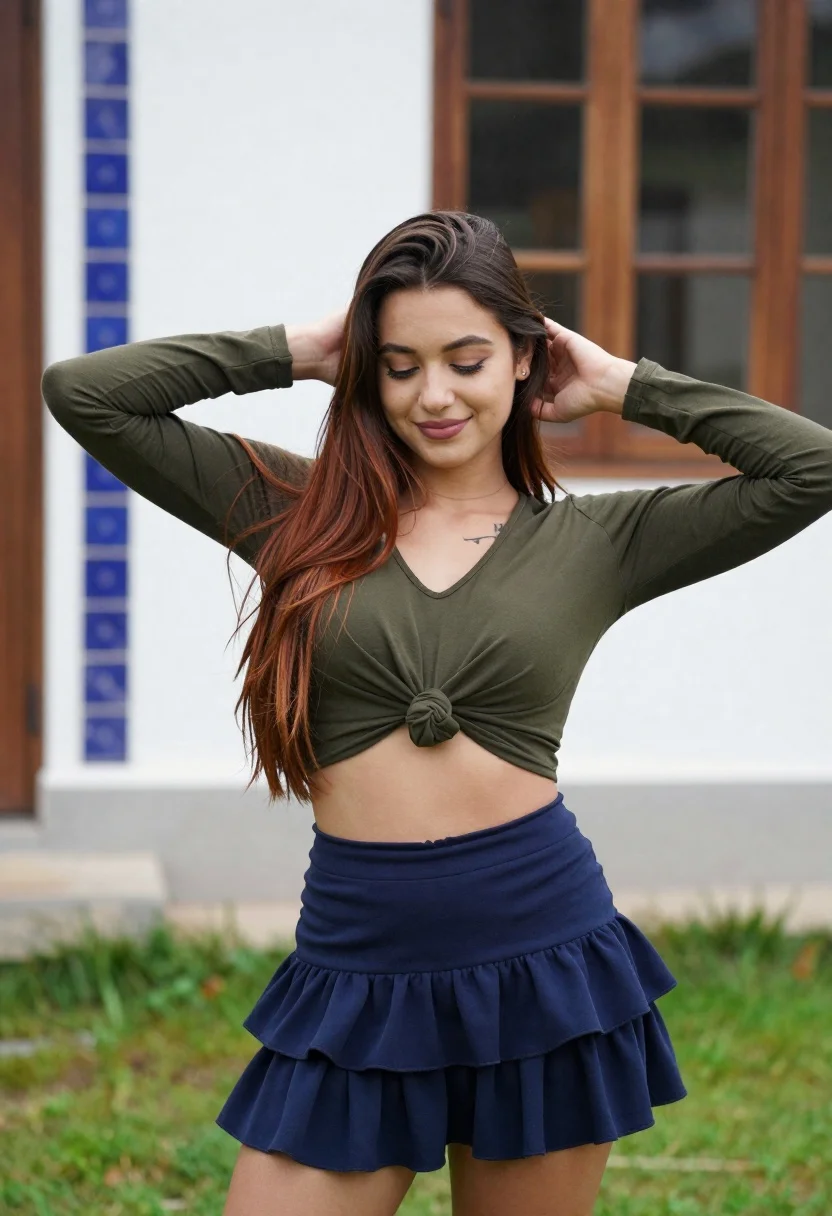
Young woman adjusting brown hair outdoors near blue tiled building wall
Prompt
A young woman with long brown hair stands outdoors in a relaxed pose, smiling gently while looking down and adjusting her hair with both hands behind her head.

Subject: A young woman with long, straight brown hair featuring subtle reddish-brown highlights at the ends, fair skin, and a small tattoo visible on her upper chest near the collarbone.

Clothing: She wears a dark olive green or black long-sleeved crop top that is knotted at the front to expose her midriff, paired with a matching dark navy blue ruffled mini-skirt made of soft fabric.

Action: The woman stands facing forward with her head tilted slightly downward and eyes cast down in a soft smile; both hands are raised behind her head as she gently pulls or adjusts her hair near her ears.

Environment: She is positioned outdoors on a patch of green grass, with a white building wall featuring vertical blue decorative tile patterns behind her to the left, and a wooden-framed window visible in the background to the right.

Camera: The shot is taken at eye level with a medium-full body framing that captures her from mid-thigh up, using a shallow depth of field that softly blurs the background elements while keeping her sharply in focus.

Lighting: Natural daylight illuminates the scene evenly from above and slightly in front, casting soft shadows under her chin and arms, creating a gentle, flattering glow on her face and clothing without harsh contrasts.

Style Details: The image has a clean, modern portrait aesthetic with natural color grading, smooth skin texture rendering, and a casual yet polished composition typical of lifestyle photography.
Description
This prompt is useful for creating lifestyle magazine features, personal branding portraits, and fashion editorial content that requires an approachable mood. The combination of 'natural daylight' casting soft shadows and the 'shallow depth of field' ensures the subject remains the clear focus while allowing the distinct blue tile patterns to provide contextual color without distracting from her gentle expression.
Suggestions
- Change 'dark olive green or black' to a specific shade like 'forest green' for better contrast.
- Swap 'blue decorative tile patterns' for 'terracotta geometric tiles' to shift the mood.
- Adjust 'medium-full body framing' to 'waist up portrait' for more focus on her face.
Category
Tags
Brown HairCasual WearFair SkinFemaleFull BodyMedium ShotOutdoorsRealistic
Date added
June 19, 2026
Added by
PromptDexter Team
Related Prompts
More prompts with similar categories and tags.

Young woman in pink camisole standing in sunlit rolling hills

Young woman in patterned dress looking back over grassy hills
Young woman with brown hair on a sunlit rustic porch

Young woman in oversized white tshirt leaning against tree in forest

Young woman posing atop great wall of china overlooking green mountains
Young woman in maroon gown on beach looking back at sunset golden
Young woman with brown hair sitting on concrete ledge amidst green foliage

Photorealistic portrait of woman in red gold armor holding shield studio shot

Smiling young woman in sweater vest within sunny autumn park setting

Blonde woman in black top on balcony overlooking beige stone street
