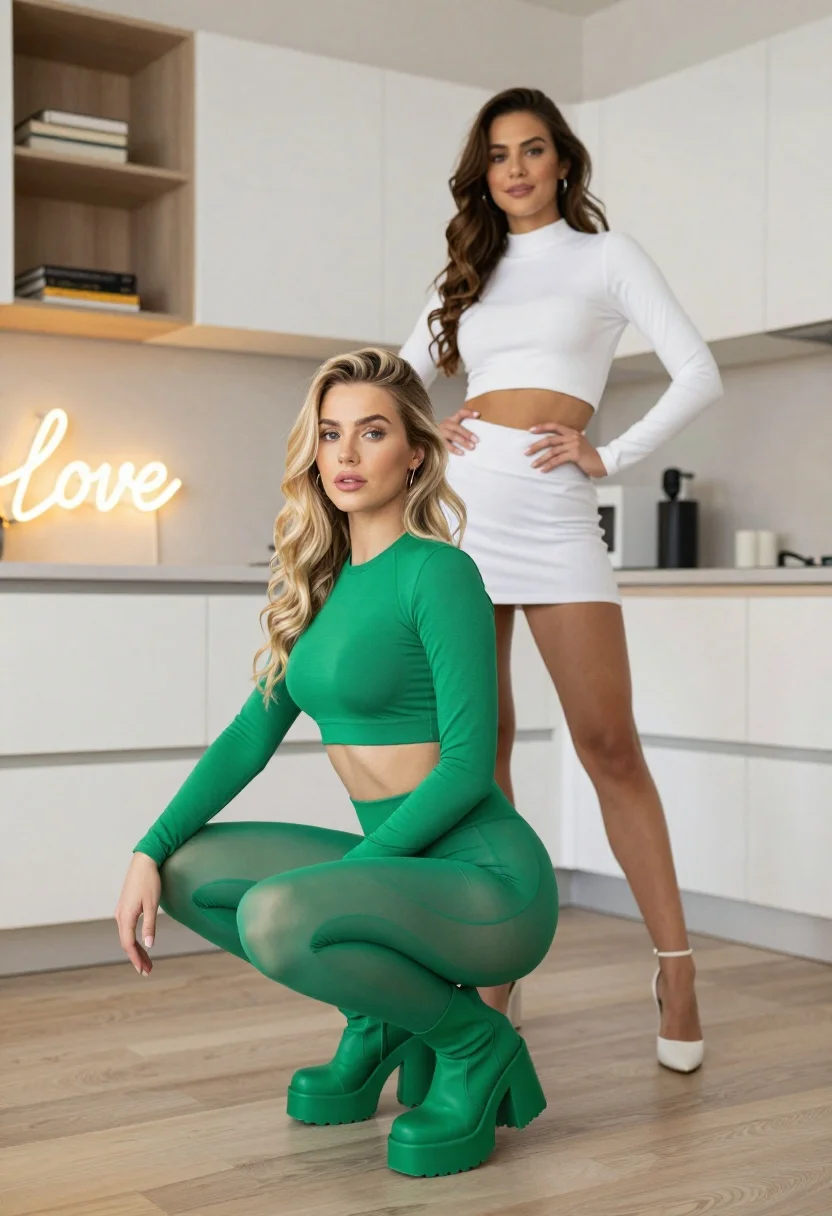
Two women posing in a modern bright kitchen interior setting
Prompt
Two women posing in a modern kitchen interior with one squatting in the foreground and another standing behind her.

Subject: A young woman with long wavy blonde hair squatting low to the ground with hands on knees, wearing a tight green two-piece outfit consisting of a long-sleeved crop top and matching leggings.

Clothing: The foreground subject wears a form-fitting emerald green long-sleeved crop top and matching high-waisted leggings that appear slightly sheer over her legs, paired with chunky green platform boots. The background subject wears a white long-sleeved mock-neck crop top and white shorts or skirt with white heels.

Action: The foreground woman is in a deep squat position looking directly at the camera with a neutral expression, while the background woman stands with hands on hips smiling slightly.

Environment: A bright modern kitchen with white cabinetry, light wood flooring, built-in shelving displaying books and a neon sign that reads Love in cursive script.

Camera: Eye-level medium shot capturing both subjects fully within the frame with a shallow depth of field keeping focus on the foreground subject.

Lighting: Soft natural indoor lighting illuminating the scene evenly with subtle shadows under the squatting figure and warm ambient glow from the neon sign.

Style Details: High-resolution fashion photography style with vibrant color saturation emphasizing the green outfit against the neutral kitchen tones.
Description
This prompt is useful for creating lifestyle editorial spreads, modern catalog shoots, and aspirational interior design features. The combination of 'soft natural indoor lighting' and 'vibrant color saturation' ensures that the emerald green outfit pops against the neutral white cabinetry, while specifying a 'shallow depth of field' directs the viewer's eye precisely to the foreground subject in her deep squat.
Suggestions
- Change 'emerald green' to 'forest green' for a deeper tone.
- Adjust 'neon sign that reads Love in cursive script' to read 'Vibe' for a more contemporary feel.
- Modify 'shallow depth of field' to 'deep focus' if you want both women equally sharp.
Category
Tags
BlondeFemaleIndoorsMedium ShotRealistic
Date added
July 12, 2026
Added by
PromptDexter Team
Related Prompts
More prompts with similar categories and tags.

Blonde woman in black lace gown standing in opulent room setting
Blonde woman in jogger pants standing in modern hallway
Young blonde woman in white crop top against bright sheer curtains

Blonde woman in bikini shorts inside rustic wooden boat house setting
Blonde woman in black lace lingerie and robe in a theater aisle

Blonde woman in white sweater sitting on pink armchair indoors

Blonde woman in striped swimsuit seated on sofa indoors studio shot

Blonde woman in maroon fringed dress standing in white arched hallway
Young woman looking back over shoulder in champagne knit top indoors

Two women in red mini dresses posing indoors at an opulent setting