
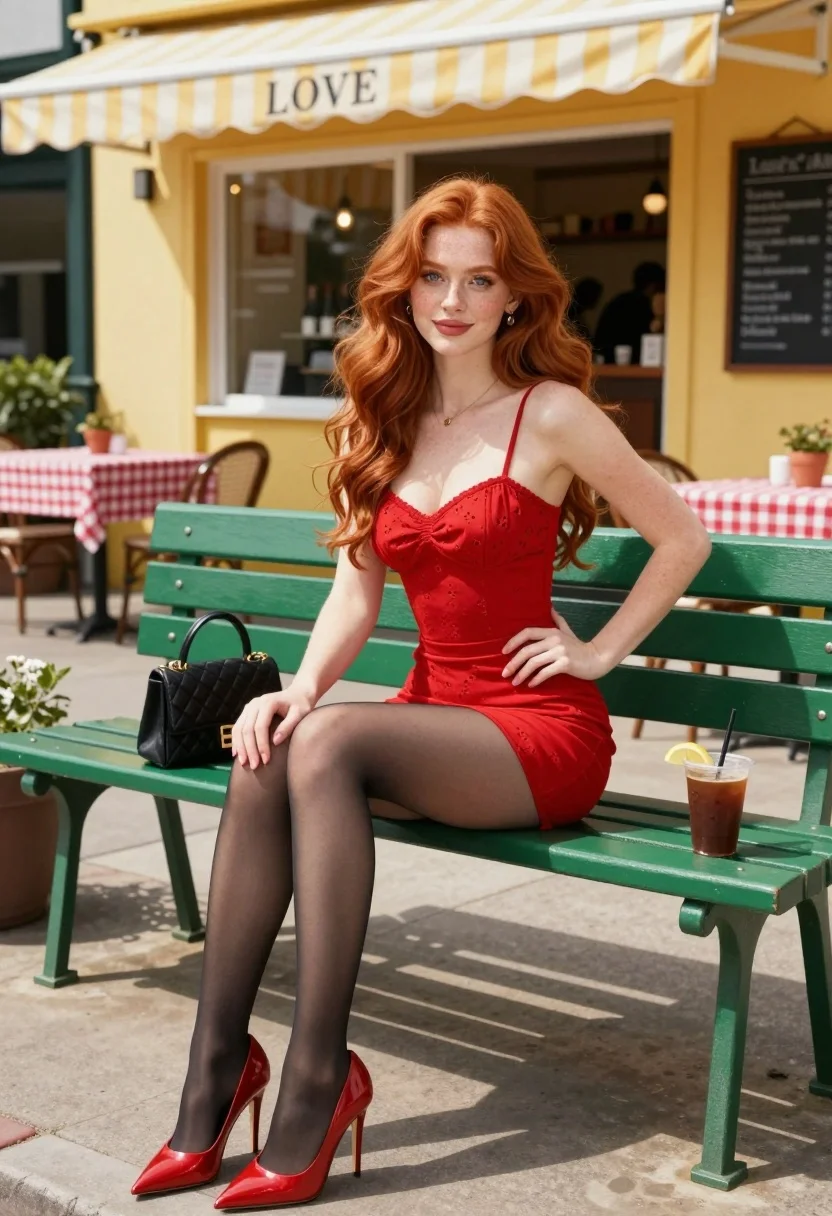
Woman with red hair sitting on green bench at sunny cafe patio
Prompt
A young woman with long wavy red hair sits on a green bench in front of a cafe.

Subject: A fair-skinned woman with long, voluminous wavy red hair and blue eyes, looking directly at the camera with a soft smile.

Clothing: She wears a fitted red mini dress with thin spaghetti straps and subtle eyelet detailing, paired with sheer black tights and glossy red pointed-toe stiletto heels.

Action: She is seated on a green slatted bench with her legs crossed at the ankles, one hand resting gently on her thigh while the other rests near her hip.

Environment: The setting is an outdoor cafe patio on a sunny day, featuring a yellow building facade with a striped yellow and white awning that reads "LOVE". Behind her are tables with red checkered tablecloths, potted plants, and a chalkboard menu.

Objects: A black quilted handbag sits on the bench beside her, along with an iced coffee drink in a clear plastic cup garnished with a lemon slice.

Lighting: Bright natural sunlight illuminates the scene from above, casting distinct shadows on the pavement and highlighting the texture of her hair and dress.

Camera: The shot is taken at eye level with a medium framing that captures the subject from head to toe, utilizing a shallow depth of field to keep the background slightly soft while maintaining sharp focus on the woman.

Style Details: The image features high-resolution digital rendering with realistic skin textures, vibrant saturated colors, and a polished commercial aesthetic.
Description
This prompt is useful for creating lifestyle magazine spreads, seasonal fashion editorials, and advertising collateral for accessories or apparel. The combination of 'bright natural sunlight' casting distinct shadows and the 'vibrant saturated colors' ensures that the red dress and yellow facade pop against the green bench, giving a polished commercial aesthetic suitable for high-impact visual storytelling.
Suggestions
- Change 'red mini dress' to 'cream knit dress' for a softer seasonal feel.
- Swap 'yellow building facade' for 'terracotta brick wall' to mute the background color.
- Adjust 'medium framing' to 'full body shot' to better showcase the stiletto heels.
Category
Tags
CafeCasual WearFair SkinFemaleFull BodyMedium ShotRealisticRed Hair
Date added
August 5, 2026
Added by
PromptDexter Team
Related Prompts
More prompts with similar categories and tags.
Woman in black slip dress on red carpet welcoming pose at event
Young woman in yellow dress sitting on park bench outside cafe patio
Blonde woman in houndstooth blazer at bright modern coffee shop interior
Young woman with red hair sitting on floral sofa in eclectic room
Young woman in doorway of rustic cafe framed by green ivy

Fair blonde woman in slip dress seated in minimalist studio setting

Fair skinned woman with red hair in brown satin dress against gray

Young woman sitting among colorful clothes in minimalist studio setting

Fair skinned woman in black sequined outfit sitting elegantly indoors

Smiling blonde woman in boutique wearing navy blouse and black skirt
