
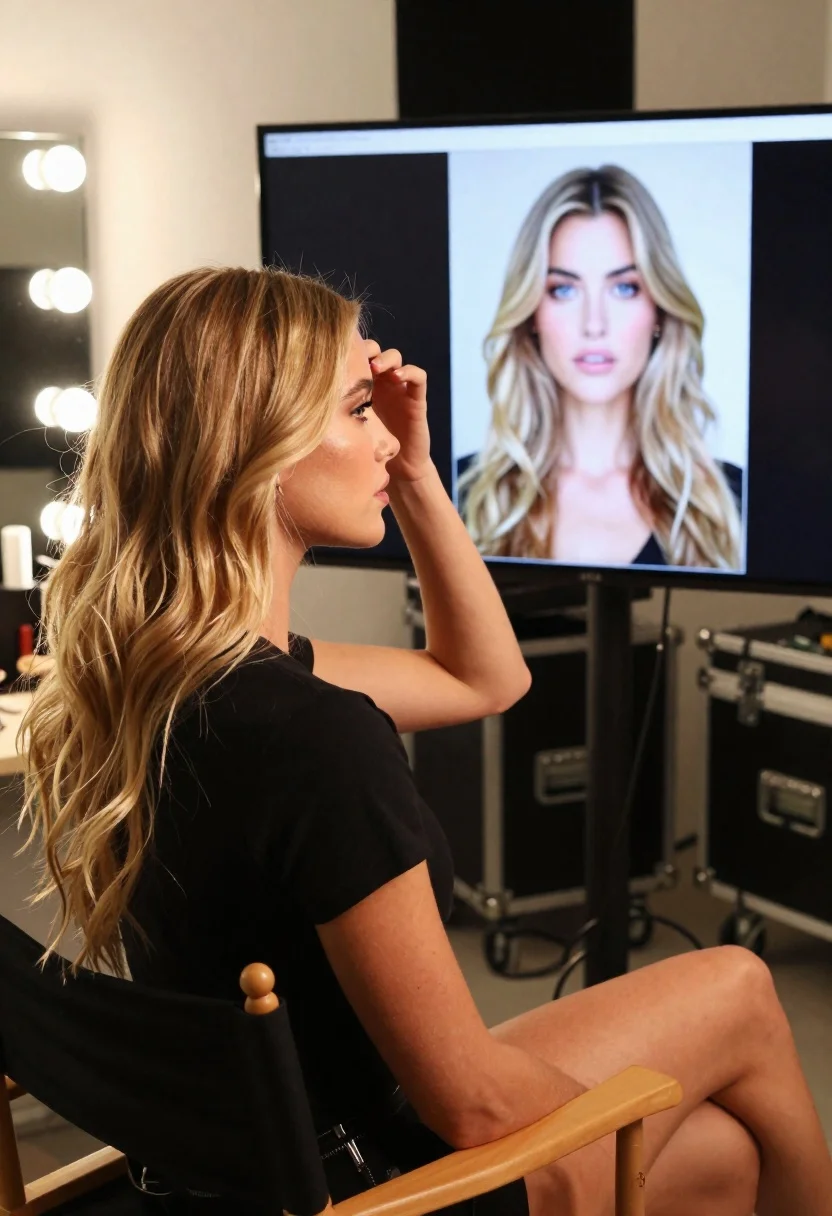
Young blonde woman in black tshirt sitting in makeup chair looking at
Prompt
A woman with long wavy blonde hair sits in a makeup chair, looking toward a large monitor displaying her own portrait.

Subject: A young woman with long wavy blonde hair and fair skin is seated in profile, gazing at a computer screen.

Clothing: She wears a simple black short-sleeved t-shirt.

Action: Her right hand is raised to her head, gently touching or adjusting her hair near her temple.

Environment: The setting is a professional backstage area or studio with a vanity mirror featuring bright round bulbs on the left and large black equipment cases in the background.

Camera: The shot is a medium close-up taken from a side angle, capturing the subject's profile and the monitor behind her.

Lighting: Warm ambient light reflects off the woman's face and hair, complemented by the bright glow of the vanity mirror bulbs on the left.
Second

Subject: A large computer monitor displays a high-resolution portrait of the same woman with blonde wavy hair against a plain background.

Objects: A wooden director's chair is visible beneath her, along with black rolling equipment cases and coiled cables on the floor.

Interaction: The woman appears to be reviewing the image on the screen while adjusting her hairstyle.

Style Details: The image has a candid, behind-the-scenes aesthetic with natural skin textures and realistic lighting.
Description
This prompt is useful for creating backstage editorial portraits, beauty industry mood boards, and character concept art showing self-reflection. The combination of 'warm ambient light' reflecting off the hair alongside the distinct 'bright glow of the vanity mirror bulbs on the left' establishes a specific, controlled environment that suggests professional preparation rather than casual snapshots.
Suggestions
- Change 'black short-sleeved t-shirt' to 'silk robe' for a more luxurious feel.
- Adjust 'warm ambient light' to 'cool fluorescent lighting' for a harsher studio look.
- Modify the background by adding 'chrome vanity mirror' to increase reflectivity.
Category
Tags
BlondeCasual WearFair SkinFemaleIndoorsMedium ShotRealisticSide ProfileStudio
Date added
June 26, 2026
Added by
PromptDexter Team
Related Prompts
More prompts with similar categories and tags.

Blonde woman in red hat seated in studio overlooking city skyline
Young woman with blonde braid holding strawberry on bathroom counter

Young woman in black bomber jacket stands inside a stainless steel elevator
Fair skinned woman with blonde hair in cream satin shirt studio portrait

Young woman in light green embroidered dress leaning indoors

Close up portrait of young woman with brown braid indoors

Blonde woman in black top on balcony overlooking beige stone street

Blonde woman in striped swimsuit seated on sofa indoors studio shot
