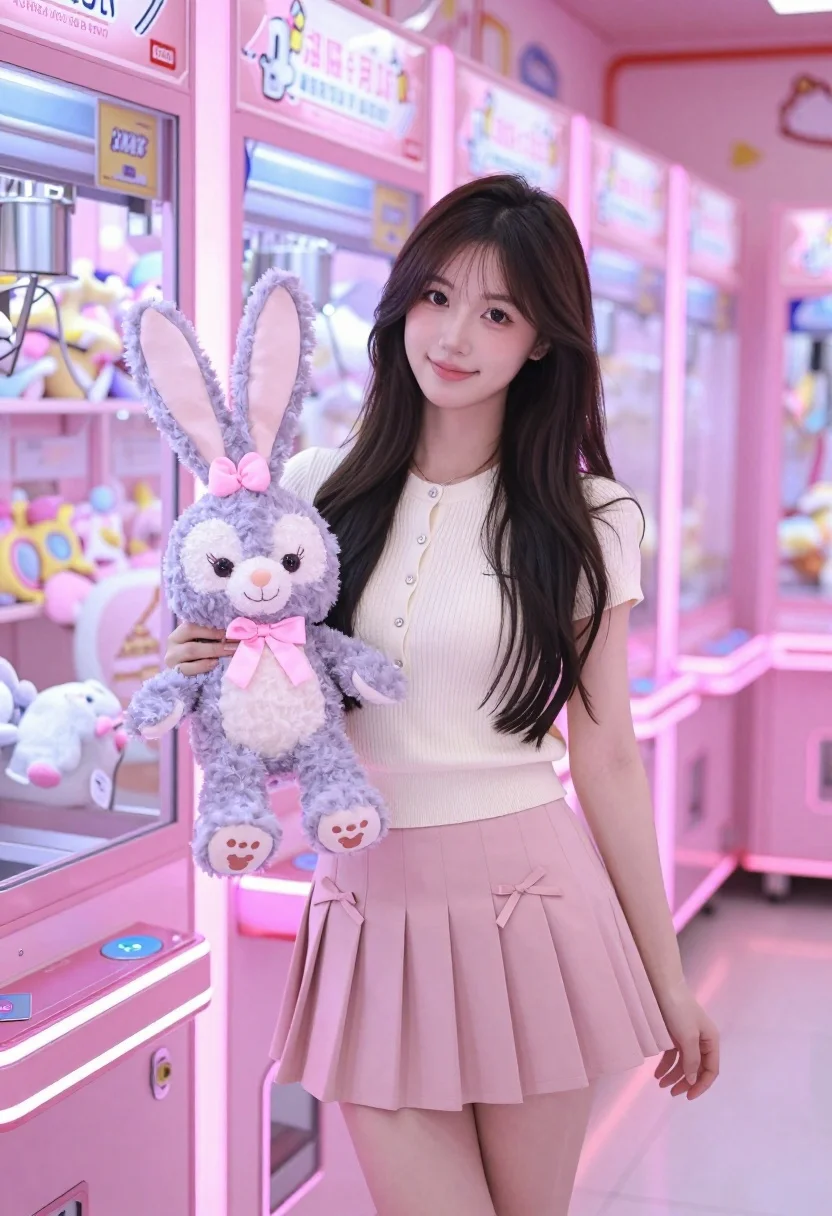
Young east asian woman smiling in pink arcade hall holding lavender plush
Prompt
A young woman with long dark hair stands smiling in a pink arcade hall holding a plush toy.

Subject: A young East Asian woman with long, wavy dark brown hair that falls over her shoulders, featuring a soft smile and bright eyes.

Clothing: She wears a cream-colored short-sleeved ribbed knit top with a buttoned placket and a light pink pleated mini skirt adorned with small ribbon bows on the sides. A delicate necklace is visible around her neck.

Action: She stands in a relaxed pose, holding a large lavender plush bunny with a pink bow in her right hand against her chest, while her left arm hangs naturally by her side.

Environment: The setting is an arcade or game center filled with rows of pink claw machines containing various stuffed animals, creating a vibrant and playful atmosphere.

Camera: The shot is taken at eye level with a medium framing that captures the subject from the thighs up, utilizing a shallow depth of field to blur the background arcade machines slightly.

Lighting: The scene is illuminated by soft, warm ambient light reflecting off the pink surfaces, creating a gentle glow on her skin and highlighting the pastel tones of the environment.

Objects: A large lavender plush bunny with black eyes and a pink ribbon bow is held in her hand.

Style Details: The image features a high-quality, polished aesthetic with vibrant pastel color grading and a clean, modern digital photography style.
Description
This prompt is useful for creating editorial character portraits, themed commercial advertising, and playful lifestyle content. The combination of 'soft, warm ambient light' reflecting off the pink surfaces ensures that the subject remains gently illuminated while the 'shallow depth of field' keeps focus tightly on her and the 'lavender plush bunny,' preventing the busy arcade background from becoming a distracting mess.
Suggestions
- Change 'pink pleated mini skirt' to 'denim A-line skirt' for more contrast.
- Swap 'lavender plush bunny' for 'pastel yellow stuffed animal' to shift the color palette.
- Adjust 'soft, warm ambient light' to 'neon glow lighting' for a moodier feel.
Category
Tags
Brown HairCasual WearFemaleMedium ShotRealistic
Date added
July 3, 2026
Added by
PromptDexter Team
Related Prompts
More prompts with similar categories and tags.

Blonde woman in rust knit sweater leaning against textured wall

Woman seated in armchair near large windows with greenery
Poised woman in white top touching collarbone against dark studio background

Woman in gold sequin slip dress looking over shoulder in forest

Woman in black dress by window overlooking ocean at golden hour

Young blonde woman in brown top seated in modern living room setting
Poised woman in black blazer sitting on stool against blue gradient background
Smiling young woman in green top standing in wildflower meadow
Medium close up of woman in denim crop top against gray studio
Young woman in brown dress leaning against beige stone wall