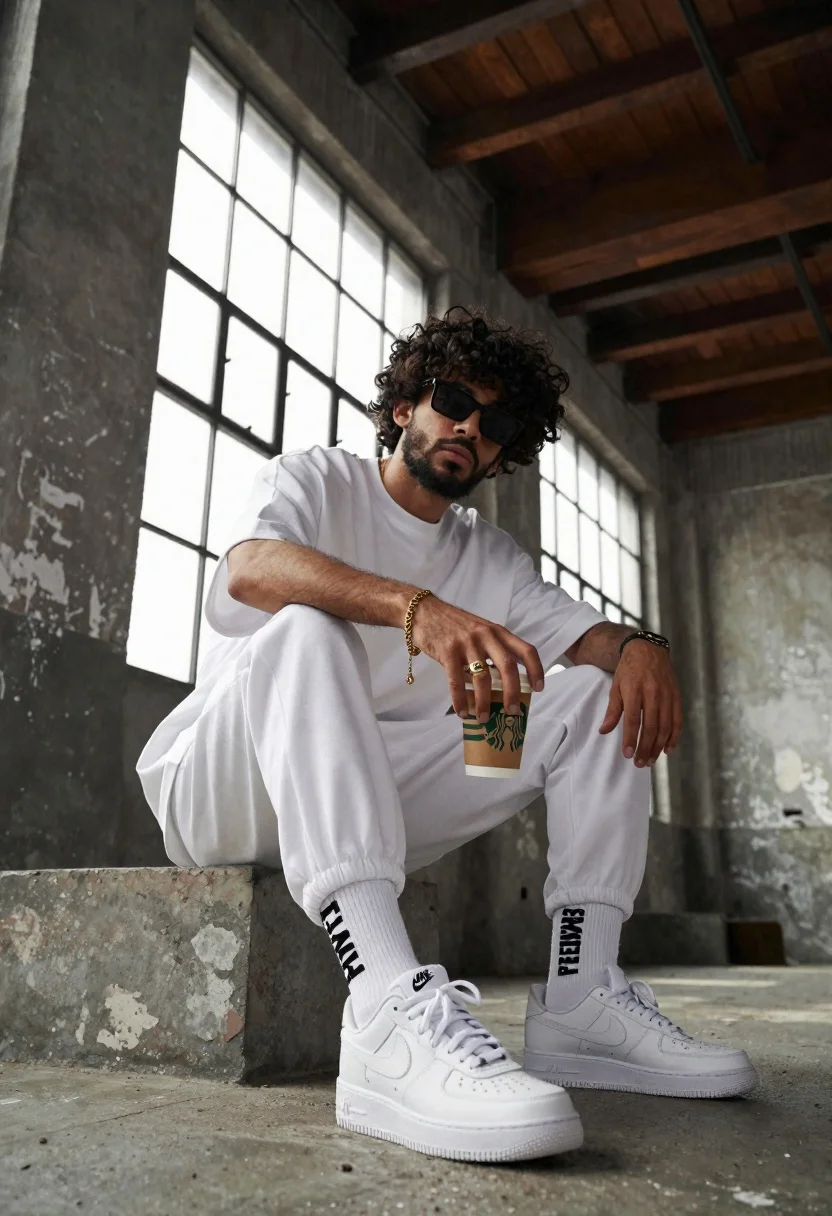
Young man with curly black hair and beard sits on concrete ledge
Prompt
A stylish young man with curly dark hair and a beard sits on a concrete ledge in an industrial loft space.

Subject: A handsome young man with thick curly black hair, a well-groomed beard, and dark sunglasses looking directly at the camera with a confident expression.

Clothing: He wears an oversized white crew-neck t-shirt and matching white jogger sweatpants with elastic cuffs. He is wearing white Nike Air Force 1 sneakers and white socks featuring bold vertical black text that reads "PLEASURES". A gold chain bracelet adorns his right wrist, and he wears a thick gold ring on his right hand.

Action: The man sits in a relaxed pose with knees bent, holding a brown Starbucks coffee cup between his thumb and fingers while resting his left hand on his knee.

Environment: The setting is a gritty industrial interior featuring large multi-paned factory windows that let in bright daylight, exposed dark wooden ceiling beams, and weathered concrete walls with peeling paint.

Camera: A low-angle shot looking up at the subject from near ground level, emphasizing the sneakers and creating a dynamic perspective against the tall windows.

Lighting: Bright natural light floods in from the large windows to the left, casting soft shadows and highlighting the textures of the clothing and concrete surroundings.

Objects: A brown paper Starbucks cup with the green logo is held in his right hand.

Style Details: High-fashion streetwear aesthetic with a cinematic color grade that emphasizes warm skin tones against cool industrial grays and whites.
Description
This prompt is useful for creating editorial fashion moodboards, streetwear lookbooks, and magazine features emphasizing urban grit. The combination of 'low-angle shot' and 'bright natural light' from the large windows creates a dynamic perspective that makes the subject appear monumental against the 'weathered concrete walls,' while the specified 'high-fashion streetwear aesthetic' ensures the white clothing pops against the cool industrial grays.
Suggestions
- Change 'oversized white crew-neck t-shirt' to 'black graphic tee' for more contrast.
- Swap 'Starbucks coffee cup' for an empty glass bottle to change the object focus.
- Adjust 'low-angle shot' to 'eye-level medium shot' for a less aggressive portrait.
Category
Tags
Black HairCasual WearFull BodyIndoorsLow AngleMaleRealistic
Date added
June 26, 2026
Added by
PromptDexter Team
Related Prompts
More prompts with similar categories and tags.
Woman in black strapless mini dress seated between two chairs
Black and white portrait of man sitting in modern living room
Studio portrait of man in armchair against gray background

Blonde woman seated sideways in black mini dress by window
Man sitting on subway seat surrounded by motion blur
Young man sitting on concrete ledge under bright blue sky
Young man in trench coat sitting on white beanbag chair against grey

Black and white studio portrait of man with beard
