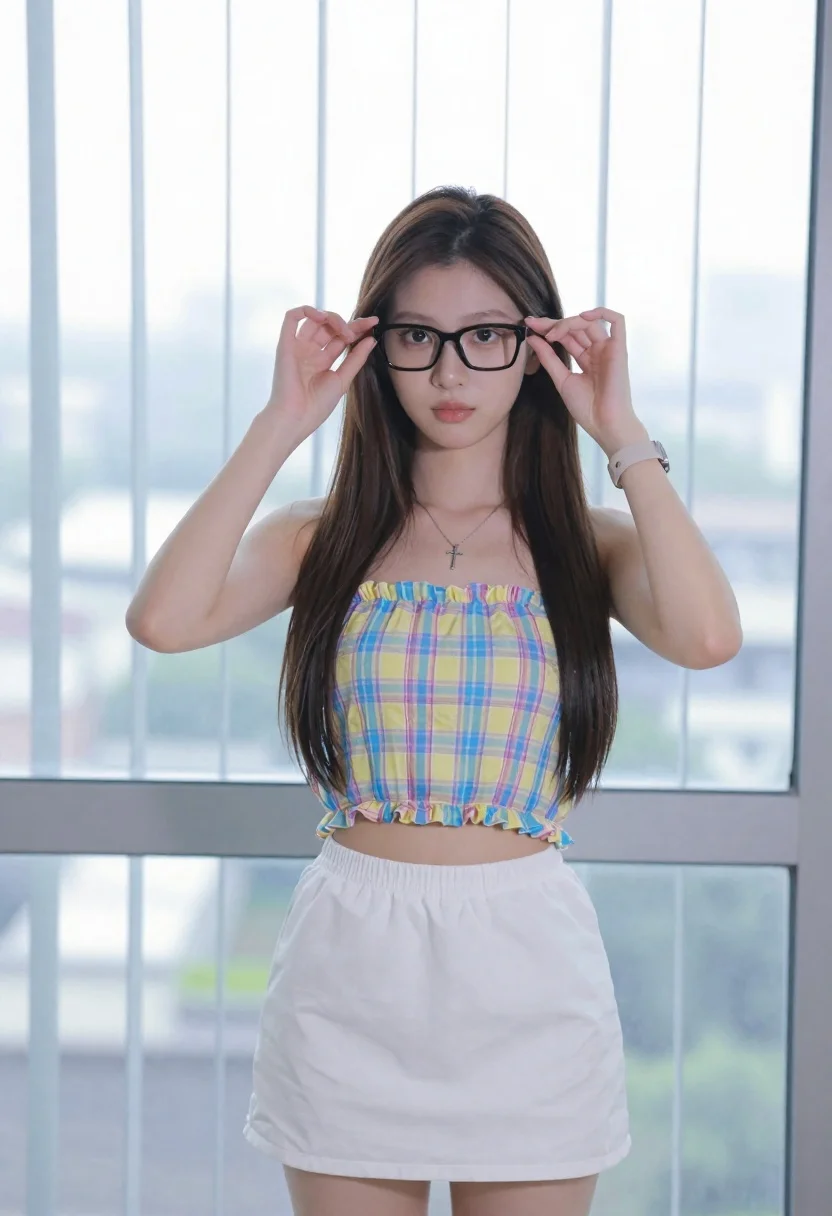
Young woman adjusting glasses indoors against blurred cityscape view
Prompt
A young woman with long dark hair stands indoors in front of a large window with vertical blinds, adjusting her black-framed glasses with both hands while looking directly at the camera.

Subject: A young woman with long, straight dark brown hair and fair skin. She has a neutral to soft expression with full lips and is wearing black rectangular eyeglasses which she is holding in place with her fingers.

Clothing: She wears a pastel plaid strapless crop top featuring yellow, blue, and pink checks with ruffled edges at the neckline and hem. She also wears a loose-fitting white mini skirt. A silver cross necklace rests on her chest, and a light-colored wristwatch is visible on her left wrist.

Action: The subject stands facing forward, holding the temples of her glasses with both hands to adjust them or push them up slightly. Her arms are raised at shoulder height.

Environment: The background consists of a large window covered by vertical blinds, through which a blurred cityscape and buildings are faintly visible.

Camera: A medium shot captures the subject from the thighs up, framed against the window backdrop with a shallow depth of field that keeps the subject sharp while blurring the distant scenery.

Lighting: The scene is lit by bright, diffuse natural light coming from behind the subject through the window, creating soft highlights on her hair and skin with minimal harsh shadows.

Style Details: The image has a clean, modern aesthetic with vibrant yet pastel color tones and high clarity.
Description
This prompt is useful for creating lifestyle editorial spreads, character concept art for contemporary media, and mood boards depicting thoughtful moments at home. The combination of 'bright, diffuse natural light' and the 'shallow depth of field' ensures that the subject remains crisp while allowing the 'blurred cityscape' to provide context without distracting from her action of adjusting her black-framed glasses.
Suggestions
- Change 'pastel plaid strapless crop top' to a solid color knit for more focus.
- Adjust 'vertical blinds' to sheer curtains for softer background diffusion.
- Swap 'medium shot' for 'close up' to emphasize the hands and glasses.
Category
Tags
Brown HairFair SkinFemaleIndoorsMedium ShotRealistic
Date added
June 19, 2026
Added by
PromptDexter Team
Related Prompts
More prompts with similar categories and tags.
Young woman in navy embroidered traditional dress indoors medium shot
Young woman with dark hair in mint dress inside modern apartment

Young woman in black crop top and cream trousers indoors looking over
Young woman in olive top and denim jeans indoors with green leaves
Woman in pink floral dress seated indoors by window with red curtains

Woman in black dress seated in dimly lit diner booth
Profile portrait of woman at dining table in upscale restaurant setting
Young girl smiling in messy bedroom with string lights
Smiling young woman with brown hair wearing white tank top indoors
Woman with dark wavy hair leaning on wooden bedpost in warmly lit