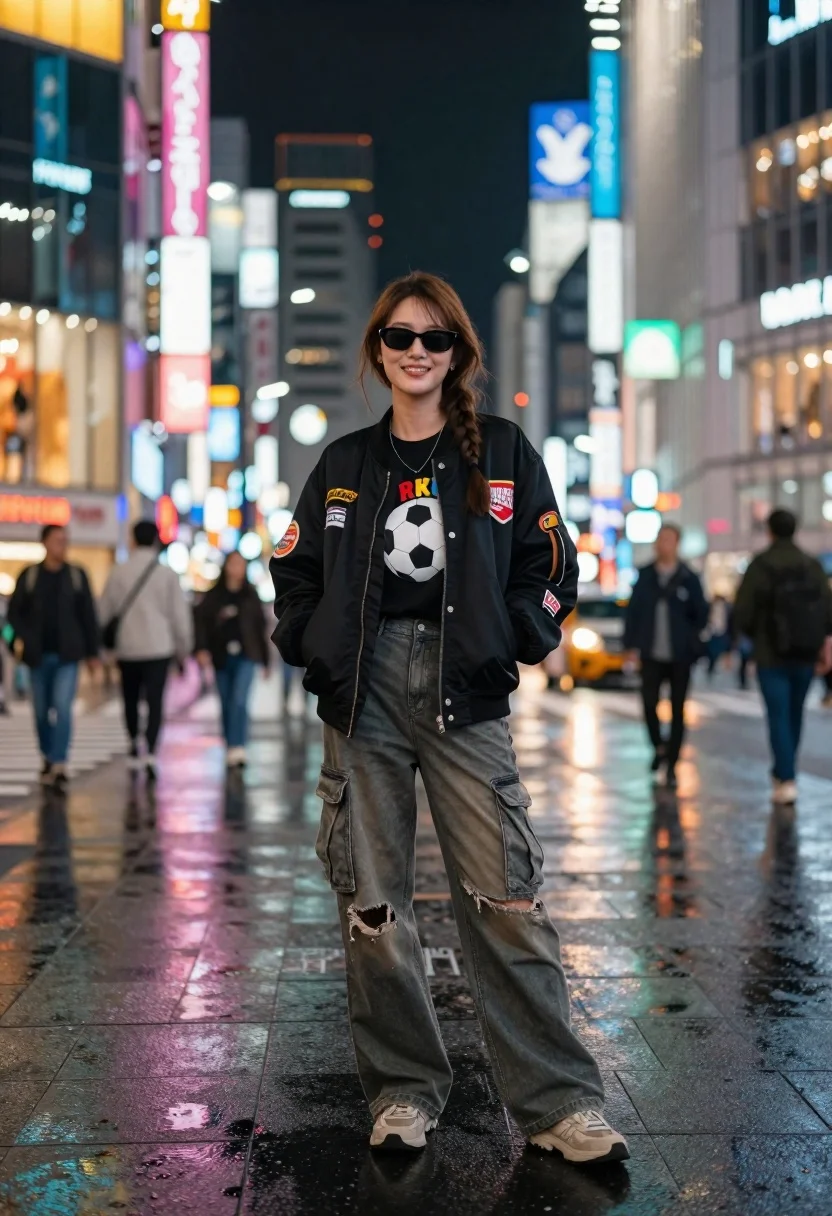
Young woman in black bomber jacket stands on a busy city street
Prompt
A young woman stands confidently in the center of a bustling city street at night, surrounded by towering buildings covered in vibrant neon signs and glowing advertisements.

Subject: A smiling young woman with long brown hair styled in a side braid, wearing dark sunglasses and looking directly at the camera with a relaxed expression.

Clothing: She wears a black bomber jacket adorned with colorful patches on the sleeves and chest, layered over a graphic t-shirt featuring a soccer ball design. Her lower half consists of loose-fitting, distressed cargo pants with large pockets and rips near the knees, paired with beige sneakers.

Action: She stands with her hands tucked into the front pockets of her jacket, exuding a casual and cool demeanor.

Environment: The setting is a busy urban street at night, likely resembling Tokyo or a similar metropolis, with wet asphalt reflecting the colorful lights from surrounding skyscrapers and storefronts.

Camera: The shot is taken at eye level with a shallow depth of field that keeps the subject sharp while blurring the background pedestrians and vehicles into soft bokeh.

Lighting: The scene is illuminated by the ambient glow of neon signs in pink, blue, yellow, and green, casting colorful reflections on the wet ground and creating a high-contrast, moody atmosphere.

Style Details: The image features a cinematic aesthetic with vivid color saturation, sharp focus on the subject, and a polished urban photography style that emphasizes the energy of city nightlife.
Description
This prompt is useful for creating editorial fashion moodboards, cyberpunk concept art, and gritty street portraiture. The combination of 'wet asphalt reflecting the colorful lights' and 'neon signs in pink, blue, yellow, and green' establishes a high-contrast, moody atmosphere that grounds the subject within an energetic urban setting, while the 'shallow depth of field' ensures the viewer's focus remains sharply on the woman despite the visual chaos suggested by the background.
Suggestions
- Change 'black bomber jacket' to 'reflective silver bomber jacket' for a more futuristic look.
- Swap 'beige sneakers' for 'chunky combat boots' to enhance the edgy vibe.
- Add 'rain streaks visible on the lens' to intensify the wet asphalt reflection.
Category
Tags
Brown HairCasual WearFemaleFull BodyOutdoorsPortrait ShotRealisticStreetUrban
Date added
June 26, 2026
Added by
PromptDexter Team
Related Prompts
More prompts with similar categories and tags.

Fair skinned woman in white coat stands in snowy city street at
Stylish woman in black halter dress on wet subway platform at night

Blonde woman in black gown posing on city street near ritz london
Young woman in red sweatshirt standing on blurred city street at night
Woman in art deco gown on fire escape looking back over shoulder

Woman in brown corduroy sitting in golden dry grass at sunset
Woman in burgundy coat walking down historic european cobblestone street

Young woman in green jacket holding plush toy at festive carousel