
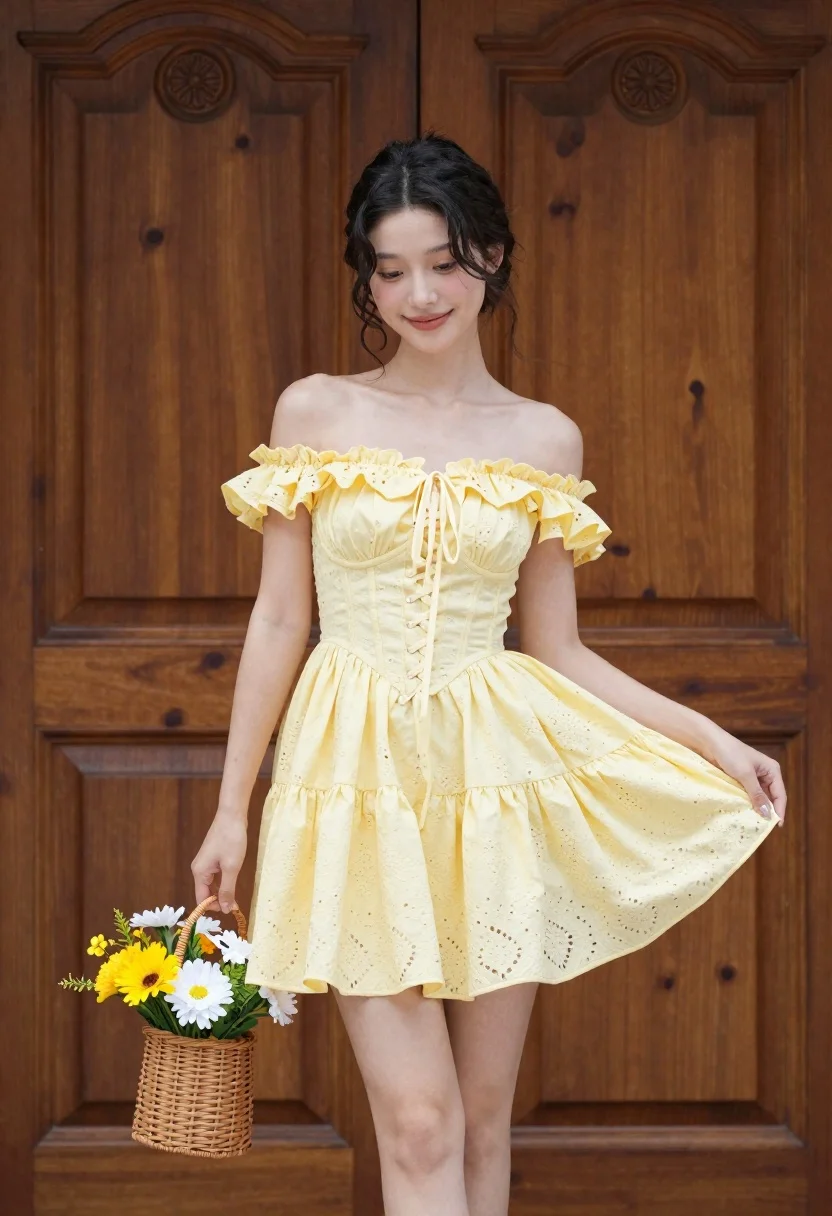
Young woman in pale yellow off shoulder mini dress holding flower basket
Prompt
A young woman stands in front of a large wooden door wearing a pale yellow off-the-shoulder mini dress with ruffled sleeves and a corset-style bodice.

Subject: A young woman with dark hair styled in an updo, featuring soft waves framing her face and a gentle, confident smile.

Clothing: She wears a pale yellow eyelet fabric mini dress with ruffled off-the-shoulder sleeves, a fitted corset-style bodice with lace-up detailing, and a flared skirt that she is holding slightly out to the side.

Action: The woman stands facing forward but looking slightly to her left, holding a wicker basket filled with yellow and white flowers in her right hand while gently lifting the hem of her dress with her left hand.

Environment: A large, dark wooden door with ornate carvings serves as the background, suggesting an entrance to a historic or elegant building.

Camera: The shot is taken at eye level with a medium-full body framing that captures the subject from head to mid-thigh, emphasizing the outfit and pose.

Lighting: Soft, natural daylight illuminates the scene evenly, highlighting the texture of the dress and casting gentle shadows on the wooden door behind her.

Objects: A woven wicker basket filled with fresh yellow and white flowers is held in her right hand.

Style Details: The image has a clean, high-resolution aesthetic with a focus on fashion photography, featuring warm tones and a soft depth of field that keeps the subject sharp while slightly blurring the background details.
Description
This prompt is useful for creating bridal editorial content, vintage portraiture, and lifestyle catalog images showcasing delicate garments. The combination of 'pale yellow eyelet fabric' against a 'large, dark wooden door' grounds the ethereal subject in an architectural context, while the 'soft depth of field' ensures the viewer focuses on the dress details rather than distracting background elements.
Suggestions
- Change 'wicker basket' to 'ceramic vase' for a more modern feel.
- Swap 'pale yellow eyelet fabric' for 'ivory lace' to increase formality.
- Adjust 'medium-full body framing' to 'three-quarter shot' to emphasize the upper body.
Category
Tags
Casual WearFemaleFull BodyMedium ShotOutdoorsPortrait ShotRealistic
Date added
June 23, 2026
Added by
PromptDexter Team
Related Prompts
More prompts with similar categories and tags.
Smiling woman in silver top and white skirt within lush bamboo grove
Smiling young woman in cream dress near large glass window outdoors

Young woman in green jacket holding plush toy at festive carousel
Woman in white lace gown standing in misty forest medium shot

Young woman leaning against white wall with beige handbag under bright sunlight
Young woman in grey top and white skirt by water at dusk

Woman standing barefoot in dry autumn field at golden hour

Woman in black dress by window overlooking ocean at golden hour
