
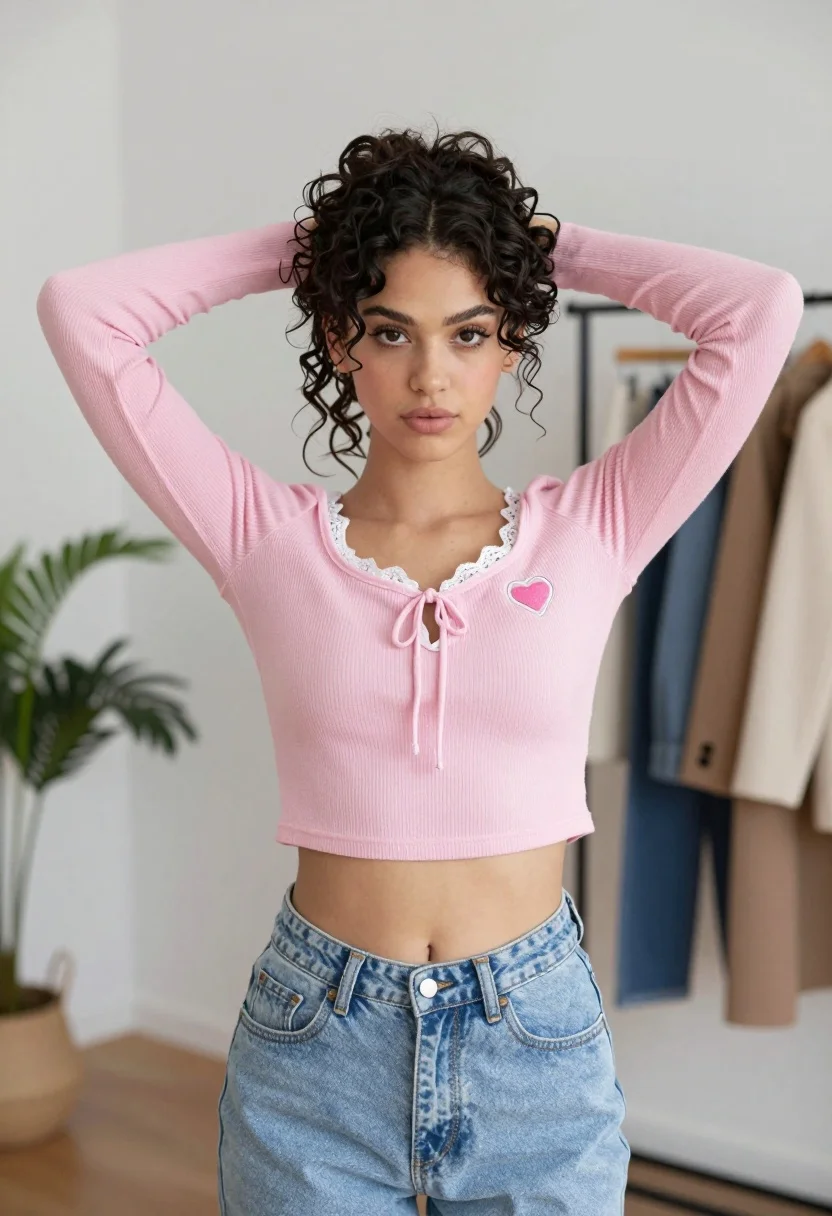
Young woman in pink crop top and jeans indoors with messy bun
Prompt
A young woman with dark curly hair tied up in a messy bun stands facing the camera with her hands behind her head.

Subject: A young woman with dark curly hair styled in a high messy bun and loose tendrils framing her face, featuring defined eyebrows and a neutral expression.

Clothing: She wears a pink long-sleeved waffle-knit crop top with white lace trim along the neckline and a front tie detail, adorned with a heart-shaped patch on the left chest, paired with light wash high-waisted blue jeans.

Action: Her arms are raised with hands clasped behind her head, accentuating the fit of the top, while she gazes directly forward.

Environment: The setting is a bright indoor room with white walls and light wood flooring, featuring a clothing rack with hanging coats to the right and a green houseplant to the left.

Camera: Shot from a straight-on medium shot with a shallow depth of field that keeps the subject sharp while softly blurring the background elements.

Lighting: Soft, diffused natural light illuminates the scene evenly from the front, creating gentle shadows and highlighting the texture of the clothing without harsh contrast.

Style Details: The image has a clean, high-resolution aesthetic with a focus on fashion photography, utilizing soft color grading and smooth skin tones.
Description
This prompt is useful for creating casual lifestyle blogs, e-commerce product mockups featuring apparel, and personal portrait galleries. The combination of 'soft, diffused natural light' with the 'white walls and light wood flooring' ensures that the focus remains entirely on the subject's outfit details, preventing harsh shadows from distracting from the texture of the 'waffle-knit crop top'.
Suggestions
- Change 'pink long-sleeved waffle-knit crop top' to a specific pattern like 'striped knit crop top' for more visual interest.
- Adjust 'light wash high-waisted blue jeans' to 'dark indigo denim' for a stronger contrast against the pink.
- Replace 'green houseplant' with a different botanical element, such as 'dried eucalyptus branches'.
Category
Tags
BrunetteCasual WearFemaleIndoorsMedium ShotPortrait ShotRealistic
Date added
August 5, 2026
Added by
PromptDexter Team
Related Prompts
More prompts with similar categories and tags.

Young woman in black graphic tshirt against white paneled wall
Young woman in red velvet outfit against white paneled interior wall

Woman with brown hair in white top and black skirt indoors
Young woman in white crop top and sequined skirt in decorated bedroom

Stylish woman in red top standing in modern kitchen setting
Fit woman stretching indoors in pink lingerie against city skyline view
Medium close up portrait of woman in red satin shirt indoors

Young woman in white lace dress seated against soft floral backdrop
Confident woman with dark wavy hair in white lace bodysuit indoors

Portrait of woman with red hair in navy blouse and green skirt
