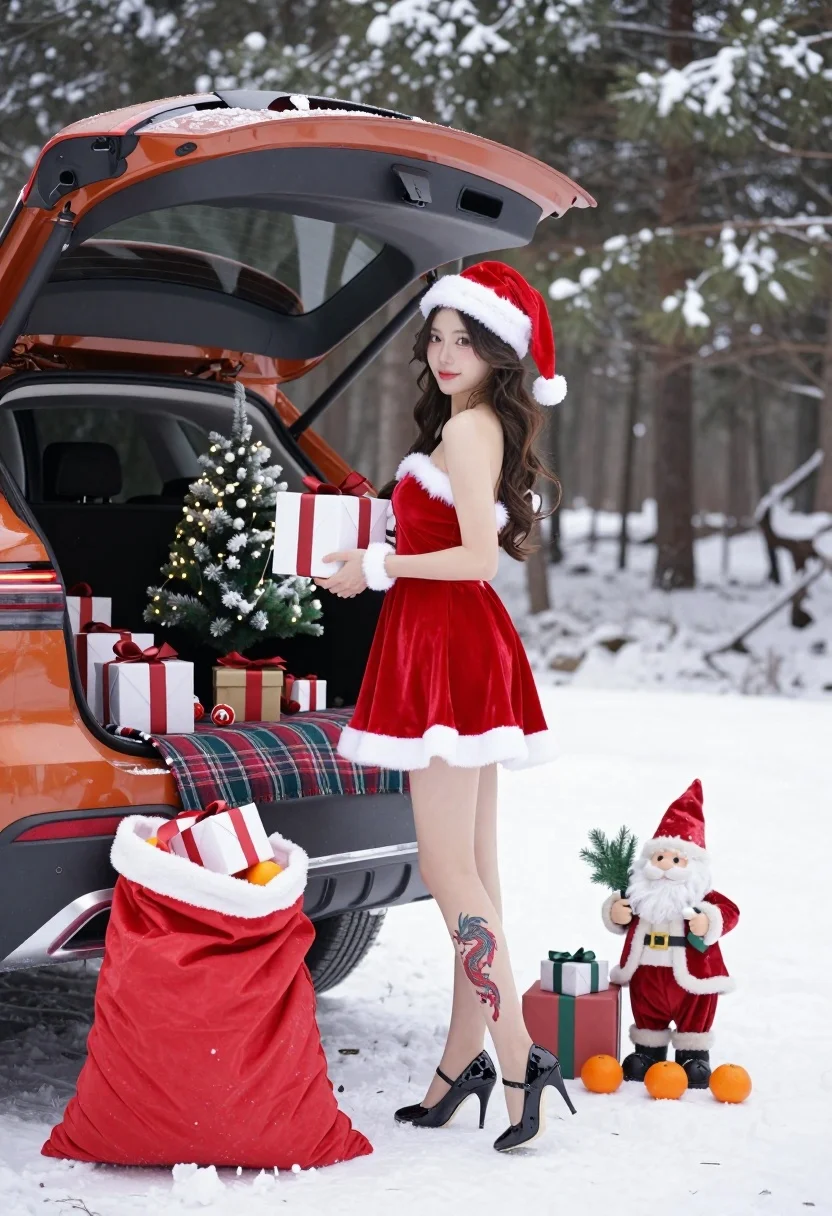
Young woman in red santa dress by open car trunk in snowy
Prompt
A young woman in a festive red Santa dress stands beside an open car trunk filled with Christmas gifts and a small tree in a snowy forest setting.

Subject: A smiling young woman with long wavy hair wearing a red velvet Santa-style dress with white fur trim, a matching Santa hat, and black high heels, featuring a red dragon tattoo on her left calf.

Clothing: Red velvet strapless mini dress with white faux fur trim at the hem and neckline, paired with black patterned stiletto heels.

Action: She holds a wrapped gift box in her hands while looking over her shoulder toward the camera with a gentle smile.

Environment: A snowy outdoor scene with tall pine trees covered in snow in the background, and an orange SUV with its trunk open revealing a small lit Christmas tree, plaid blanket, and various wrapped presents inside.

Objects: A large red Santa sack overflowing with gifts sits on the ground next to a standing Santa figurine holding a sprig of greenery, surrounded by scattered tangerines and additional gift boxes.

Lighting: Soft natural daylight illuminates the scene evenly, creating gentle shadows and highlighting the textures of the snow and velvet fabric.

Camera: Medium shot capturing the full figure from head to toe with a shallow depth of field that softly blurs the forest background.

Style Details: Festive holiday aesthetic with rich reds and whites, high-resolution photography with clean composition and vibrant color saturation.
Description
This prompt is useful for creating seasonal catalog imagery, festive narrative scenes, and themed editorial spreads for winter holidays. The combination of 'red velvet' against the 'snowy forest setting' establishes a rich contrast that prevents the scene from looking washed out by the snow, while the 'soft natural daylight' ensures the textures of both the fabric and the gifts remain visible without harsh highlights.
Suggestions
- Change 'red velvet' to 'deep burgundy velvet' for a more muted holiday tone.
- Swap 'orange SUV' for 'dark green vintage car' to complement the forest palette.
- Adjust 'shallow depth of field' to 'bokeh effect' for an even softer background blur.
Category
Tags
Casual WearFemaleForestFull BodyMedium ShotOutdoorsRealisticRed HairVehicle
Date added
July 12, 2026
Added by
PromptDexter Team
Related Prompts
More prompts with similar categories and tags.
Woman in yellow satin gown holding cocktail glass at beach table during
Cinematic portrait of stylish couple standing beside classic black convertible car at

Woman in black dress by window overlooking ocean at golden hour
Young woman in red outfit on balcony overlooking water and hills

Woman posing on terrace at golden hour by mediterranean buildings
Young woman with ice cream beside vintage blue convertible on sunny street

Woman in white off shoulder dress sitting on boat edge near sea
Woman in teal satin slip dress standing on terrace overlooking blue sea
Smiling woman in pink top walking down narrow cobblestone street
Stylish woman in hijab holding fan on busy urban city street