
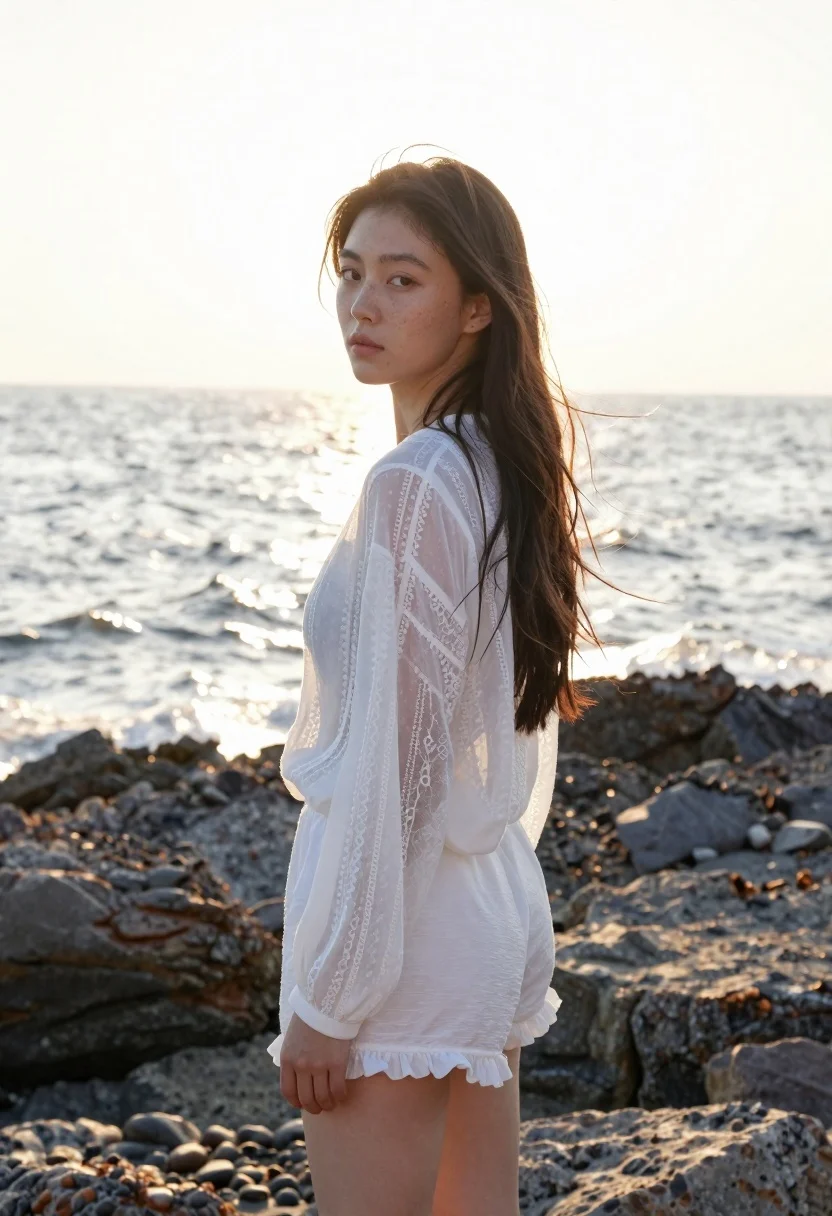
Young woman in white lace blouse standing on rocky shore at sunset
Prompt
A woman stands in profile against a sunlit ocean backdrop with dark rocks at her feet.

Subject: A young woman with long, dark hair and fair skin featuring natural freckles across her nose and cheeks.

Clothing: She wears a sheer, white, long-sleeved blouse with delicate lace detailing on the sleeves and a matching pair of white shorts with a ruffled hem.

Action: She stands in profile looking back over her shoulder toward the camera with a calm, neutral expression while loose strands of hair blow gently in the wind.

Environment: The setting is a rocky shoreline with dark, jagged stones in the foreground and a vast ocean stretching to the horizon under a bright sky.

Lighting: Strong backlighting from the sun creates a glowing halo effect around her head and highlights the translucency of her blouse.

Camera: A medium shot captures the subject from the thighs up, utilizing a shallow depth of field that blurs the water in the background.

Style Details: The image has a soft, dreamy aesthetic with high-key lighting and a warm color palette reminiscent of golden hour photography.
Description
This prompt is useful for creating romantic portraiture, bridal editorial content, and fine art lifestyle photography. The combination of 'strong backlighting' generating a glowing halo effect and the 'sheer, white, long-sleeved blouse' emphasizes delicate textures, which perfectly complements the soft, dreamy aesthetic desired for these evocative scenes.
Suggestions
- Change 'dark rocks' to 'wet black volcanic rock' for more dramatic foreground interest.
- Swap 'golden hour photography' for 'late afternoon diffused light' to soften the highlights.
- Adjust 'medium shot' to 'waist-up portrait' to focus more on the lace detailing.
Category
Tags
BeachBlack HairFair SkinFemaleMedium ShotOutdoorsOver The ShoulderRealisticSide Profile
Date added
June 21, 2026
Added by
PromptDexter Team
Related Prompts
More prompts with similar categories and tags.

Woman in red dress holding heart shaped balloon against white wall

Young woman in cream outfit looking back over shoulder on paved street
Young woman in maroon gown on beach looking back at sunset golden

Blonde woman in black top on balcony overlooking beige stone street

Smiling young woman in white kurta outdoors with green trees background

Young woman with dark hair at wooden table in open air setting
Smiling young woman in gingham dress holding red rose on pebbly beach

Smiling young woman in denim overalls outdoors near ocean shoreline