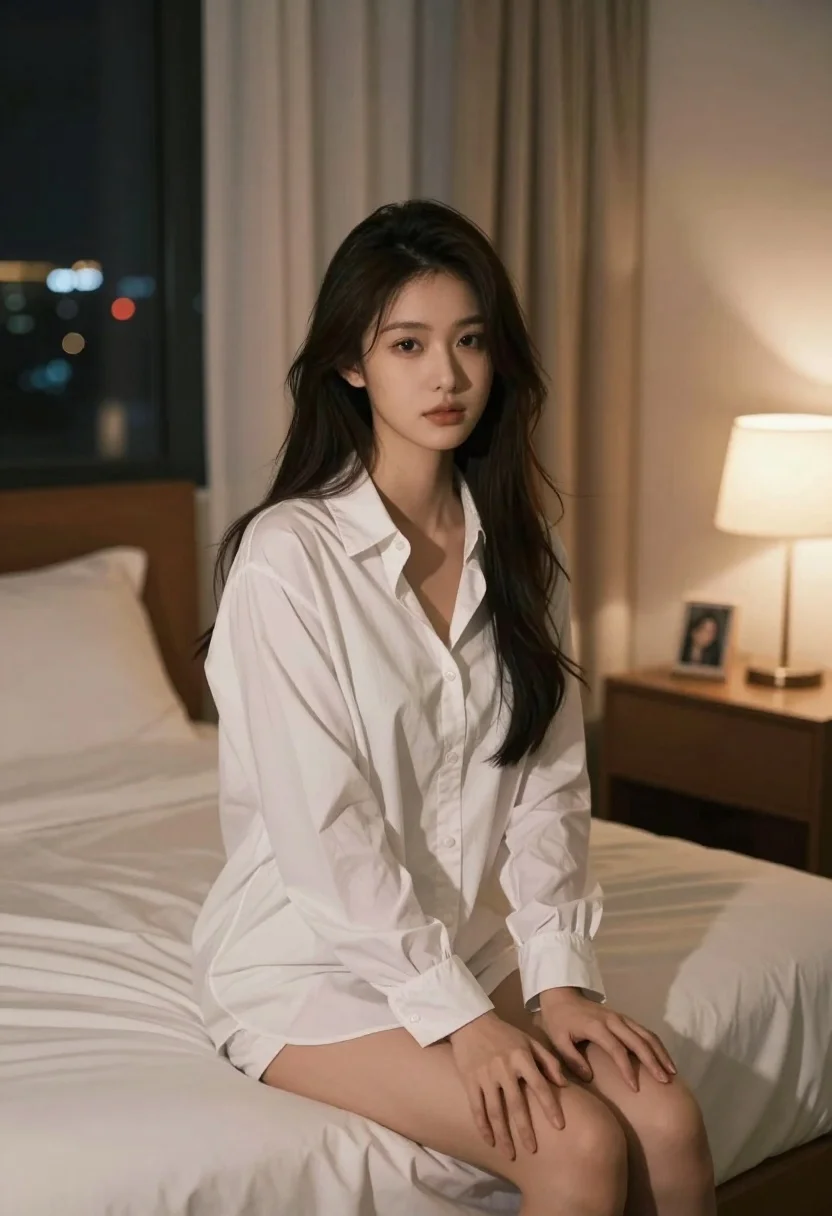
Young woman in white pajamas sitting on bed at night with city
Prompt
A young woman with long dark hair sits on a bed in a softly lit bedroom at night.

Subject: A young woman with long, loose dark hair and fair skin looking directly at the camera with a calm expression.

Clothing: She wears an oversized white button-down shirt worn as pajamas, unbuttoned slightly to reveal her chest, paired with matching shorts or the shirt tied around her waist.

Action: She is seated on the edge of a bed with her legs visible, hands resting gently on her thighs, and her gaze fixed forward.

Environment: The setting is a bedroom featuring a wooden headboard, white bedding, beige curtains, and a window showing city lights in the distance. A bedside table with a lamp and a framed photo is visible to the right.

Lighting: Warm ambient light from a bedside lamp illuminates the scene from the right, creating soft shadows and highlighting her face and hair against the darker background.

Camera: Medium shot capturing the subject from the thighs up, with a shallow depth of field that keeps the focus on her while softly blurring the background elements.

Style Details: The image has a cinematic, realistic aesthetic with smooth skin textures and a cozy, intimate atmosphere typical of high-quality lifestyle photography.
Description
This prompt is useful for creating editorial intimacy shots, sophisticated 'at-home' brand campaigns, and moody personal portraiture. The combination of 'warm ambient light from a bedside lamp' casting soft shadows against the visible 'city lights in the distance' establishes an immediate sense of private narrative, while the 'shallow depth of field' ensures that even detailed background elements like the wooden headboard support the focus on the subject without becoming distracting.
Suggestions
- Change 'oversized white button-down shirt' to 'silk pajama set' for a richer material feel.
- Swap 'beige curtains' for 'dark velvet drapes' to deepen the nighttime mood.
- Adjust 'warm ambient light' to 'moonlit glow' for a cooler, more mysterious tone.
Category
Tags
BedroomCasual WearFair SkinFemaleIndoorsMedium ShotRealistic
Date added
July 3, 2026
Added by
PromptDexter Team
Related Prompts
More prompts with similar categories and tags.

Blonde woman seated sideways in black mini dress by window
Fair skinned woman in dark velvet slip dress sitting on hotel bed
Young woman with blonde pigtails holding hair while sitting on a pink
Young woman in blue tank top kneeling on pink bed holding hair
Young woman in pink room sitting on bed wearing hello kitty shirt

Young woman in plaid pajamas with gingerbread cookies in festive bedroom

Blonde woman sitting on kitchen counter with watermelon slice

Young blonde woman in brown top seated in modern living room setting
Young woman kneeling on bed holding mug in white dress

Woman with freckles sitting on brown leather sofa