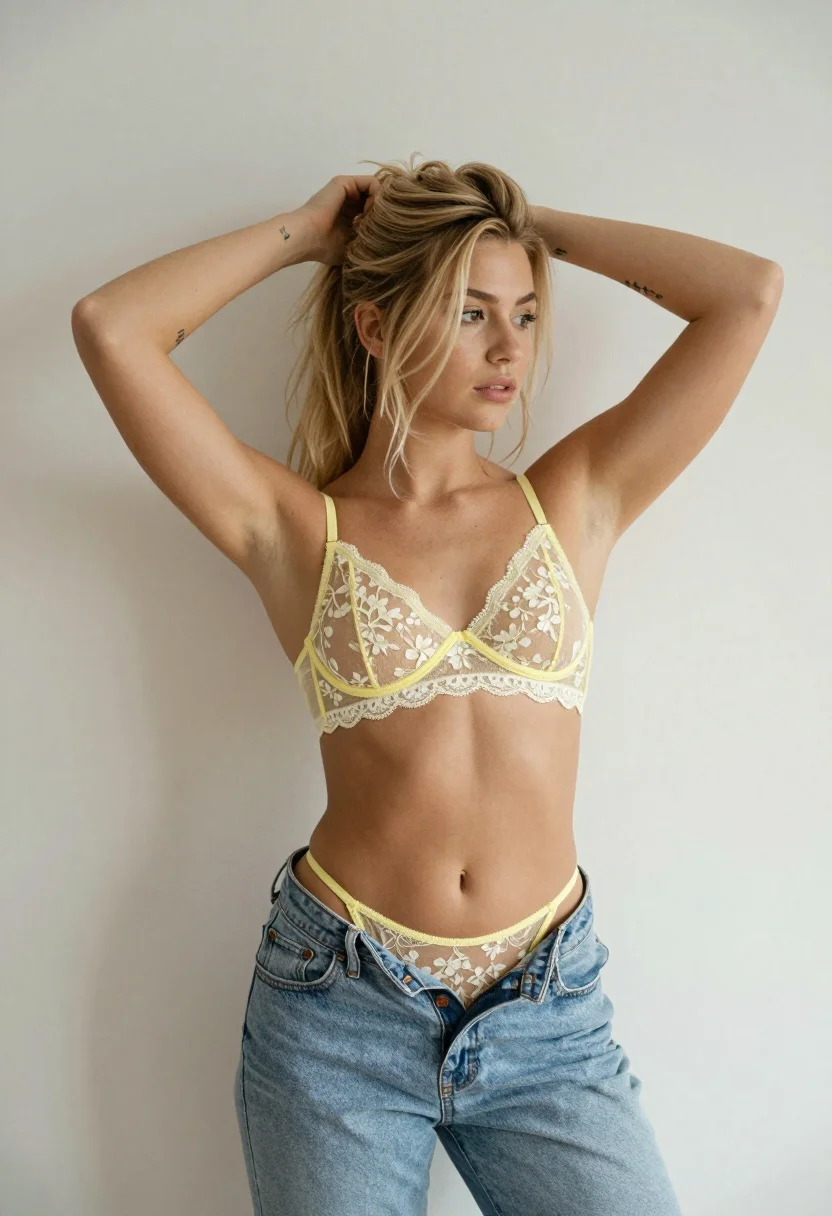
Young woman with blonde hair in yellow lace bralette against plain wall
Prompt
A young woman with blonde hair tied back in a messy ponytail stands against a plain off-white wall.

Subject: A fit young woman with fair skin and blonde hair pulled back into a casual high ponytail with loose strands framing her face. She has small tattoos visible on both forearms, including an arrow design on her left wrist. Her expression is neutral and she gazes slightly to the side.

Clothing: She wears a yellow lace bralette featuring white floral embroidery and delicate scalloped edges. Matching yellow lace underwear is pulled up slightly above her waistline. She wears light-wash blue denim jeans that are unbuttoned and low on her hips, exposing the top of her underwear.

Action: Her arms are raised with both hands gripping her ponytail as she adjusts or holds her hair back. Her torso is angled slightly to the right while her head faces forward.

Environment: A minimalist indoor setting with a plain, light-colored wall serving as a neutral background.

Camera: Medium shot framing from the upper thighs up to the top of the head, utilizing a soft depth of field that keeps the subject sharp while blurring the background slightly.

Lighting: Soft, diffused natural lighting illuminates the scene evenly from the front-left, casting gentle shadows and highlighting the texture of her skin and clothing without harsh contrast.

Style Details: Naturalistic photography with a clean, modern aesthetic emphasizing soft textures and neutral tones.
Description
This prompt is useful for creating intimate boudoir photography, editorial lingerie lookbooks, and casual portrait sessions focusing on texture. The combination of 'yellow lace bralette' against the 'plain off-white wall' utilizes soft, diffused natural lighting to emphasize delicate textures like embroidery and skin tone without introducing harsh shadows that would distract from the subject's pose or the clothing details.
Suggestions
- Change 'yellow lace bralette' to 'ivory crochet top' for a more muted palette.
- Add 'golden hour side light' to introduce more dramatic shadow play.
- Swap 'plain off-white wall' for 'textured plaster background' to add visual interest.
Category
Tags
BlondeBrunetteCasual WearFair SkinFemaleMedium ShotPortrait ShotRealistic
Date added
July 12, 2026
Added by
PromptDexter Team
Related Prompts
More prompts with similar categories and tags.

Blonde woman in striped swimsuit seated on sofa indoors studio shot

Two women in red mini dresses posing indoors at an opulent setting

Woman in sheer crystal gown looking over shoulder at event backdrop

Blonde woman in suede jacket lingerie against warm beige wall

Blonde woman in black gown posing against white studio background
Young woman in black mini dress on urban balcony looking back
Glamorous portrait of blonde woman in embellished slip dress against grey background

Young woman leaning against white wall with beige handbag under bright sunlight

Smiling young woman in floral mini dress against soft textured beige wall
Fair blonde woman in blue blouse on textured surface studio portrait