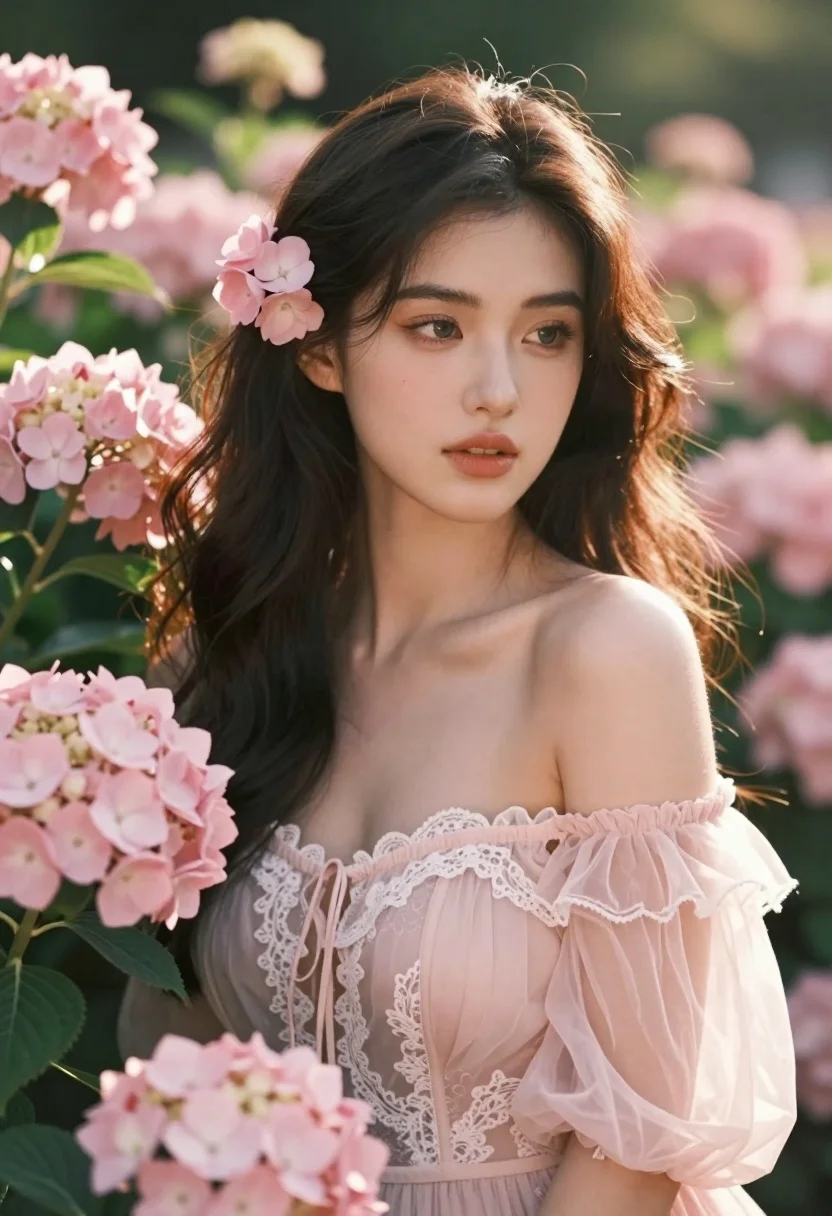
Beautiful woman with dark hair in pale pink flowers garden at golden
Prompt
A beautiful woman with long dark hair adorned with pink flowers stands amidst a field of soft pink hydrangeas and roses.

Subject: A young woman with fair skin, defined eyebrows, green eyes, and a gentle, confident expression looking slightly to the side. Her hair is styled in loose waves with several small pink blossoms tucked behind her ear.

Clothing: She wears a delicate, pale pink off-the-shoulder top made of sheer fabric with intricate white lace detailing on the bodice.

Action: She stands still with a relaxed posture, her gaze directed forward, exuding a calm and serene demeanor.

Environment: The setting is an outdoor garden filled with large, vibrant pink hydrangeas and roses that frame the subject in the foreground and blur into a soft background.

Camera: A medium close-up shot with a shallow depth of field that keeps the woman sharp while rendering the surrounding flowers as a creamy bokeh.

Lighting: Warm, golden sunlight bathes the scene from the side, creating a soft glow on her skin and highlighting the texture of her hair and clothing.

Style Details: The image features a hyper-realistic, cinematic aesthetic with high detail, smooth skin textures, and a dreamy, romantic color palette dominated by pastel pinks and warm golds.
Description
This prompt is useful for creating bridal portraiture concepts, ethereal editorial spreads, and fine art nature photography. The combination of 'shallow depth of field' rendering the flowers as 'creamy bokeh,' paired with 'warm, golden sunlight' side-lighting, ensures the subject remains sharply focused against a soft backdrop, which is ideal for emphasizing delicate details like the 'intricate white lace detailing' without visual competition.
Suggestions
- Change 'pale pink hydrangeas and roses' to 'blush peonies and dusty miller' for more varied texture.
- Swap 'sheer fabric' for 'silk chiffon' to alter how the light catches the clothing.
- Adjust 'medium close-up shot' to 'full body shot' to incorporate more of the garden environment.
Category
Tags
BlondeBrown HairCasual WearFair SkinFemaleMedium ShotNatureOutdoorsPortrait ShotRealistic
Date added
August 5, 2026
Added by
PromptDexter Team
Related Prompts
More prompts with similar categories and tags.

Young woman in olive saree leaning on railing outdoors during golden hour

Young woman with dark hair at wooden table in open air setting

Blonde woman holding white roses against a dark textured wall
Close up portrait of young woman with brown hair outdoors at golden

Smiling young woman in white ruffled dress between green topiary bushes

Young woman in pink camisole standing in sunlit rolling hills

Blonde woman in black top on balcony overlooking beige stone street

Young woman in patterned dress looking back over grassy hills

Blonde woman in purple polo shirt on an urban street setting

Smiling young woman in maroon top standing outdoors with blurred background