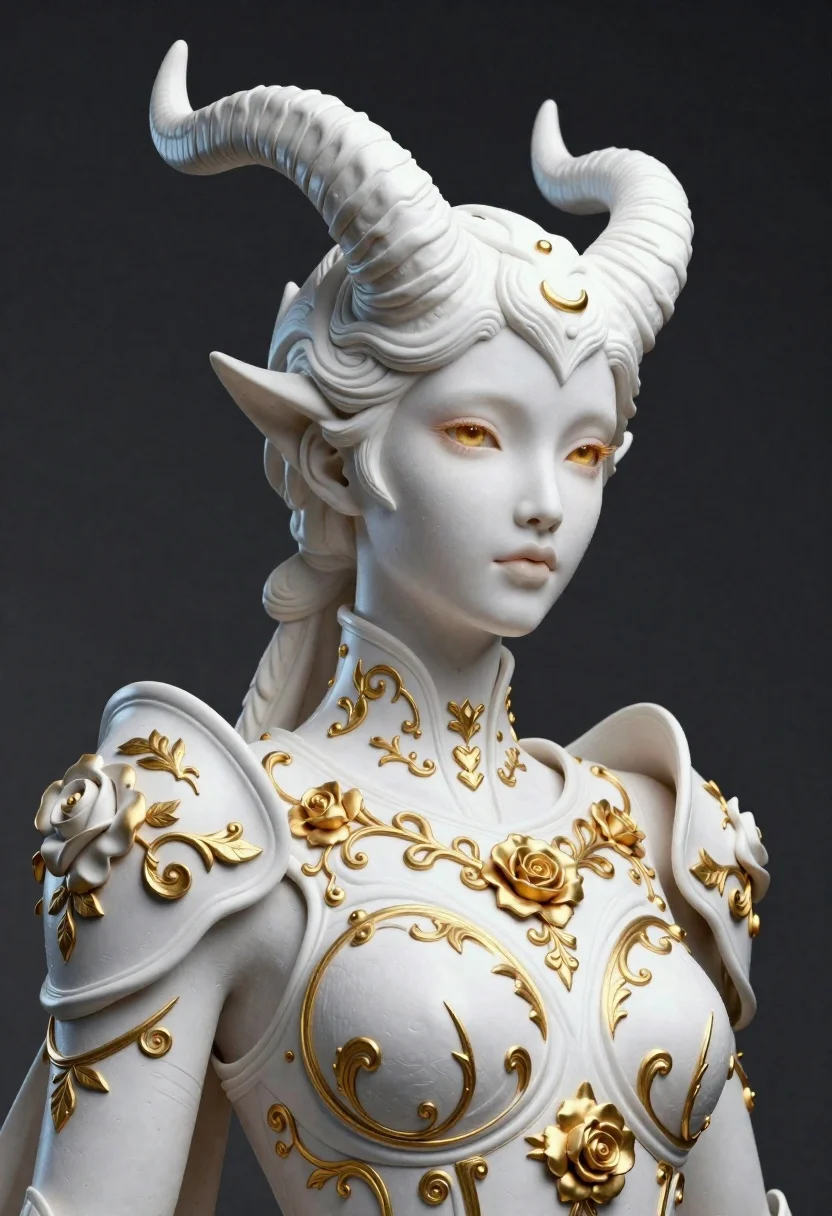
Elegant figure in white armor with horns against dark background
Prompt
Subject: an elegant female figure with pale skin and large, curved horns integrated into a sculpted headpiece; golden-brown eyes gazing softly to the side.

Clothing: ornate white armor adorned with intricate gold floral reliefs, swirling vine-like patterns, and rose motifs covering shoulders, chest, and neck collar.

Environment: dark gradient background that emphasizes the figure as central focus.

Lighting: soft directional lighting from front-left highlighting facial features and sculpted textures while casting subtle shadows for depth.

Style Details: hyper-detailed 3D render with a blend of fantasy artistry and classical sculpture aesthetics, emphasizing texture contrast between smooth skin/metal and embossed gold filigree.
Description
This prompt is useful for creating character concept art for high fantasy RPGs, book jacket illustrations, and museum-style digital sculptures. The combination of 'soft directional lighting from front-left' accentuates the sculpted textures by defining edges against the 'dark gradient background,' while specifying 'hyper-detailed 3D render' ensures the intricate gold filigree reads as tangible metal rather than a flat pattern.
Suggestions
- Change 'golden-brown eyes' to 'iridescent violet eyes' for an otherworldly touch.
- Add 'volumetric dust particles' to the environment description for atmosphere.
- Swap 'classical sculpture aesthetics' for 'Art Deco geometry' to shift the overall mood.
Category
Tags
3dArmorFair SkinFemaleFull BodyPortrait Shot
Date added
June 19, 2026
Added by
PromptDexter Team
Related Prompts
More prompts with similar categories and tags.

Three disney characters on a tropical grassy rock

Futuristic soldier in heavy snowfall on an urban street
Close up portrait of serene bust with gold kintsugi cracks

Obsidian humanoid in neon cube holding glowing heart

Astronaut portrait against pale blue sky background

Close up portrait of woman holding miniature animated version of herself
Young woman in pink puffer jacket standing by counter with minions

Futuristic android woman in metallic corridor