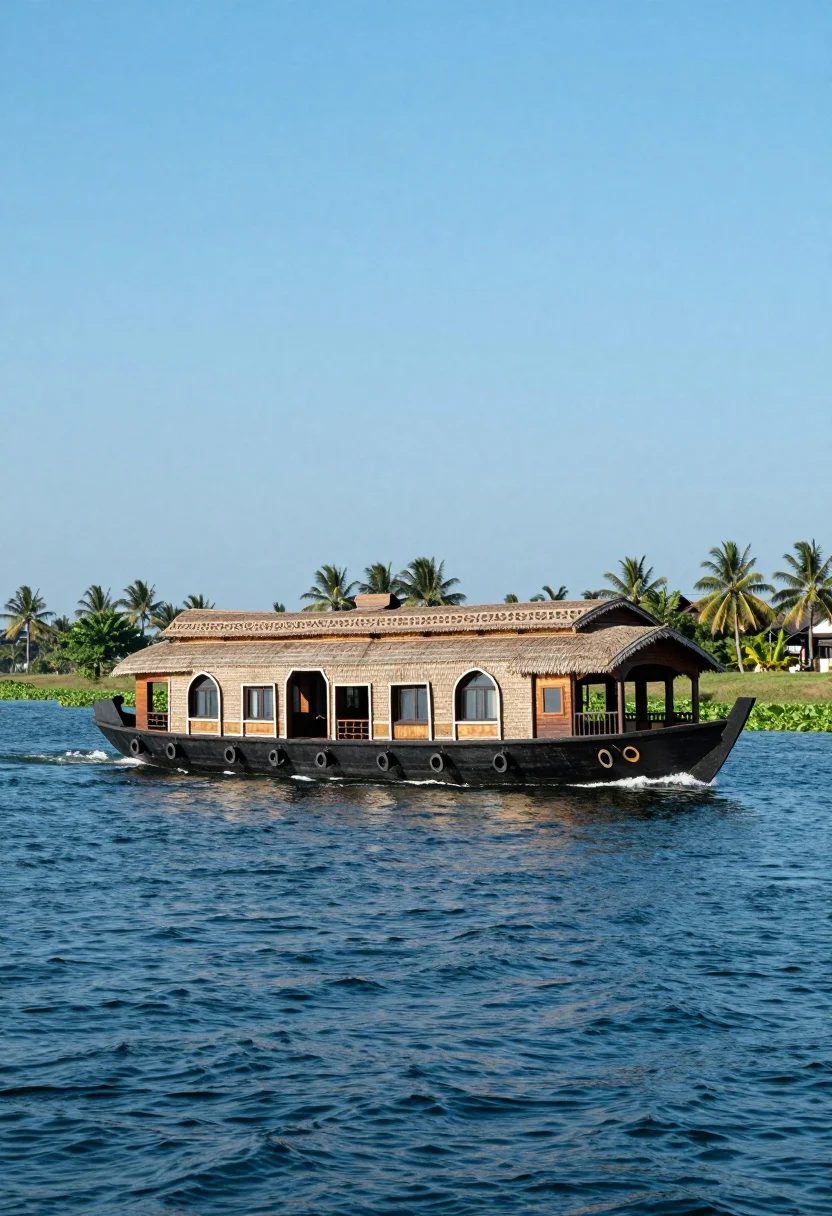
Large traditional houseboat gliding across deep blue water near palm trees
Prompt
A large traditional houseboat glides across a wide expanse of deep blue water under a bright sky.

Subject: A long, multi-level wooden houseboat with a black hull and thatched roof, featuring arched windows, a spacious open-air deck with pillars, and decorative railings on the upper level.

Action: The boat moves forward through the water, creating small splashes near the bow and gentle ripples trailing behind it.

Environment: The vessel floats on calm, deep blue water with green aquatic plants visible along the edge; in the background, a grassy shoreline dotted with tall palm trees stretches under a clear sky.

Camera: Shot from a low angle close to the water’s surface, emphasizing the boat’s length and movement, with a wide field of view capturing both the vessel and distant landscape.

Lighting: Bright daylight illuminates the scene evenly, casting soft shadows beneath the boat and highlighting the textures of wood and water without harsh contrasts.

Style Details: Rendered with vivid colors and smooth digital clarity, resembling a high-quality travel photograph enhanced for visual appeal.
Description
This prompt is useful for creating exotic destination concept art, architectural visualizations of waterways, and cinematic background plates for film production. The combination of 'low angle close to the water’s surface' with a 'wide field of view' exaggerates the houseboat's scale against the distant landscape, while specifying 'soft shadows beneath the boat' prevents the harsh, flat look that might otherwise flatten the detailed wood textures.
Suggestions
- Change 'deep blue water' to 'turquoise lagoon' for warmer tones.
- Add 'mist rising from the water' to enhance atmosphere.
- Swap 'thatched roof' for 'dark teakwood roof' for a more uniform material.
Category
Tags
Digital ArtLow AngleOutdoorsRealisticTraditional WearWide Shot
Date added
August 5, 2026
Added by
PromptDexter Team
Related Prompts
More prompts with similar categories and tags.
Sleek red electric train curving through a majestic alpine mountain valley landscape
Red passenger train traveling along grassy mountain track with snowcapped peaks
Curving passenger train moving through lush green valley near blue mountains
Young man beside red vw gti in vast sunflower field under bright

Young woman in pink shirt holding vintage bicycle in grassy field
Commercial airliner flying across bright blue sky with scattered white clouds
Sleek orange sports car speeding along winding mountain road during autumn
Man sitting on black motorcycle in tall grass with blurred forest background

Man leaning on black motorcycle in sundrenched autumnal forest clearing
High angle aerial view of freight train through curving forest landscape