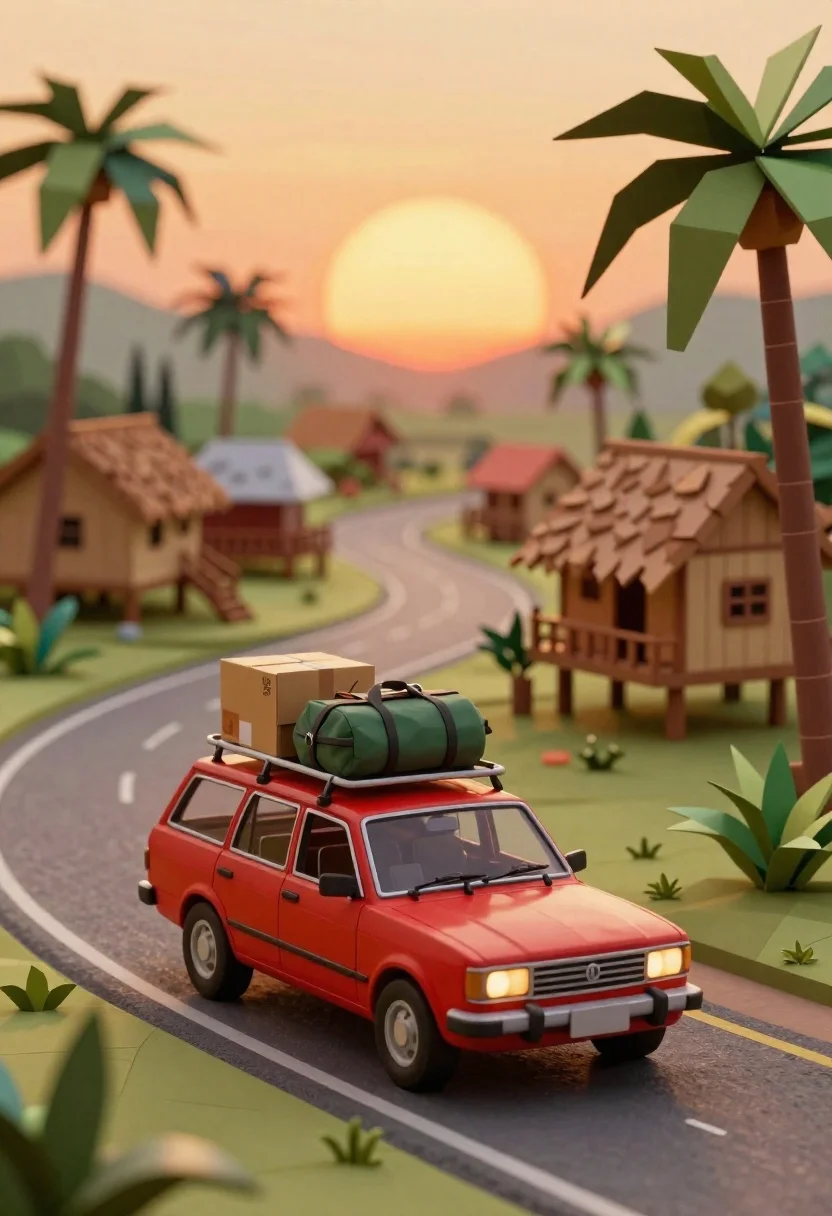
Red station wagon loaded with luggage driving on winding road through tropical
Prompt
A red station wagon loaded with luggage drives along a winding road through a tropical village at sunset.

Subject: A vintage red station wagon with a boxy design and visible headlights.

Clothing: None.

Action: The car is driving forward on a paved road, carrying a stack of cardboard boxes and a green duffel bag strapped to its roof rack.

Environment: A lush tropical setting featuring wooden stilt houses with thatched roofs in the background, tall palm trees framing the scene, and a large glowing orange sun low on the horizon casting a warm glow over the landscape.

Camera: The shot is taken from a slightly elevated angle looking down at the car, with a shallow depth of field that blurs the background houses and distant palms while keeping the vehicle in sharp focus.

Lighting: Warm golden hour lighting emanates from the large sun behind the village, creating soft shadows and highlighting the red paint of the car.

Style Details: The image features a low-poly aesthetic with geometric terrain and stylized foliage, rendered with a soft-focus background that mimics a miniature diorama or stop-motion animation style.
Description
This prompt is useful for creating travel concept art, architectural visualization mockups, and animated storybook backgrounds. The combination of 'low-poly aesthetic' with the 'warm golden hour lighting' ensures that while the subject matter—the red station wagon—is detailed enough to read as a vehicle, the stylized foliage and geometric terrain prevent it from looking like a photograph, fitting perfectly into miniature or stop-motion narratives.
Suggestions
- Change 'red station wagon' to 'vintage blue station wagon' for color variation.
- Swap 'thatched roofs' for 'tiled roofs' to alter the architectural feel.
- Adjust 'shallow depth of field' to 'deep focus' if you want more background detail.
Category
Tags
3dLow AngleVehicle
Date added
June 26, 2026
Added by
PromptDexter Team
Related Prompts
More prompts with similar categories and tags.

Low poly orange station wagon loaded with luggage driving on road at
Miniature orange van loaded with luggage parked on cobblestone path in tropical
Rusty vintage spacecraft bus drifting through a dense asteroid field in deep

Cheerful cartoon boy in racing suit standing next to formula one car

Miniature illuminated tokyo cityscape inside a glass bottle
Miniature london cityscape inside cracked eggshell

Miniature figurines in blue rowboat holding fish and fishing rod
Young woman driving classic convertible on coastal highway at sunset