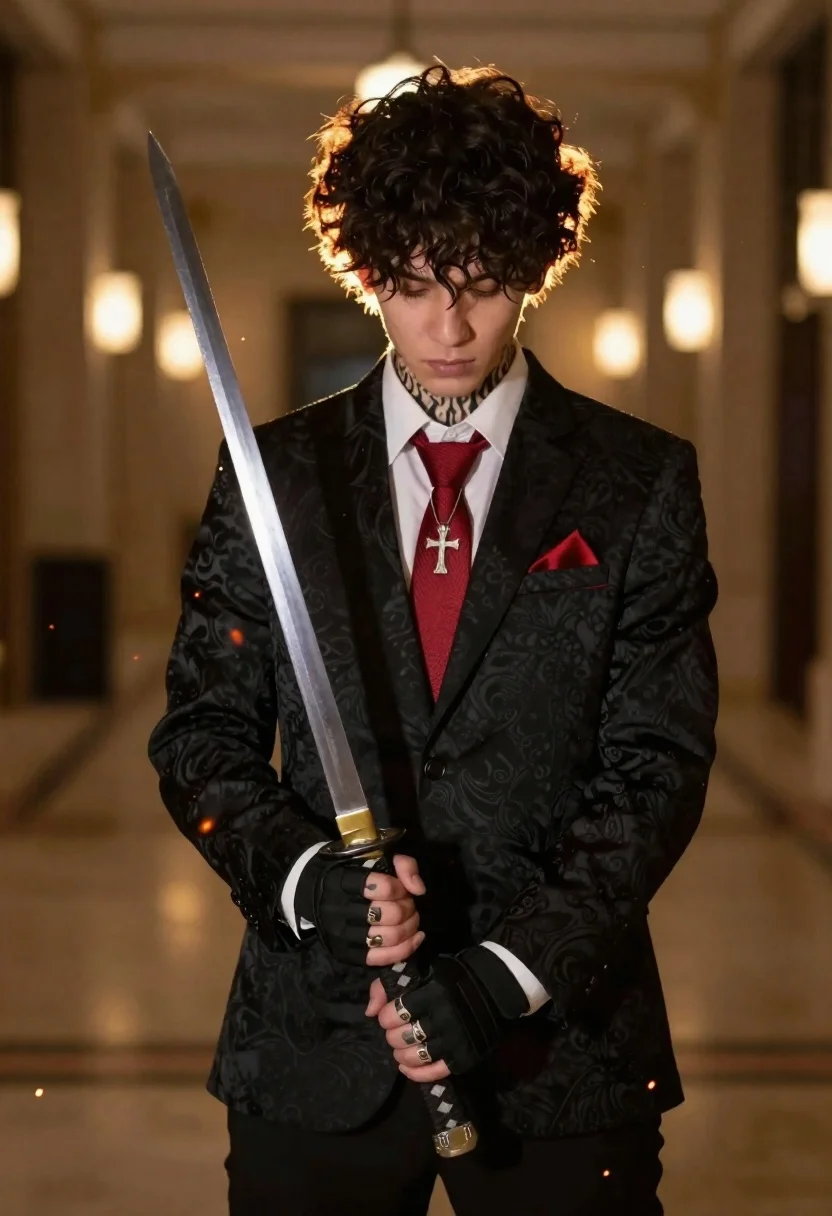
Young man with katana in suit standing in dimly lit hallway
Prompt
A young man with dark curly hair and visible tattoos on his neck and arms stands in a dimly lit indoor space holding a katana.

Subject: A handsome young man with messy dark curly hair, prominent flame-style tattoos on his neck and forearms, and a serious downward gaze.

Clothing: He wears a black patterned suit jacket over a white dress shirt with the cuffs rolled up, paired with a textured red tie featuring a silver cross pendant and a matching red pocket square.

Action: He holds a katana vertically in front of him with both hands, gripping the hilt with his right hand adorned with multiple rings and wearing a black tactical glove on his left hand.

Environment: The setting is an indoor hallway or large room with soft warm ambient lighting, blurred architectural columns in the background, and floating embers or sparks around the sword.

Camera: Medium shot with a shallow depth of field that keeps the subject sharp while blurring the background to emphasize the figure.

Lighting: Warm golden backlighting creates a dramatic rim light on his hair and shoulders, contrasting with the darker foreground and casting soft shadows.

Style Details: Cinematic photography style with high contrast, rich color grading, and a focus on texture and detail in the clothing and tattoos.
Description
This prompt is useful for creating neo-noir character portraits, action sequence concept art, and dramatic editorial spreads for fictional publications. The combination of 'warm golden backlighting' providing a 'dramatic rim light' against the 'black patterned suit jacket' ensures that the subject remains visually separated from the background elements like the 'blurred architectural columns,' preventing him from merging into the shadows.
Suggestions
- Change 'dark curly hair' to 'slicked-back wet hair' for a different mood.
- Swap 'red tie' for 'deep emerald silk tie' to complement the tattoos.
- Adjust 'floating embers or sparks' to 'falling rain streaks' for an alternative environment.
Category
Tags
Black HairMaleMedium ShotRealistic
Date added
June 19, 2026
Added by
PromptDexter Team
Related Prompts
More prompts with similar categories and tags.
Medium close up profile of young man smoking by rainy window
Young man in black hoodie standing on rainy city street at night
Handsome man in tuxedo amidst heavy snowfall by pine trees
Young man in black leather jacket leaning against teal concrete wall
Young man in black hoodie sitting on rocky cliff in thick mist
Bride and groom under lace veil in sunlit garden holding roses
Man sitting inside a flower shop seen through silhouettes of pedestrians
Young man in black hoodie leaning against telephone booth on wet street

Man in pinstriped shirt leaning on balcony railing in urban alley
Young man in denim jacket sitting on bench in bus shelter