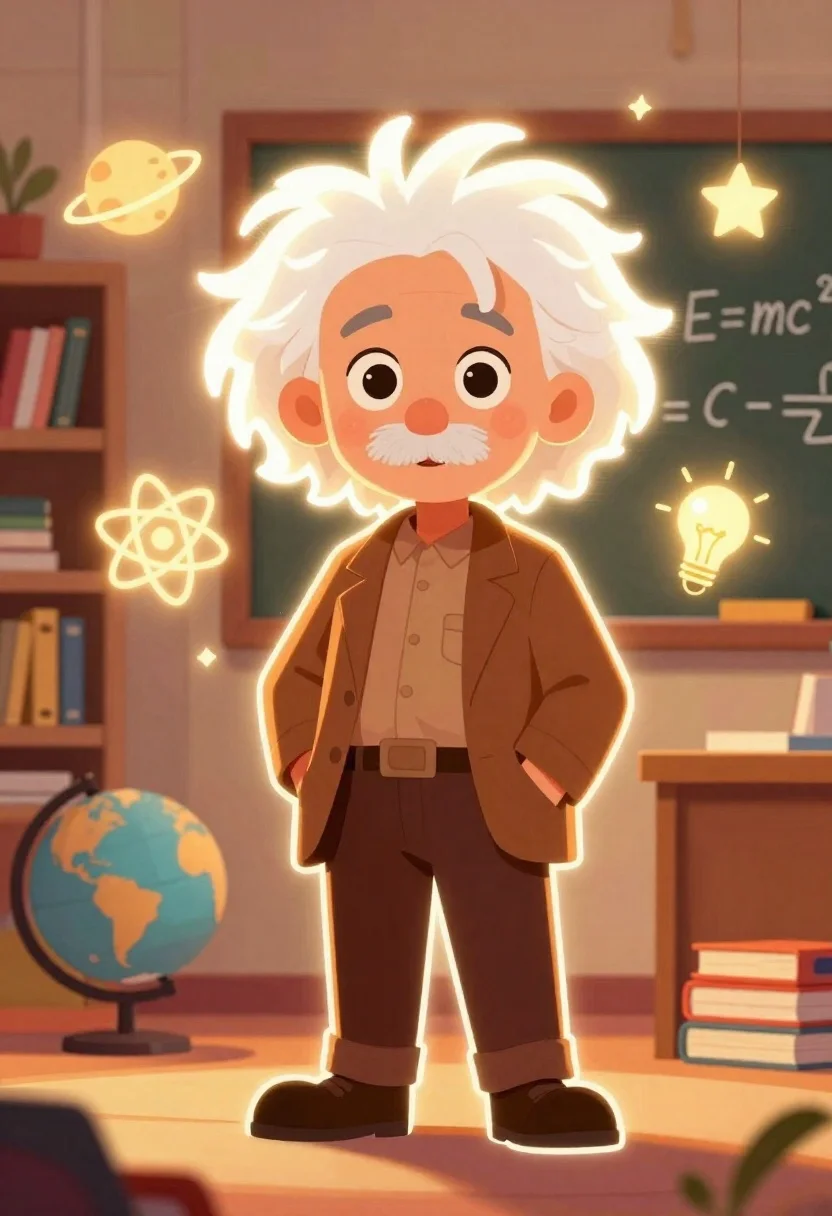
Young man with white hair and mustache standing in a warm classroom
Prompt
A glowing cartoon illustration of a young man with wild white hair and a mustache standing in a warm classroom setting.

Subject: A stylized young man resembling Albert Einstein with large expressive eyes, a prominent white mustache, and messy white hair that glows with a bright white outline.

Clothing: He wears a textured brown suit jacket over a matching shirt with a pocket on the left side, and dark trousers.

Action: The character stands facing forward with his hands tucked into his pockets, looking directly at the viewer with a friendly expression.

Environment: A cozy classroom background featuring a bookshelf filled with books to the left, a chalkboard displaying the equation E=mc^2 behind him, a globe on the floor, and a stack of colorful books on a wooden desk to the right.

Objects: Floating glowing icons surround the character including a planet, an atom symbol, a lightbulb, and stars.

Lighting: The scene is bathed in warm golden ambient light with high-contrast glowing white outlines around the character's hair and body creating a neon-like effect.

Camera: A medium shot framed to capture the full body of the character with a shallow depth of field blurring the background elements slightly.

Style Details: The image features a 2D vector art style with thick glowing strokes, vibrant colors, and a magical atmosphere suitable for a poster design.
Description
This prompt is useful for creating educational concept art, character profile illustrations for children's books, and whimsical academic posters. The combination of 'glowing cartoon illustration,' 'warm golden ambient light,' and 'thick glowing strokes' establishes a magical atmosphere that makes the scientific elements feel approachable rather than dry, perfectly suiting an educational context.
Suggestions
- Change 'brown suit jacket' to 'navy blazer' for a more academic feel.
- Swap 'planet' for 'DNA helix' among the floating icons.
- Adjust 'medium shot' to 'full body portrait' to better showcase the classroom environment.
Category
Tags
Casual WearDigital ArtFull BodyIndoorsMaleMedium Shot
Date added
June 26, 2026
Added by
PromptDexter Team
Related Prompts
More prompts with similar categories and tags.

Young black boy in black suit standing in a cozy bedroom at

Smiling couple embracing indoors woman in red satin dress holding roses

Young girl named paige standing in a cozy bedroom with magical sparkles
Young woman taking mirror selfie holding coffee cup in full body shot

Young woman arranging yellow flowers in a glass jar at a wooden
Full body illustration of young girl with pigtails holding teddy bear
Young girl taking mirror selfie with shopping bags in dreamy watercolor style

Young woman with glasses gently touching nose of fluffy cream cat indoors